Full site index for AI agents: llms.txt. Every page is also available as Markdown: replace the trailing slash with .md, so /pricing/ becomes /pricing.md. Or send the header Accept: text/markdown to the page URL itself.
Simpler, more seamless cookie consent for Shopify stores.
A cookie banner is a notice on a website that tells visitors which cookies the site uses and lets them manage their choices. It usually appears on the first visit, and visitors should be able to reopen it at any time to change or withdraw consent.
Whether you need one depends on where your visitors are. EU and UK rules require consent before non-essential cookies are set, while most US state laws require a way to opt out instead. You’ve probably clicked through hundreds of cookie banners as a visitor. Now it’s your turn to add one, so we’ll walk you through the rules for your region, the layouts you can choose from, and how to get a banner live on your site.
What is a cookie banner?
A cookie banner is a notice that appears on a website to inform visitors about its use of cookies and other tracking technologies and, where required, give them control over how their information is collected and used.
Cookies are small pieces of data stored on a visitor's device. They help websites remember preferences, keep users logged in, measure website traffic and support personalised advertising.
A cookie banner typically allows visitors to:
Accept cookies: Agree to the use of cookies for specified purposes.
Reject non-essential cookies: Decline cookies that are not strictly necessary for the website to function.
Customise preferences: Choose which categories of cookies to allow, such as analytics or advertising cookies.
Yes, you'll likely need a cookie consent banner if your website uses cookies for analytics, advertising or other non-essential purposes. This includes small business websites, blogs and online stores. You don't have to be a large company or collect thousands of visitors' details for cookie consent rules to apply.
However, the cookie consent requirements depend on where your visitors are located, which privacy laws apply to your business and how your website uses cookies.
Privacy laws such as the General Data Protection Regulation (GDPR) and ePrivacy Directive, the UK GDPR and PECR, California CCPA and Brazil LGPD regulate how businesses collect and use personal data through cookies. Some require consent, while others require businesses to offer opt-out choices. Each law has its own scope and requirements.
Need to install a cookie banner?
Sign up to CookieYes and set up your cookie banner for free
Meet legal requirements: Obtain consent or offer opt-out choices where required by applicable privacy laws.
Explain how cookies are used: Let visitors know whether your website uses cookies for analytics, advertising or other purposes.
Give visitors control: Allow them to accept, reject or customise optional cookies and change their preferences later.
Respect visitors' choices: Help ensure that cookies and tracking technologies operate according to the preferences visitors select.
Remember, a cookie banner is only effective when your website actually follows the choices visitors make.
Not sure which cookies your website uses? Start with a free cookie scan to see what's running on your website.
Types of cookie banner
There are mainly two types of cookie banners:
Opt-in cookie banner
An opt-in banner asks visitors for consent before setting non-essential cookies. It typically includes Accept all, Reject all and Customise buttons, allowing visitors to choose which cookies to allow.
Best suited for: Websites subject to EU or UK cookie consent requirements. It's also a useful default for websites serving visitors from multiple countries.
Opt-out cookie banner
An opt-out banner allows certain tracking to begin unless visitors choose to stop it. It may include a "Do Not Sell or Share My Personal Information" link or a settings option to manage tracking preferences.
Best suited for: Businesses covered by US state privacy laws that require opt-out mechanisms, such as California's CCPA. California also requires covered businesses to honour qualifying Global Privacy Control (GPC) signals.
Other types of cookie banners
In addition to the opt-in and opt-out cookie banners, there are some others too such as:
Notice-only cookie banner
A notice-only banner informs visitors about cookie use without asking them to accept or reject anything. It usually has a single button, such as OK or Got it.
Best suited for: Websites using only cookies that are exempt from consent requirements. If your website uses non-essential cookies in the EU or UK, a notice alone won't be enough, and is considered a dark pattern.
Consent or pay banner
This model gives visitors two options: accept certain tracking, usually for personalised advertising, or pay to access the service without that tracking.
Whether law allows it or not depends on how it's implemented. In Opinion 08/2024, the European Data Protection Board (EDPB) stated that large online platforms should offer a free alternative without behavioural advertising, rather than limiting users to accepting tracking or paying.
How to add cookie banner to website
This is the easiest part. With CookieYes CMP, you can implement a custom cookie banner within minutes. Follow these steps to create a personalized cookie banner with custom branding or stick to a simple cookie banner.
Step 1. Sign up on CookieYes for free
The first step is toSign up on CookieYes. It’s free for 14 days. You can cancel anytime. All you have to do is fill in your email address, your website domain and your password. You can get started with our cookie banner generator!
Step 2. Select and customize the template
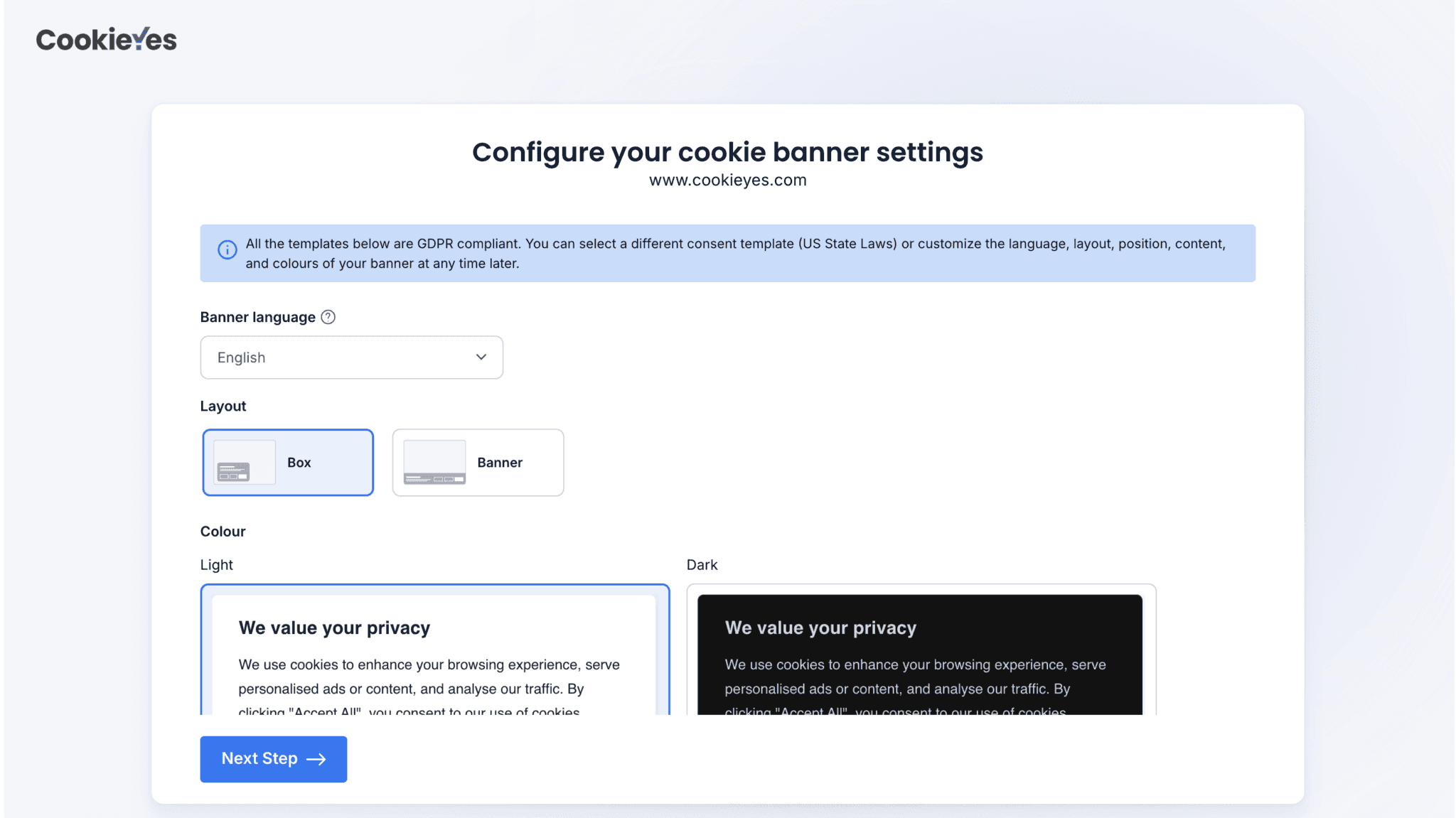
On signing up, you will be directed to a setup screen. Here you can select a cookie banner template and fully customize it. Or you can select the default (GDPR-compliant cookie banner), preview it on your website, and head to the next step.
Customise and preview your cookie banner on CookieYes CMP.
If you want to add personalization to your banner, you can customise it.
On signing up, you will be directed to a setup screen. Here you can select a cookie banner template and fully customize it. Or you can select the default GDPR-compliant cookie banner, preview it on your website and head to the next step.
How to add a cookie banner without a CMP: you can code a banner yourself, but you must also block scripts until consent, store consent logs, handle withdrawal, and keep the cookie list current. For most sites this costs more time than a CMP.
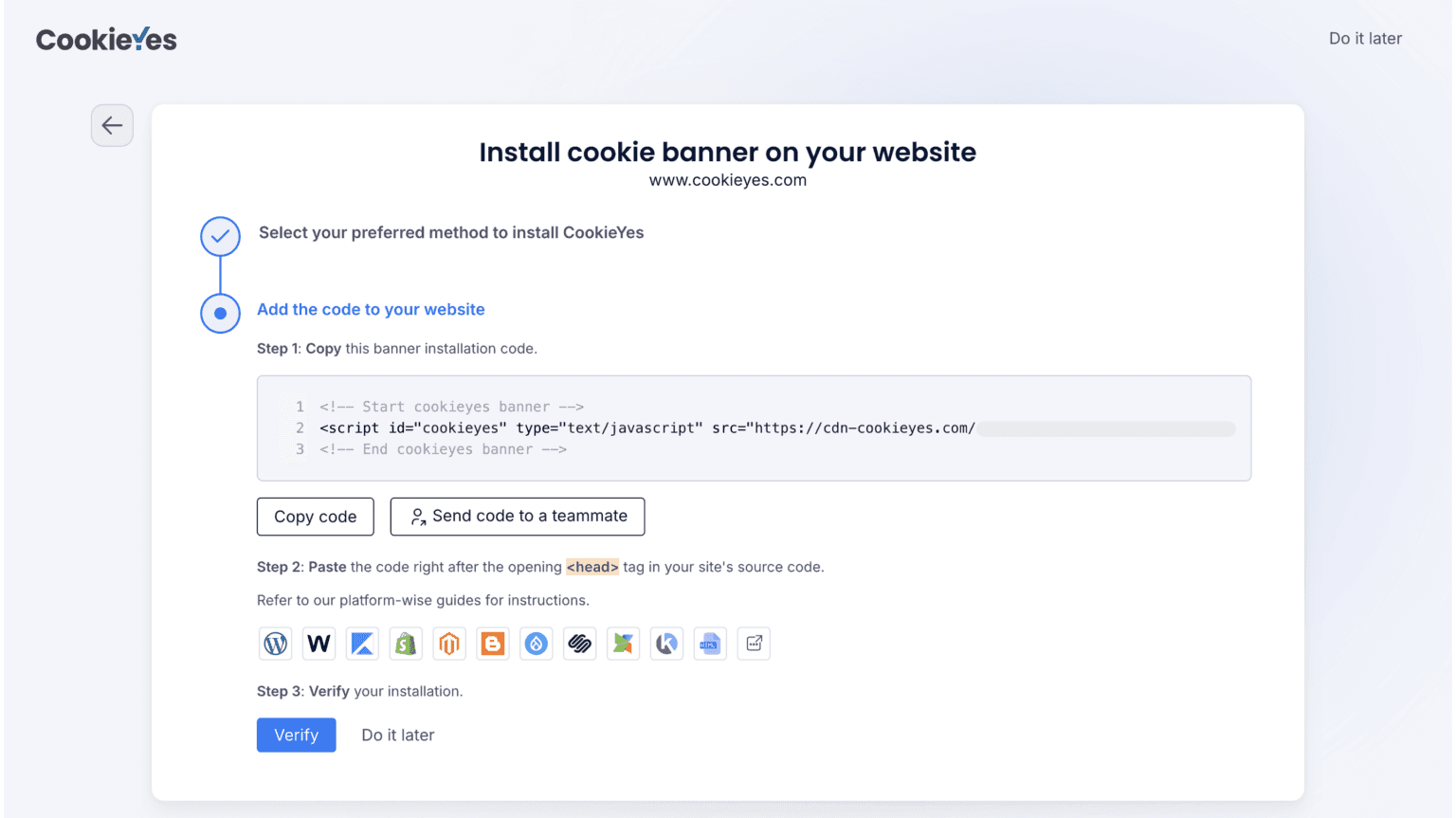
Copy banner installation code and paste it on your website to activate.
For a detailed guide, access the CMS setup guides, follow the instructions and you will have a cookie consent banner on your website!
Does GDPR require a cookie banner?
The ePrivacy Directive and General Data Protection Regulation (GDPR) are the two main EU laws governing the use of cookies. The ePrivacy Directive sets the rules for storing and accessing cookies, while the GDPR sets the requirements for valid consent. Consent must be freely given, specific, informed and unambiguous, and as easy to withdraw as to give.
A cookie banner can help you meet these requirements, but displaying one alone is not enough. Here's a checklist of GDPR cookie consent requirements to help you set up a compliant EU cookie banner on your website.
An example for a GDPR-complaint cookie banner with an equally prominent accept and reject button.
Country-wise cookie banner guidelines
Territory
Cookie Guidelines
European Union
Give equal prominence to ‘accept’ and ‘reject’ buttons.
Inform users of cookies and its purposes in plain language.
Include a link to the cookie settings so users have granular control over cookies.
Include a link to the cookie policy.
Keep cookie consent separate from other terms and conditions.
Cookie walls are not acceptable as consent cannot be conditional.
Keep cookie consent separate from processing for other purposes.
Display a custom cookie consent banner as per your website’s design
Provide a user-friendly layout optimized for different devices
Inform users about cookie usage in plain and jargon-free language
Display auto-translated banner according to user’s browser language
Showcase different cookie categories used on your website
Provide granular options to accept/reject different cookie categories
Display ‘accept’ and ‘reject’ buttons prominently on the banner
Auto-block third-party scripts till users give consent
Link to a compliant cookie policy on the cookie banner
Display a revocable cookie banner so users can easily withdraw consent
Record user consents for proof of compliance (consent log)
Do you need a cookie banner in the USA?
A CCPA/CPRA opt-out notice powered by CookieYes.
The United States does not have a general requirement to obtain consent before using non-essential cookies. Instead, state privacy laws such as California's CCPA/CPRA focus on giving consumers the right to opt out of certain uses of their personal information.
For example, if your business is covered by the CCPA and uses cookies for cross-context behavioural advertising, you may need to provide an opt-out mechanism.
Not every US website needs a cookie banner. CCPA cookie banner requirements depend on which state laws apply to your business and how you use personal data.
CCPA/CPRA opt-out banner checklist
Inform visitors about the personal information collected through cookies and how it is used or shared.
Allow consumers to opt out of the sale or sharing of their personal information.
Provide a “Do Not Sell or Share My Personal Information” link or another method permitted by the CCPA regulations.
Stop the sale or sharing of personal information covered by a valid opt-out request, including through relevant third-party tracking technologies.
Treat qualifying Global Privacy Control signals as opt-out requests.
Keep records required to demonstrate how consumer requests were handled.
Is a cookie banner required in the UK?
Yes, you need to display a cookie banner, if your website uses advertising, cross-site tracking or other non-essential cookies that require consent. However, the UK's Data (Use and Access) Act 2025 introduced new exceptions under PECR, allowing certain cookies without prior consent.
Cookies that may not require consent:
Strictly necessary cookies: Essential for services requested by visitors.
Analytics cookies: Used solely to collect statistics to improve your website or service.
Preference cookies: Remember visitors' choices, such as language or display settings.
For the analytics and preference exceptions, you must provide clear information and a simple, free way to object. Other conditions also apply.
Cookies that generally still require consent: Advertising, retargeting and cross-site tracking cookies.
Where consent is required, visitors must be able to reject cookies as easily as they accept them. Your website must also respect their choices.
Give equal prominences to “accept” and “reject” options.
Inform users of cookies and its purposes in plain language.
Provide access to cookie settings so users have granular control over cookies.
Include a link to the cookie policy.
Keep cookie consent separate from other terms and conditions.
The opt-in consent for cookies must not be pre-enabled. (eg pre-checked boxes)
Don’t use cookie walls that block access to the website if the user doesn’t give cookie consent.
Implied consent is not acceptable (e.g. consent implied from the continued use of the website.)
Cookie banner examples
Cookie banners can come in different layouts and styles according to the website’s design and branding. It's important that cookie banners are user-friendly and privacy-compliant. Here are a few examples of GDPR-compliant cookie banners, powered by CookieYes CMP, a consent management platform trusted by over 2 million websites for cookie compliance.
Banner layout
Footer or header banners are often used by websites to request cookie consent. In a study of consent banners in the EU, close to 58% used bottom banners and 27 % used top banners, similar to a website header or footer (bar style). These banners are non-intrusive and do not interrupt the content or user experience of the website.
Jack & Jones website features a cookie banner, powered by CookieYes.
Floating layout
Floating box layouts or popups are also seen on websites often placed in the left or right corner of the site. These types of banners are non-intrusive and can be aligned with the site’s aesthetic.
A floating cookie banner by CookieYes on Skoda ’s website.
Popup layout
This layout is placed in the centre of the webpage and demands a user’s interaction before they can continue to the website. When using this layout, it’s important to give users the option to dismiss the popup or reject cookies easily. Otherwise, you may risk being non-compliant with cookie consent requirements in the EU and UK.
You can implement a simple cookie banner on your website that is not intrusive and also aligns with your website’s branding. On the other hand, you can add advanced CSS customizations and branding and tailor your banner to your website’s design.
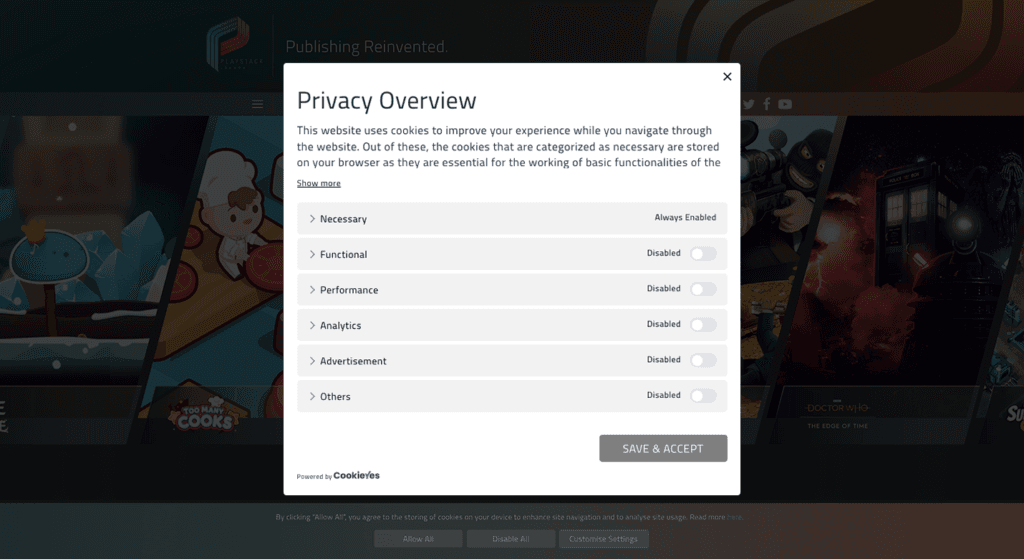
A customised cookie banner on Playstack , that matches the site’s branding.
Granular control
Usability and ease of giving consent are important for the effectiveness of a cookie banner. Users should be able to easily control their cookie preferences on the banner or on the second layer.
A preference centre that allows users to have complete control of their cookie settings.
Multilingual banner
Cookie notices should be made available to users in the language of your website or should be auto-translated in the case of multi-lingual websites. This ensures that your users are making an informed choice about cookie consent.
An auto-translated banner that reflects user’s language preferences.
Mobile-responsive
Cookie banners should also be optimized for different devices. CookieYes banners are intuitive and can be tailored for mobile and tablet users, to give them a user-friendly banner.
Banner in mobile view
Banner in ipad 13 pro
Banner in desktop view
Integration with Google Consent Mode
If you use Google Analytics or Google Ads for your website, you must implement a cookie banner that seamlessly works with Google Consent Mode. This will ensure that your analytics and marketing data are collected based on the consent provided by visitors and is passed to Google which then determines the behaviour of its tags and scripts.
If you run ads for your EU and UK audience using Google AdSense, Google Ad Manager and AdMob, you need a cookie banner that is compliant with IAB’s Transparency and Consent Framework. The TCF is an industry-approved framework to communicate consent choices between users, website publishers (like you) and ad tech vendors. With a TCF-compliant banner, you don’t risk GDPR non-compliance while using advertising.
Yes, websites that fail to meet applicable cookie consent requirements risk fines, regulatory action and damage to their reputation. Regulators in the EU and US have taken action against businesses for setting cookies without consent, making it difficult to reject tracking and failing to honour opt-out requests.
The penalties depend on the law violated.
EU: GDPR fines for certain violations can reach €20 million or 4% of a company's worldwide annual turnover, whichever is higher. Cookie violations may also attract penalties under national laws implementing the ePrivacy Directive.
California: CCPA civil penalties can reach $2,663 per violation or $7,988 for intentional violations and violations involving minors, based on the penalty amounts adjusted for 2025.
In 2022, the French regulator CNIL fined Microsoft €60 million for making it difficult for users to refuse cookies with ease. The same year, beauty giant Sephora also faced $1.2 million in CCPA’s first-ever fine, for failure to process user requests to opt out of sale of their data.Some recent examples include:
Google (€325 million, 2025): France's CNIL fined Google for placing advertising cookies without valid consent and showing ads in Gmail without the required consent.
SHEIN (€150 million, 2025): The CNIL fined SHEIN for setting cookies without consent, failing to respect users' choices and providing inadequate information about cookies.
PlayOn Sports ($1.1 million, 2026): California's privacy regulator fined the company for failing to provide proper opt-out options and honour browser privacy signals.
These cases show that displaying a cookie banner isn't enough. Your website must also respect visitors' consent and opt-out choices. A cookie banner generator like CookieYes can help you collect consent, manage cookie preferences and keep records of visitors' choices.
No. If implemented correctly, cookie banners will not affect your SEO. If cookie banners are not intrusive, GoogleBot will be able to crawl your website. Google stresses avoiding intrusive interstitials and clarified that important notices like cookie banners will not negatively impact a site’s search performance.
You should display your cookie banner on the top, side or footer of your page where it does not obstruct the content on the page. It should also be optimized for different devices so that the banner does not take up half the screen, for instance on mobile devices.
Cookie banner and cookie policy: What's the difference?
Cookie banner or cookie notice is an alert or popup displayed on a website to request consent from visitors on the use of cookies, as required by privacy regulations such as the GDPR, LGPD, and CCPA. The banner will inform visitors that the website uses cookies and ask for the visitor’s permission to set cookies on their browser.
Cookie policy is a detailed disclosure that explains a website’s use of cookies. It documents what cookies are, the types of cookies used on your website, why they are used and how these cookies are used to collect information from visitors. While privacy regulations may not explicitly require sites to have a cookie policy, it is often a standard practice adopted to respect user privacy and display transparency about data collection.
Is my cookie banner compliant?
Lastly, if your website has a cookie banner, here’s a quick checklist to see if it’s compliant. If your banner has any of the following characteristics, it needs a revamp.
There is no clear information on all the cookie categories used.
The purpose of cookie usage is not stated.
It has pre-ticked boxes for cookies other than strictly necessary ones.
It does not have a reject button or option to customize cookie settings.
It blocks the user from browsing the site till they accept it.
Buttons are designed to nudge users to accept.
It does not link a cookie/privacy policy.
There is no option to consent to specific cookie categories.
It does not automatically block third-party scripts.
A good cookie banner should be easy to understand, use and manage. Use this checklist to make sure your banner gives visitors clear choices and works as intended.
Wording
Keep the message short and explain why your website uses cookies.
Mention specific purposes, such as analytics or personalised advertising, instead of vague phrases like "improve your experience".
Use clear buttons such as Accept all, Reject all and Customise.
Provide a link to your cookie policy for more information.
Display the banner in a language your visitors can understand.
Design
Make accepting and rejecting cookies equally easy, without using colours or layouts that push visitors towards accepting.
Keep the banner visible without unnecessarily covering website content.
Make sure the banner works on mobile devices, with buttons that are easy to find and tap.
Match the banner to your website's branding without compromising readability or user choice.
Consent and tracking
Block non-essential cookies until consent is given, where required by law.
Keep optional cookie categories switched off by default when opt-in consent is required.
Remember visitors' choices so the banner doesn't appear on every page.
Provide an easy way to withdraw consent or change cookie preferences.
Display consent or opt-out options based on applicable regional requirements.
Honour Global Privacy Control (GPC) signals where legally required.
Accessibility
Make banner controls accessible using a keyboard.
Use clear button labels that screen readers can identify.
Ensure text and controls meet applicable WCAG contrast requirements.
Maintenance
Scan your website regularly for new cookies and trackers. You can schedule automatic scans in your CookieYes account.
Keep records of consent and privacy choices where required, including relevant details such as timestamps.
Review your banner and cookie policy whenever you add new plugins, analytics tools or advertising partners.
Test whether your website actually follows visitors' choices, including when they reject optional cookies.
Cookie banner FAQs
How do I add cookie banner to my website?
To add a cookie banner to your website, you need to sign up for free on CookieYes CMP.
1. Select a banner layout from the pre-built templates and customize it to your liking 2. Copy the cookie banner installation code 3. Paste the code on your website's source code and publish A cookie banner will be live on your website instantly!
Cookie banners should state the website’s use of cookies and the purposes for which they are used. The cookie banner text should use crisp, jargon-free language.
In the second layer of a cookie banner, it should include detailed information about the different cookie categories, the purpose of each cookie, the duration it will be stored in a user’s device and if the website shares the data collected with any third parties.
How do I know if my website uses cookies?
Most websites use cookies. The easiest way to find out if your site uses cookies is to conduct a cookie scan. You can use the in-built scanner in CookieYes or can use this free cookie scanner. The scanner will crawl through your websites, activate hidden cookies and trackers, identify and categorize them and generate a cookie audit report.
Is cookie notice and cookie banner the same?
Cookie notice, cookie notification, cookie popup, cookie warning, cookie consent banner etc. are all different names for a cookie banner. The important thing to remember is, if your business falls under the scope of a privacy law that regulates cookies, you require a cookie banner on your website.
What are strictly necessary cookies?
Strictly necessary cookies are cookies that are exempt from cookie consent. As the name suggests, they are essential for the website to function properly. For instance, they are cookies that are essential to access certain features of the website such as signing in, adding items to a shopping cart, or making online payments etc.
Is a cookie banner mandatory?
A cookie banner is mandatory if your website sets non-essential cookies for visitors in the EU or UK. In the US, most state laws do not require prior consent for cookies, but they do require a clear way to opt out of targeted advertising and the sale or sharing of data.
What should a cookie banner say?
A cookie banner should clearly explain why your website uses cookies and give visitors a way to accept, reject or customise them, where required. Keep the message short, use clear button labels and include a link to your cookie policy for more details.
Kavya is a content designer who works across marketing, and product to create simple, user-first content. She brings expertise in long-form content, UX writing, and copywriting for B2C and B2B brands. In her downtime, she’s probably watching re-runs of mobster dramas and baking.