

WordPress owners value user experience, and cookie banners significantly impact it. Design choices from button colours and labels to the banner placement affect how users perceive your site. These small details also determine your compliance in strict regions like the EU and the US. In this guide, you will learn how to design compliant cookie banners for both opt-in and opt-out needs, with key UX and legal insights. Read on for WordPress cookie banner design tips.
Key highlights:
- Comply with privacy laws: opt-in for GDPR and opt-out for CCPA/CPRA.
- Avoid dark patterns, provide clear choices, and support granular consent.
- Do not block content for consent.
- Ensure mobile-friendly design, accessibility, and multi-language support.
- CookieYes WordPress plugin offers 360° cookie compliance, including auto scans, consent mode integration, geo-targeting and multilingual banners.
What is a cookie banner?
A cookie banner is a notice that appears when visitors land on a site. It explains what cookies the site uses and lets users decide whether those cookies may be placed.
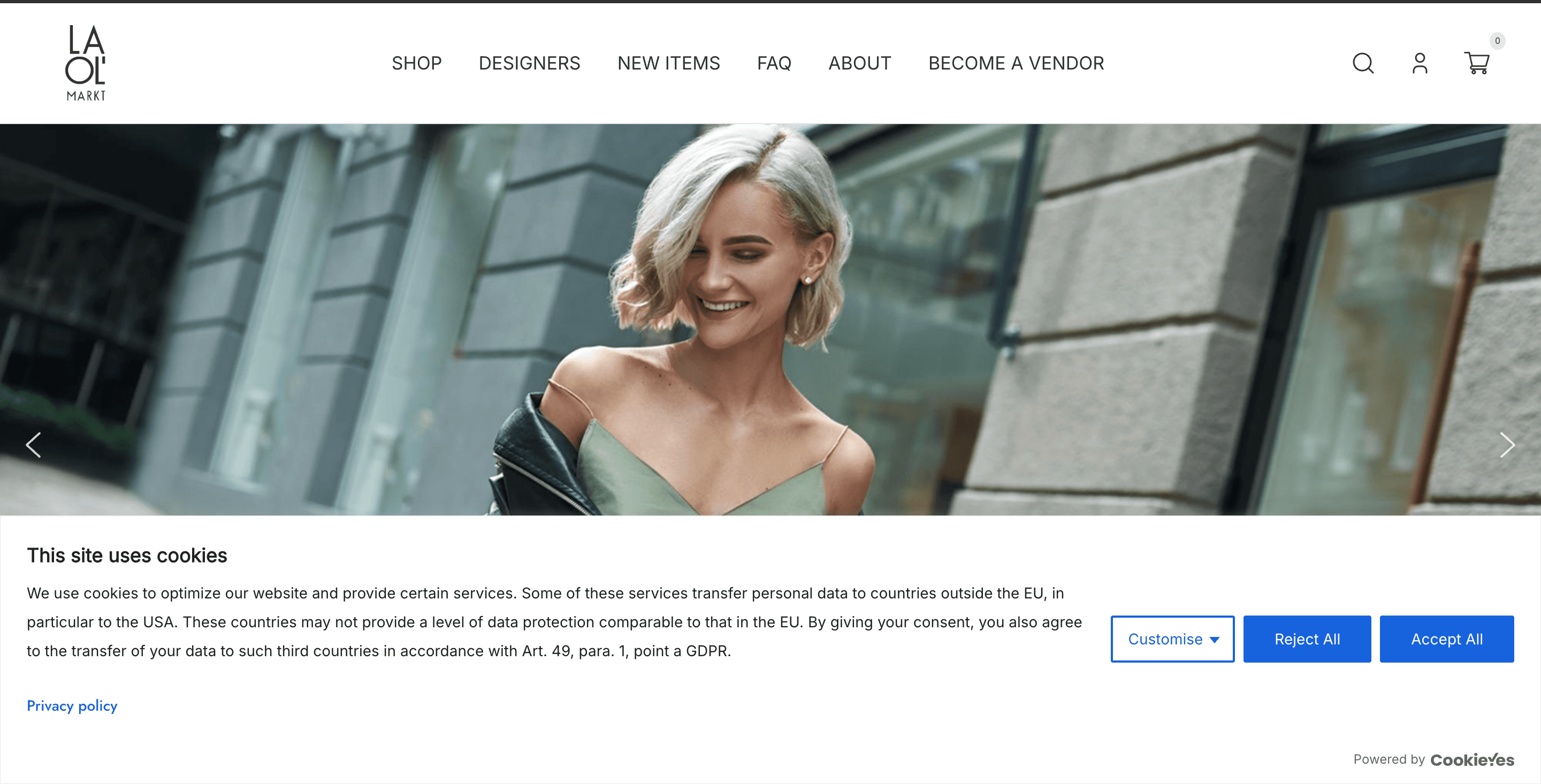
The cookie banner on LA OL’, a fashion website build on WordPress.
Depending on the privacy laws, cookie banners can be of opt-out or opt-in styles. The banner typically contains:
- A cookie message informing visitors about the use of cookies on their website
- Buttons, links, or toggles to exercise their cookie choices
- Link to cookie policy
Want to customise a cookie banner for your site?
Unlock pre-built templates and advanced customisations with CookieYes
Get for free- 1.5 M+ active installs
- Easy to set-up
Why does the cookie banner design of your site matter?
Here is why a cookie banner matters for your WordPress site:
#1 Compliance with global privacy laws
Privacy regulations such as the GDPR, ePrivacy Directive, and state laws in the United States require transparency and user control over the use of cookies.
- GDPR: Non‑essential cookies may only be set after an affirmative action from the user. This is known as the opt‑in consent.
- Your site must show a banner with clear Accept, Reject, and Customise buttons in the first layer.
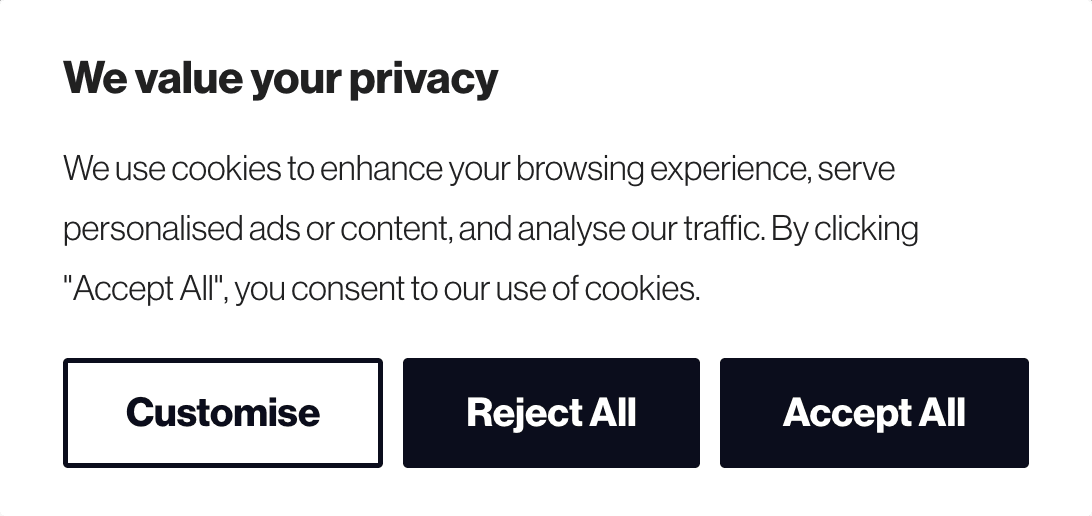
Image of an opt-in cookie banner
- CCPA/CPRA: Focuses on the right to opt out of the “sale or sharing” of personal information and requires a “Do Not Sell or Share My Personal Information” link.
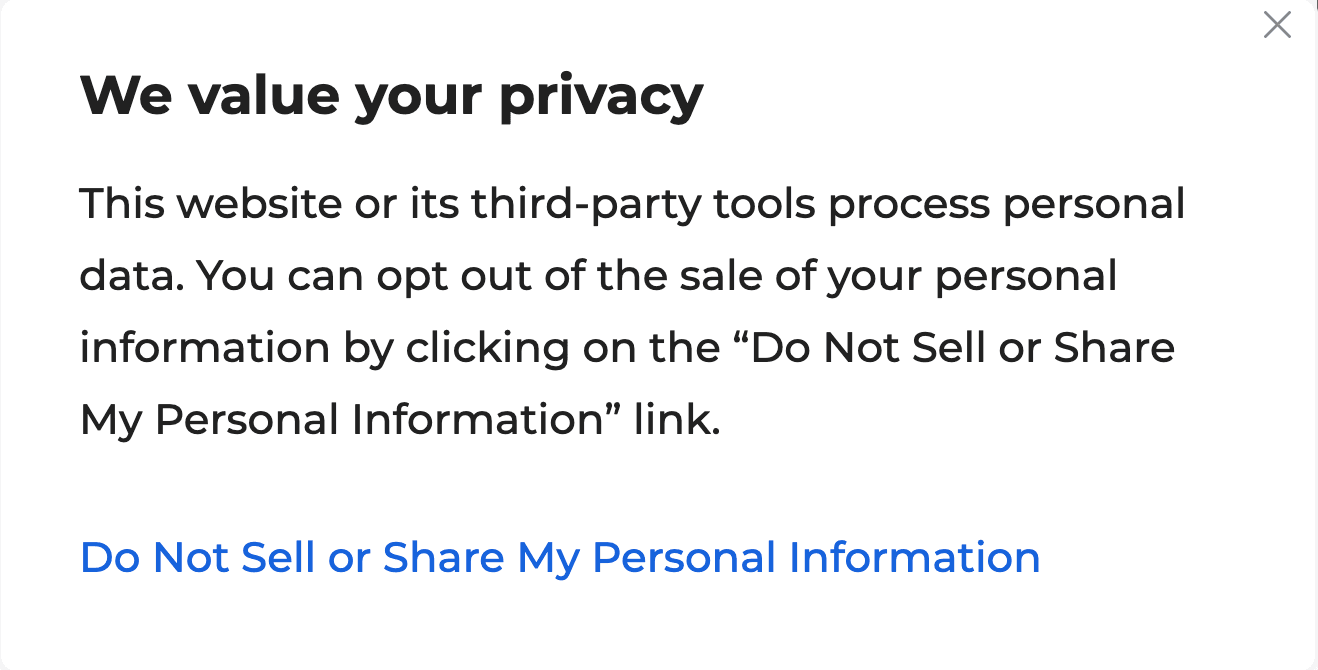
Image of an opt-out cookie banner
#2 Transparency and trust
When the design avoids pressure, dark patterns or misleading elements, it supports a smoother browsing experience.
A clear cookie banner helps visitors:
- Understand why cookies are used
- Allows them to make simple choices
#3 User experience and SEO
Banners that load quickly avoid layout shifts and are unlikely to hurt your search rankings.
Google considers cookie banners only indirectly through page experience metrics such as loading speed and visual stability. Heavy scripts or full‑screen interstitials can harm core web Vitals.

Also read
Types of cookie banners: Opt‑in vs opt‑out vs notice‑only
The three commonly used cookie banner models are:
Opt‑in banners (explicit consent)
Opt‑in banners require the user to actively consent before non‑essential cookies are set. This model is required in the EU and countries following the GDPR.
Best practices include:
- Equal prominence for choices: If there is an “Accept All” button, there must be an equally visible “Reject All” button, with comparable size, colour and placement.
- Clear wording: Use direct labels such as Accept all, Reject all, and Customise.
- Granular consent: Users should be able to opt in or out of cookies easily. These options should not be buried in multiple layers of settings, but rather be easy to find.
- Affirmative action: Consent cannot be implied by scrolling or closing the banner. Visitors must actively select their preferences before non‑essential cookies are activated.
- Easy withdrawal: Provide a persistent link or button allowing users to change or withdraw consent at any time. Also, link to your cookie/privacy policy.
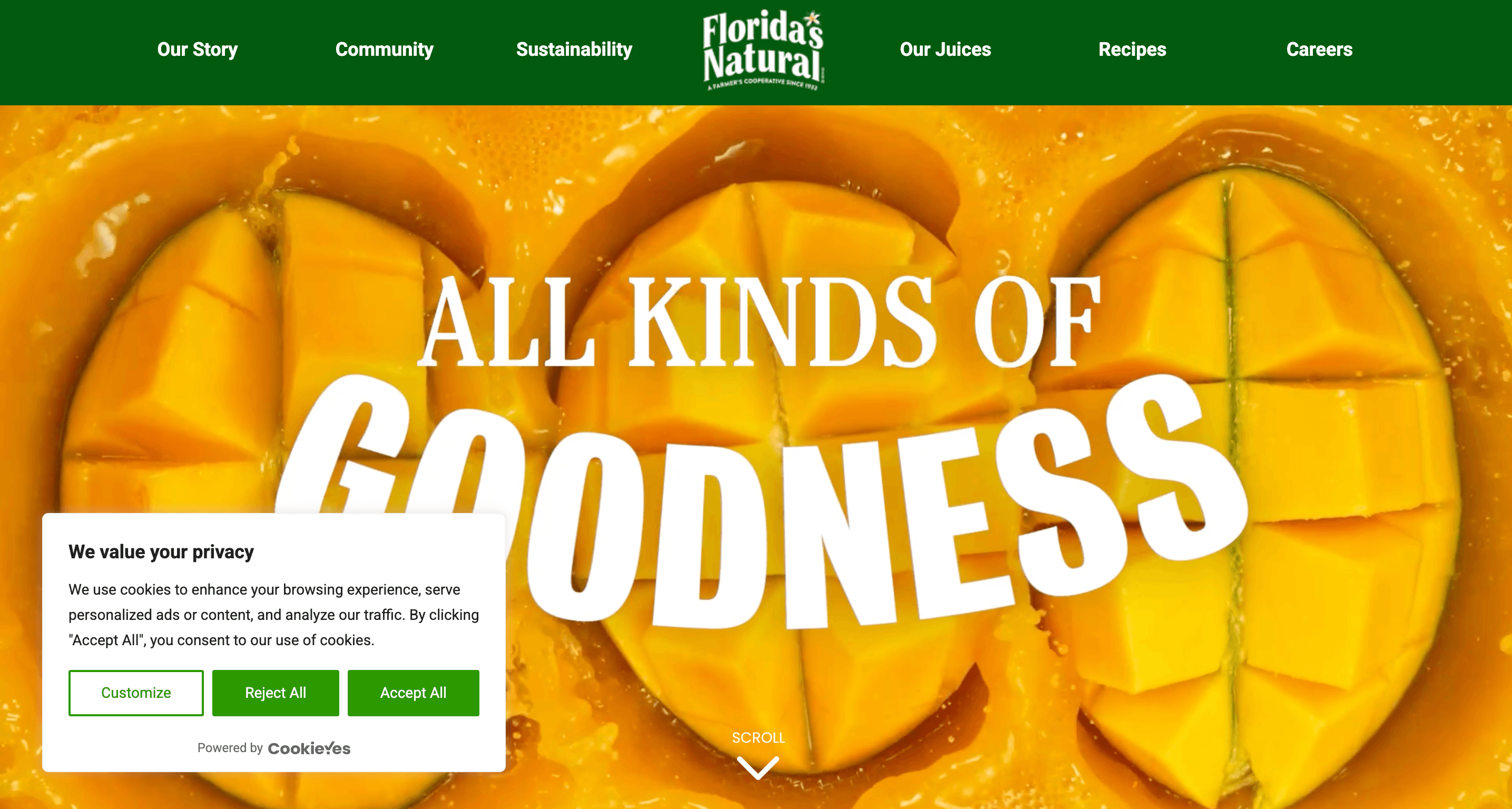
Example of an opt-in cookie banner with a clear cookie message and cookie consent buttons. Source: Florida’s Natural
Opt‑out banners (notice and opt‑out)
In the US, state laws such as the CCPA/CPRA, Virginia’s VCDPA and others require companies to inform users about data collection and provide an easy way to opt out of the sale or sharing of personal information. Key points:
- Consent model: Opt‑out banners assume consent unless the user declines.
- Opt-out link: The CCPA/CPRA requires businesses to display a clear link titled “Do Not Sell or Share My Personal Information”.
- Policy: Link to your privacy policy for detailed cookie information.
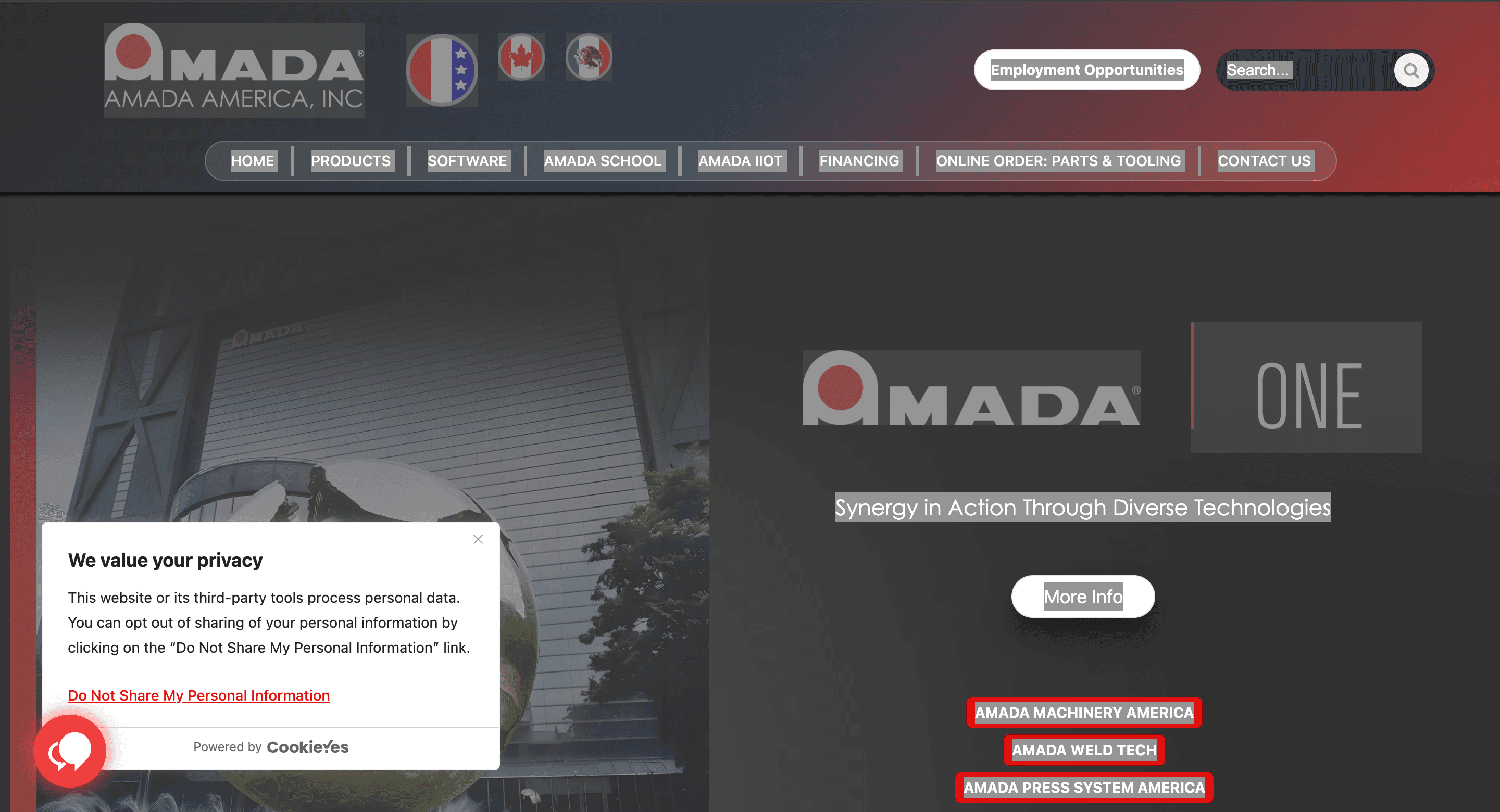
Example of an opt-out cookie banner with a link to opt out of data sharing and selling. Source: Amada America
Notice‑only banners
Notice‑only banners simply inform users that the site uses cookies without seeking consent. These banners are generally not compliant with GDPR or most US state laws because they do not give users a choice.

Example of a notice-only cookie pop-up
They may be acceptable if your site uses only strictly necessary cookies, but if you employ any analytics or advertising cookies, a consent or opt‑out mechanism is required.
Pro tip: Use geo‑targeting to show the appropriate banner to each region.
Dark patterns: What not to do when designing WordPress cookie banners?
Dark patterns are interface designs that nudge users into making decisions they might not otherwise choose. In cookie banners, dark patterns include:
- Pre‑ticked boxes
- Hidden reject buttons
- Forced consent (cookie walls)
- Any other visual trickery to induce consent.
EU Data Protection Authorities have warned against these tactics. Last year, the Belgian DPA fined Mediahuis 25,000 Euros per day for its misleading cookie banner design.
Similarly, the UK ICO guidelines also confirm that consent must be informed, voluntary, and specific. Using dark patterns may seem to increase acceptance rates, but it undermines compliance and damages trust. To avoid dark patterns:
- Give equal prominence to acceptance and rejection: Do not hide the Reject button on your cookie banner. Instead, it should be as easy to find as the Accept button.
- Provide clear, unambiguous choices: Offer clear, easy to find choices: Accept all, Reject all, and Customise on the first layer, followed by granular cookie options per category.
- No pre‑ticked boxes: Users must take an affirmative action, like clicking a button to indicate consent.
- Use plain, jargon‑free language: The cookie message and each cookie’s purpose must be in simple and layman's terms.
- Offer a close button responsibly: A close button can let users dismiss the banner without giving consent, but do not interpret closing the banner as consent.
- Colours: Do not highlight Accept buttons to nudge users to consent.
UX design considerations for cookie banners
A cookie banner should be noticeable but not intrusive. When designing a WordPress banner, consider the following UX principles:
Visibility without blocking content: Place the banner in a way that it does not hide the website content. Try to avoid full‑screen interstitials that hide navigation for better UX.
Consistent design with your brand: Customise colours, fonts and button texts to match your site’s aesthetic.
Responsive and mobile‑first: Since most browsing happens on smartphones, ensure the banner is responsive and doesn’t cause layout shifts.
Multi‑language support: If your audience is global, present the banner in the visitor’s language.
Accessibility features: Use high colour contrast, keyboard navigation, ARIA labels and screen‑reader compatible text.
Persistent preference centre: Offer a preference centre where users can review and modify their choices. Provide a permanent link or widget on every page for revisiting consent.
Minimal performance impact: Choose lightweight scripts to avoid slowing down the site.
How can CookieYes help in designing WordPress cookie banners?
WordPress offers cookie consent plugins in its Marketplace. The most popular among them is CookieYes CMP, which comes with a stack of features that support compliance and UX:
- Automatic cookie scanning and categorisation. The CookieYes WordPress plugin scans your site, detects cookies, and categorises them. This ensures your preference centre lists every tracker.
- GCM Integration: CookieYes is a Gold-level Google CMP partner and supports Google Consent Mode v2.
- IAB TCF support: If you run programmatic advertising, the CookieYes plugin is compatible with the IAB Transparency and Consent Framework (TCF v2.2).
- Geo‑targeting and multi‑jurisdictional banners: The geo-targeting feature within CookieYes automatically adapts the banner based on the location.
- Preference centre and consent logs: The plugin also allows you to set up a preference centre providing toggles for each cookie category. It stores consent logs to demonstrate compliance during audits.
- Multi‑site management and styling. If you run multiple WordPress sites, the CookieYes plugin is right for you as it allows you to manage banners for multiple domains from one dashboard.
- Translation and internationalisation. The plugin can automatically translate the banner into 40+ languages relevant to your audience.
Practical steps to designing your WordPress cookie banner
- Audit your cookies. Use the cookie scanner on your CMP to list all cookies and classify them by purpose.
- Write or update your cookie policy. Provide detailed descriptions of each cookie and its purpose. Link this policy from your banner.
- Configure the plugin. Choose the relevant consent law (e.g., GDPR, CCPA), enable geo‑targeting, and select a layout that aligns with your site.
- Customise the banner. Adjust colours, fonts, and button texts to match your brand and compliance requirements.
- Test across devices and regions. Check the banner on desktop, tablet and mobile. Ensure the banner respects Consent Mode and that no cookies fire before consent.
- Monitor and update. Re‑scan your site regularly or set up an auto scan with CookieYes to catch new cookies. Update your consent records and banner content as privacy laws evolve.
Also read:
The bottom line
Cookie banners are not an afterthought but a central component of your WordPress site’s privacy posture.
- A compliant banner informs visitors, offers real choices, and respects the legal rights of people across different jurisdictions.
- When you design your banner, focus on clarity, fairness and accessibility.
- Avoid dark patterns that manipulate users.
- It should be easy to find all the cookie consent buttons.
- Provide granular control over cookie categories and an easy way to revisit consent.
- To automate the consent management, select a WordPress plugin like CookieYes that supports geo‑targeting, multi‑language banners, IAB TCF integration and Consent Mode v2.
Think you need a cookie banner?
We can help! Sign up to CookieYes and customise your very own cookie banner now.
Get for free- 1.5 M+ active installs
- Easy to set-up
FAQs on WordPress cookie banner designing
How to design a cookie banner?
To design an effective cookie banner, focus on clarity, compliance, and ease of use:
- Use a clean layout that works on both desktop and mobile
- Custom-brand it for a consistent look on the website
- Write simple, transparent text about cookie use
- The cookie consent buttons should be easy to find
- Include a link to your privacy or cookie policy
- Ensure the banner is accessible and easy to read
You can design a banner manually or use a tool like CookieYes, which offers ready-made templates, automatic cookie scanning, region-specific consent modes, and customisation options to design a compliant banner in minutes.
Can you use custom CSS when designing a cookie banner?
Yes. You can use Custom CSS for further styling of your cookie banner’s design. This includes adjusting colours, fonts, spacing, padding, width, borders, and button styles. Custom CSS helps you fine-tune the banner to your website’s branding.