
Cookie banners have become a routine part of the web experience, appearing on nearly every site to request permission for tracking, analytics, or personalisation. If you, like us, care about compliance and user experience, knowing what drives a user to accept, reject, or customise cookies would be interesting. This blog attempts to explore the intersection of cookie consent psychology, law and user experience. It also breaks down the factors behind acceptance and rejection rates while revealing how the structure of your cookie banner shapes every decision.
Cookie banner and cookie consent: What it means for your business
What is a cookie banner?
Cookie banners inform users that cookies are used on a website and provide them with choices on how their data is handled. They are the front-facing layer of a website's compliance with privacy laws.
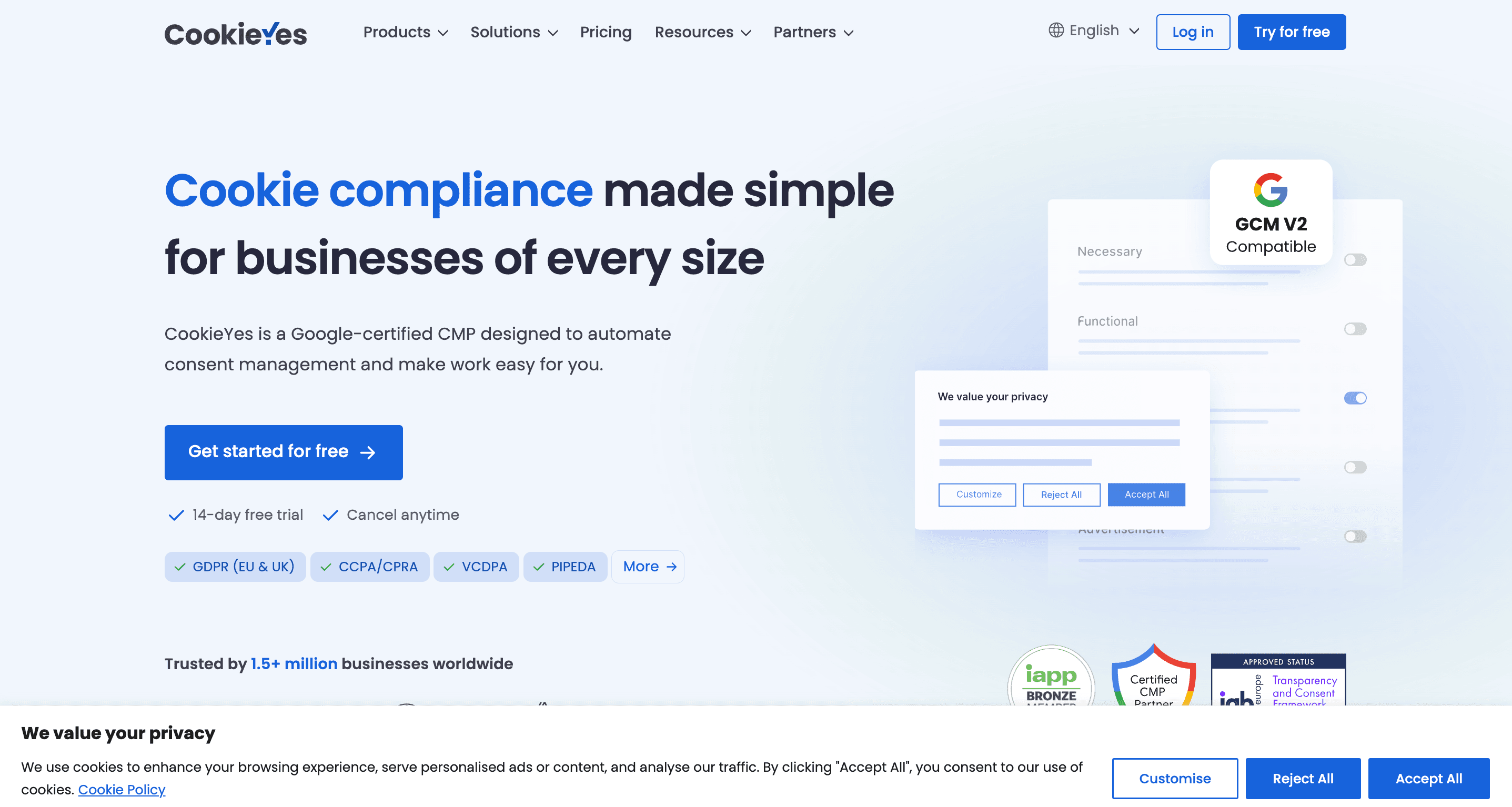
CookieYes cookie banner shown at the bottom of the window.
Global privacy laws such as the GDPR, ePrivacy Directive, CCPA, PECR, LGPD, and PIPEDA mandate transparency and user control over data collection.
Although specific requirements for cookie banners vary by jurisdiction, they share a common goal to enable informed consent.
Cookie banners serve as a practical tool to achieve it by clearly communicating what data is collected, how it will be used, and giving users meaningful options to accept, reject, or customise their preferences.
What is cookie consent?
Cookie consent is the permission to use cookies, which are small data files used to track behaviour, personalise content, or gather analytics on an online platform.
A user's choice here determines what kind of data your business can collect.
- Legal compliance: Non-compliance with consent requirements can lead to fines, enforcement action, and reputational damage.
- User trust: A clear and fair banner builds credibility and reassures users that you respect their privacy.
- Engagement: When users feel in control, they are more likely to stay on your site and interact positively.
- GDPR & ePrivacy Directive: Mandates prior, explicit, granular informed, and revocable consent before setting non-essential cookies (Opt-in consent).
- CCPA/CPRA (California): Requires websites to offer a “Do not sell/share my personal information” link on their cookie banner.
- PECR (UK): Complements the UK GDPR and mandates specific rules for cookie usage and electronic communications, including the need for consent for non-essential cookies.
- LGPD (Brazil): Aligns with GDPR in requiring informed, explicit consent and gives users the right to revoke it at any time.
- PIPEDA (Canada): Requires meaningful consent, especially for sensitive data, and businesses must provide clear explanations of what data is collected and how it is used.
- POPIA (South Africa): Stipulates that personal information may only be processed with consent, and users must be informed of the nature and purpose of data collection.
- Law 25 (Québec, Canada): Introduces strengthened consent rules and mandates that businesses clearly explain the use of tracking technologies.
- FADP (Switzerland): Requires websites to obtain informed user consent before deploying tracking technologies.
Across these and other jurisdictions, the emphasis is on transparency, freely given consent, and easily accessible mechanisms for opting in and out.
Before deploying any non-essential cookies (like marketing or analytics), businesses must:
- Ensure valid, opt-in consent is obtained (GDPR and other opt-in laws).
- Use a Consent Management Platform (CMP) to track and manage preferences.
- Enable easy withdrawal of consent.
- Comply with geolocation-specific rules (e.g. EU vs US users).
Cookie consent isn’t just a legal formality. It also does the following:
- Differentiate your brand through transparency.
- Improve data quality by collecting information from users who consciously opt in.
- Build long-term customer relationships based on trust and ethical practice.
- Avoid legal consequences and fines
What is cookie consent psychology?
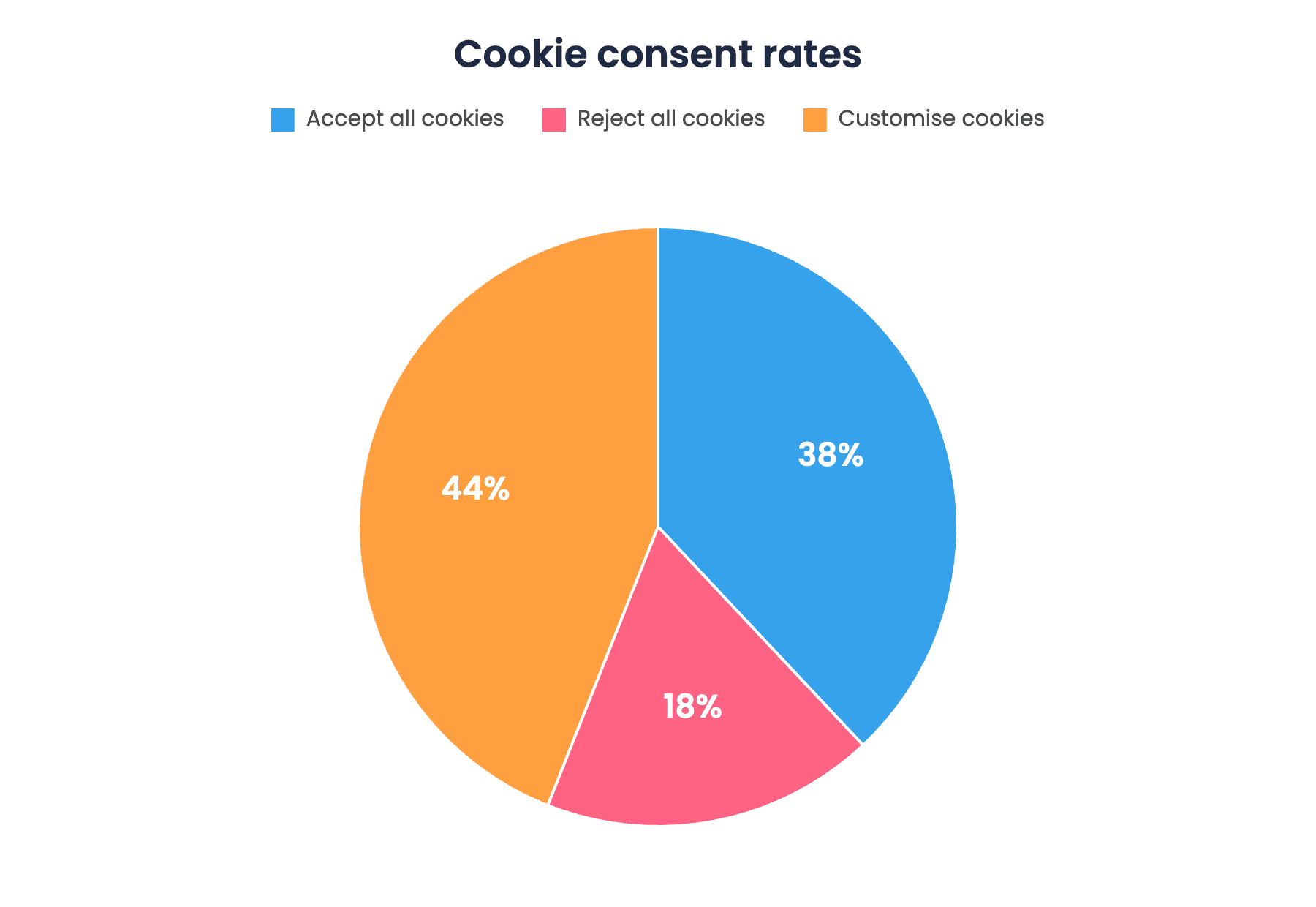
Above is a pie chart depicting the cookie consent rates based on an internet cookie survey conducted by All About Cookies.
Cookie consent psychology refers to the behavioural and cognitive factors that influence how users respond to cookie banners. It seeks to understand the reasons behind user actions, whether they accept, reject, or customise their cookie settings, based on how information is presented to them.
At its core, cookie consent psychology blends insights from behavioural science, interface design, and privacy attitudes.
It explores how banner layout, colour schemes, copywriting, button hierarchy, and timing can shape user decisions.
Key psychological drivers include:
- Cognitive biases, such as default bias, which leads users to choose the easiest option (often "Accept all").
- Emotional responses to language or visuals that convey trust, urgency, or ambiguity.
- Consent fatigue, where users, overwhelmed by repeated prompts, act reflexively rather than thoughtfully.
- Idea of control, when users feel they have privacy choices, even if navigating those choices is burdensome.
Understanding cookie consent psychology helps businesses design banners that not only comply with privacy laws but also respect user intent.
It encourages the creation of ethical interfaces that support informed decision-making, build trust, and enhance long-term user engagement.
Cookie consent psychology: Key factors that influence user decisions
A choice made by users when met with a cookie banner could be driven by many invisible levers. Let’s look at some of them.
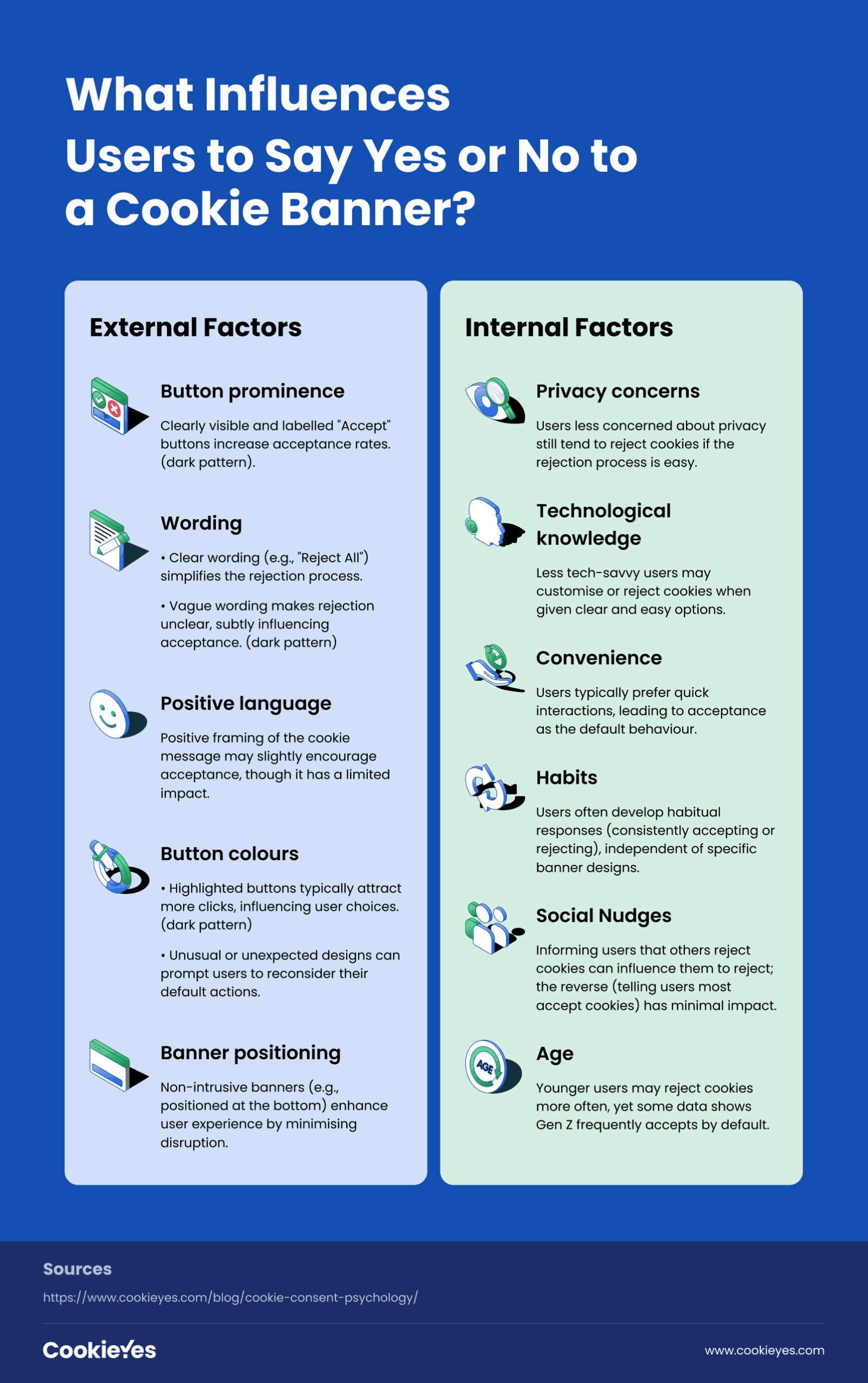
Cookie banner design/ External factors
If you are familiar with websites, you would already know that every button and text is a conscious choice. Similarly, many websites use design elements to increase acceptance rates and cater to their marketing needs. But here is a quick reminder: NOT ALL OF THEM ARE LEGAL.
Prominent reject button
Cookie banners that highlight the “Accept” button while hiding the “Reject” option, often placing it behind a secondary “More Options” layer, tend to generate higher consent rates. This design creates friction for those wanting to decline, nudging users towards the easier, more visible path.
Research confirms that both the actual and perceived effort to reject cookies significantly affects user behaviour. When rejection requires more clicks or is poorly labelled, users are more likely to accept by default.
Moreover, the study found that when the “Reject” button was clearly labelled and visually prominent, acceptance rates dropped notably. This reinforces that design and language jointly shape user decisions, often influencing consent without users being fully aware of it.
This is considered a dark pattern under most privacy laws.
Positive text
The tone of the cookie banner message, particularly when it uses positive language to frame consent as beneficial, can have a small effect on user choices.
For example, messages that highlight improved user experience or personalisation may encourage some users to accept.
However, a study by Jere Laine indicates that message tone alone does not have a major impact on overall acceptance rates. Its influence is limited compared to other factors like button design or labelling.
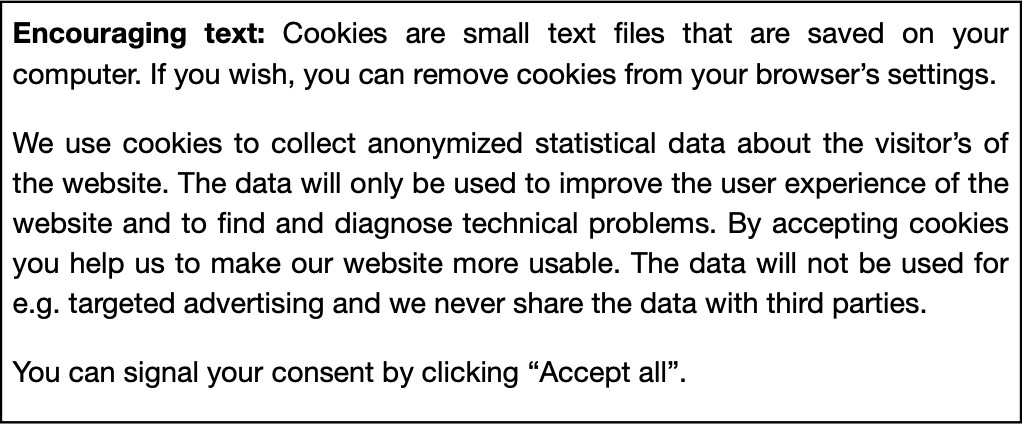
Encouraging text used in the experiment on cookie consent behaviour.
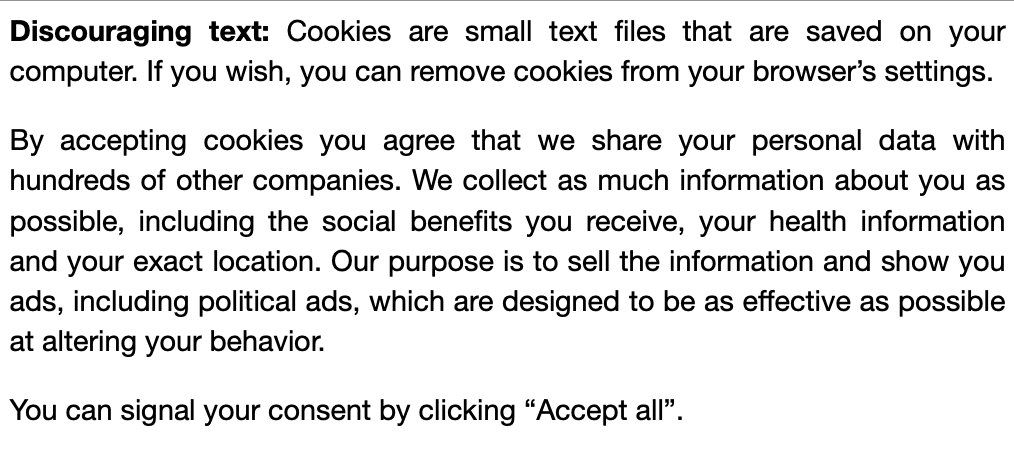
Discouraging text used in the experiment on cookie consent behaviour.
Button labels
The phrasing of button labels plays a more substantial role in shaping user behaviour.
For instance, using a generic term like “Privacy Settings” instead of a clearer label such as “Show More Cookie Options” led more users to accept cookies.
This is likely because vague wording reduces awareness of the option to reject cookies. In effect, users may unknowingly consent simply because the banner’s language makes the opt-out less obvious.
Even without changing the structure of the banner, word choice alone can steer decisions, subtly increasing consent by making alternatives less clear.
Button colours
Users tend to click the button that stands out visually, whether it’s “Accept” or “Reject.”
Highlighting a button using colour or contrast draws attention, increasing the likelihood that it will be selected. This demonstrates that many users follow the most visually prominent path, rather than making a fully informed decision.
This is also a dark pattern under most privacy laws.
Interestingly, this effect could also be stronger among rational, analytical users. When the less common option, such as “Reject,” is highlighted, the users might pause to reconsider and likely refuse cookies.
This suggests that even thoughtful users can be influenced by how unusual or unexpected a design looks, nudging them toward less typical actions like rejecting cookies.
Psychological/ internal factors
Privacy concerns
It might seem logical that people who care about privacy would reject cookies more often, but that is not always the case. Even users with strong privacy concerns may still allow tracking if the banner is unclear or if opting out feels like too much effort.

This reflects what is often called the privacy paradox, where people say they value privacy but do not act on it when the process is inconvenient. At the same time, users who are less focused on privacy might still choose to reject cookies when the option is easy to find and simple to use.
When the design makes privacy choices straightforward, people are more likely to follow through, regardless of their initial level of concern.
Technological knowledge
It is often assumed that people who are not tech-savvy do not pay attention to cookie settings, but that is not always the case. Some may still engage with the consent banner when the process is simple and clear.
At the same time, users who view cookies as helpful for personalisation or site performance may prefer to customise their settings rather than reject them entirely.
For many, the decision comes down to convenience and perceived benefit, not just technical confidence.
Convenience
Users who see cookies as helpful for personalisation or essential site functions may be more inclined to customise their settings rather than reject them entirely.
Shortcuts and habits
Many users develop shortcuts when dealing with cookie banners. Some routinely click “Accept” to continue quickly, while others always seek the opt-out. These behaviours can form through repeated exposure across websites.
While visual cues like highlighting can influence decisions, they do not affect everyone equally.
Around two-thirds of users tend to stick with their usual behaviour, consistently accepting or rejecting cookies, regardless of banner design.
Still, it is unclear whether these habits would hold if rejecting cookies required more effort.
Social nudge
A study published in Frontiers in Psychology found that telling users most people reject cookies made them more likely to do the same. However, stating that most people accept cookies had little to no effect.
Age
Age may also play a role in cookie decisions.
Younger users tend to reject cookies more often than older ones. This could be due to higher digital awareness or increased scepticism about tracking and personalisation among younger generations.
However, the Internet cookie survey by All About Cookies reports that Gen Z are most likely to click the accept all button. So this is still a grey area.
What makes users accept or reject your website cookies?
Designing cookie banners that comply with privacy laws and earn user trust
Global privacy laws like the GDPR and CCPA prohibit dark patterns such as hidden opt-outs or pre-ticked boxes, as these invalidate consent. Sites that use such tactics risk not only fines but also user distrust.
To stay compliant and credible, banners must be clear, fair, and easy to navigate. Here’s how to design cookie prompts that respect privacy and encourage honest engagement. Here’s how to strike the right balance.
#1 Present accept and reject options equally
Ensure fairness by giving users a real choice upfront
Legally valid consent must be freely given, and that starts with design parity.
- Your banner should make the “Reject All” button just as visible, clickable, and accessible as the “Accept All” button.
- Hiding decline options under “Settings” or requiring multiple clicks to opt out may violate GDPR standards.
- From a UX perspective, equal choice empowers users and reflects a respect-first approach.
- Ensure all buttons are equally styled and available at first glance.
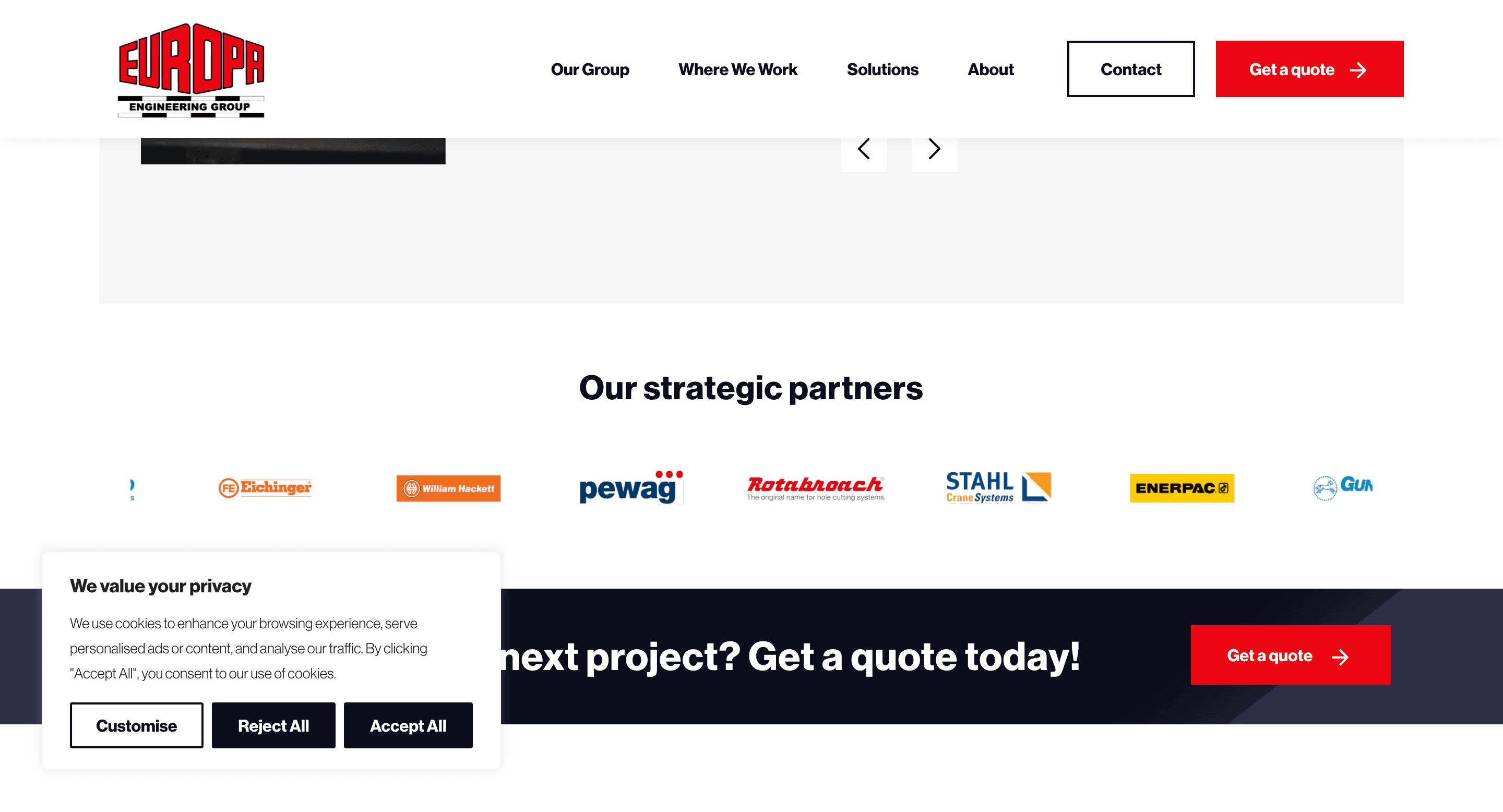
Cookie banner with equally prominent accept and reject buttons on the Europa engineering group’s website.
#2 Write in clear, user-friendly language
Avoid legalese and speak in plain terms
- Confusing terminology alienates users.
- Your cookie banner should explain, in straightforward language, what cookies do and why they’re used.
Instead of “processing personal data via third-party tracking technologies,” consider “We use cookies to improve your experience and show relevant ads.”
Plain language boosts transparency, helps users make informed decisions, and signals that your organisation has nothing to hide.
#3 Avoid deceptive design tactics (Dark patterns)
Tricks might win clicks, but they’ll cost you compliance
- Design patterns that nudge users to consent without their awareness, like low-contrast “Reject” buttons, misleading labels, or persistent pop-ups, are dark patterns.
- They are increasingly banned in privacy legislation (including CCPA and GDPR). Consent obtained this way is not legally valid.
Instead of cornering users into saying “yes,” create an environment where consent is a conscious, informed decision. This reduces legal risk and improves the quality of your analytics data.
#4 Optimise banner placement for better UX
Respect users’ space and attention span
- Consent prompts don’t have to be intrusive.
- Full-screen pop-ups that interrupt navigation are often annoying and less effective.
- Consider placing a small banner at the bottom of the screen, visible but not obstructive.
#5 Offer cookie category controls (Granular controls)
Let users customise, but keep it simple at first
Most privacy regulations require cookie banners to offer granular cookie settings that allow users to decide between functional, analytical, and advertising cookies.
However, displaying a cluttered list of toggles on the first banner layer can overwhelm and discourage meaningful choice.
Start with clear, high-level choices. For example, give three options in the first layer of the banner- “Accept All,” “Reject All,” and “Customise”.
Then, allow deeper configuration for users who want it. This balances control with usability, keeping engagement high and stress low.
#6 Be transparent about what consent means
Clarity now prevents backlash later
A vague or sugar-coated banner may nudge more users to click “Accept,” but it risks backlash once users realise how their data is used.
Being open about the consequences of acceptance, such as data sharing with advertisers, helps users make informed decisions.
While this may reduce opt-in rates, it increases consent quality and long-term user trust.
Link clearly to your cookie policy, and briefly explain the types of data you collect and why.
#7 Respect declined consent without punishment
A ‘no’ should never break the site or be ignored
When a user refuses non-essential cookies, that choice must be honoured without retaliation.
Disabling site functionality, repeatedly prompting the user, or silently dropping trackers despite their refusal violates both the spirit and the letter of global privacy regulations.
A respectful “no” experience shows your site is committed to data dignity. It also leaves the door open for future engagement. When users feel respected, they’re more likely to return and reconsider.
Examples of compliant cookie banners on real websites
Figma
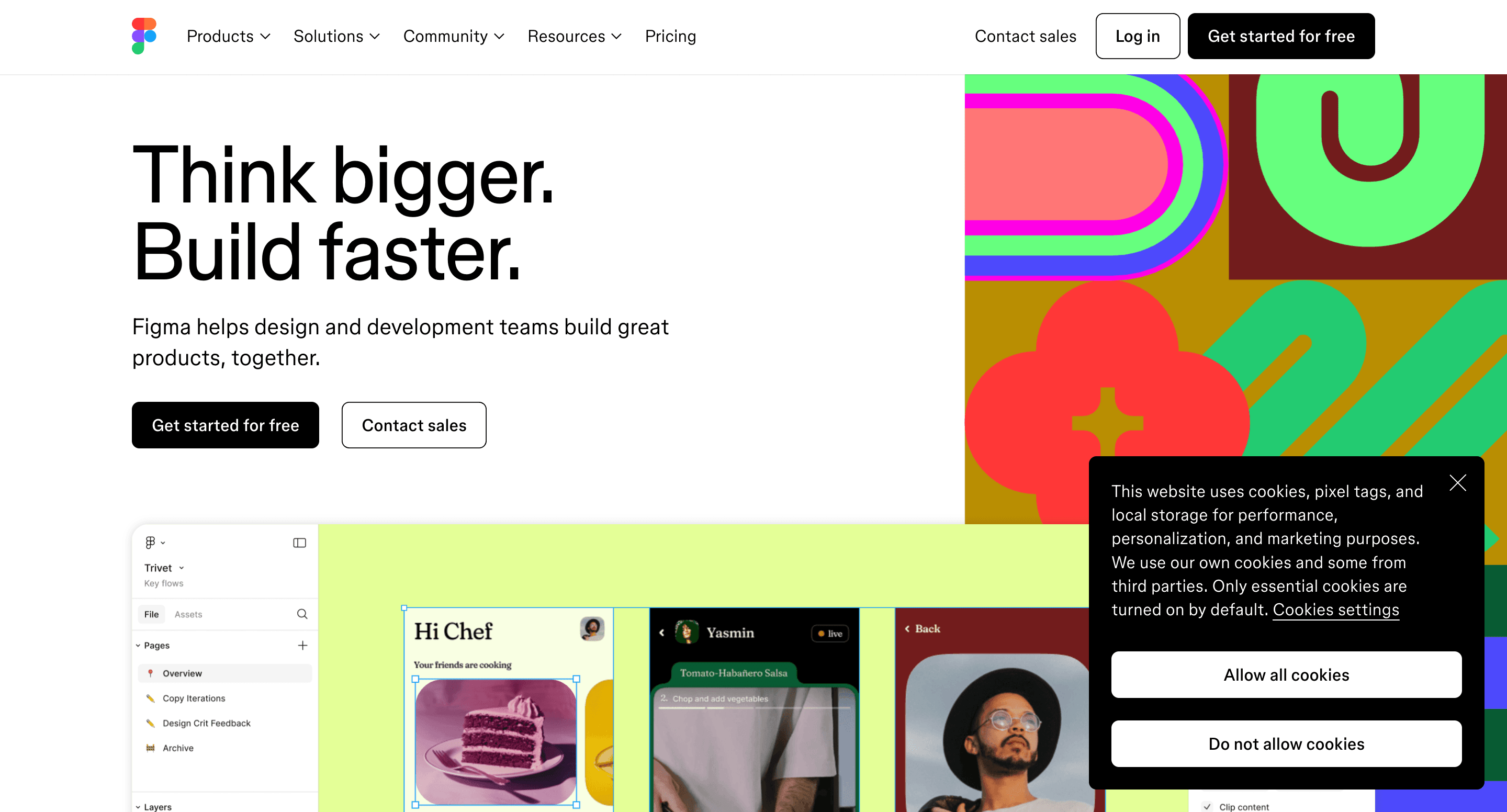
Cookie banner as seen on Figma's website.
The cookie banner on Figma’s website provides equal prominence for both accept and reject buttons. It is aligned to the bottom-right, is conspicuous and is compliant with opt-in laws like GDPR.
Landmark Systems
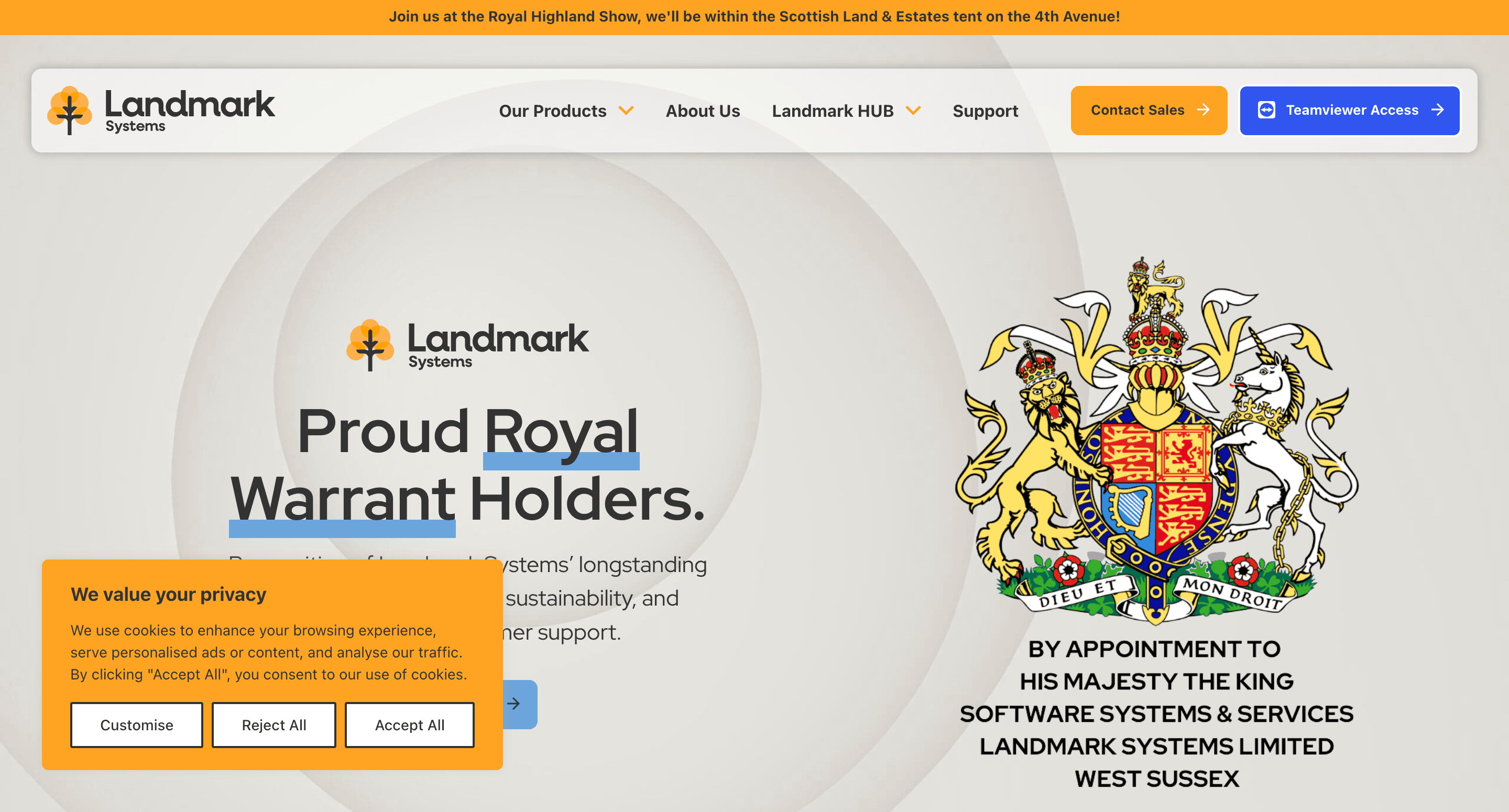
Cookie banner as seen on Landmark systems' website.
The cookie banner on Landmark’s website features a clear and concise cookie message, with equally prominent accept, reject, and customise buttons. It is customised to match the website's colour scheme using CookieYes and is aligned to the bottom-left. The banner complies with GDPR and similar opt-in legislation.
FIFA
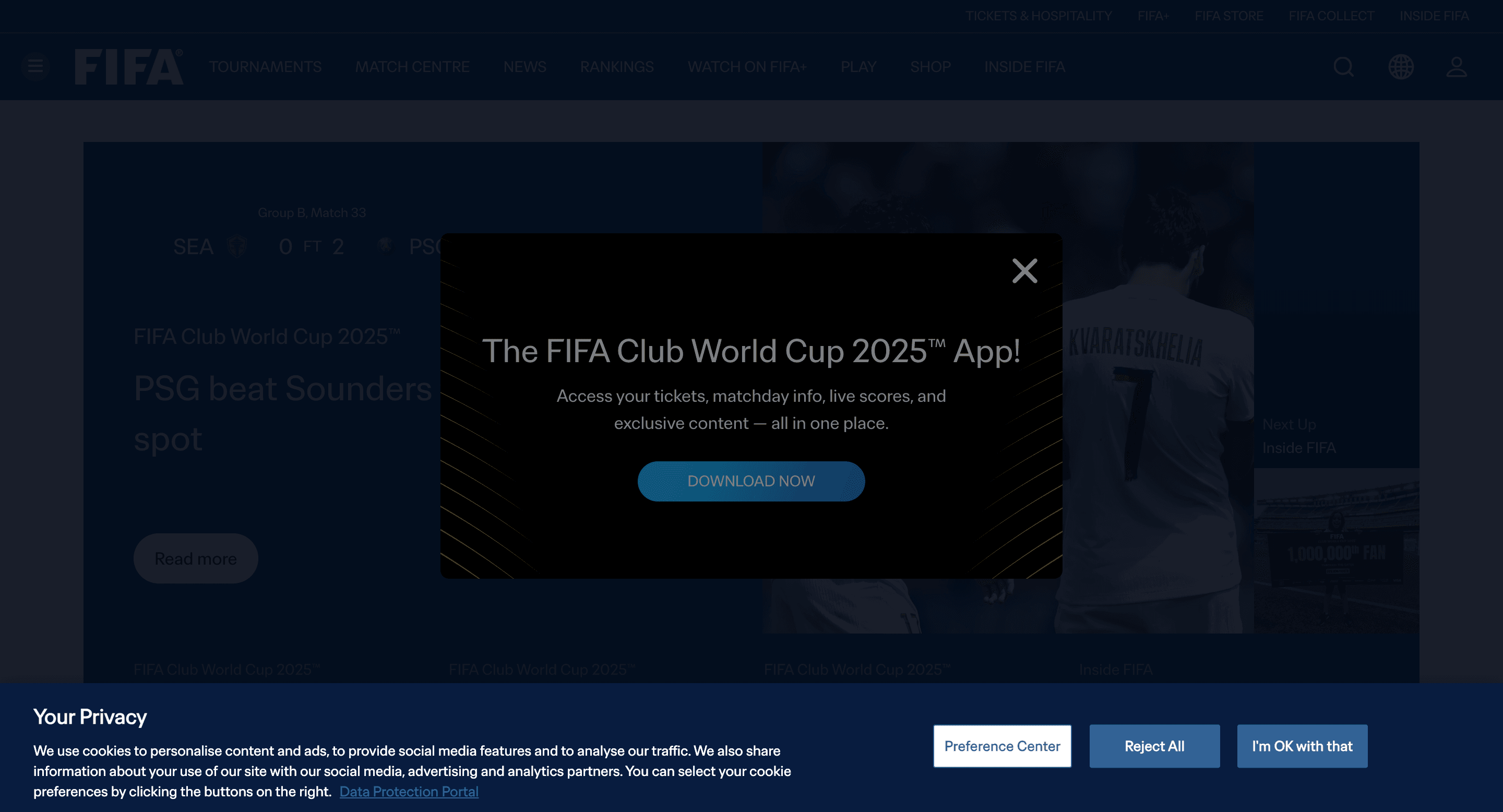
Cookie banner as seen on FIFA's website.
Cookie banner on FIFA’s website uses the text “I’m okay with that” instead of the typical use of “Accept”. The banner is aligned to the bottom of the window and doesn’t interfere with the browsing experience. It follows an opt-in model.
HubSpot
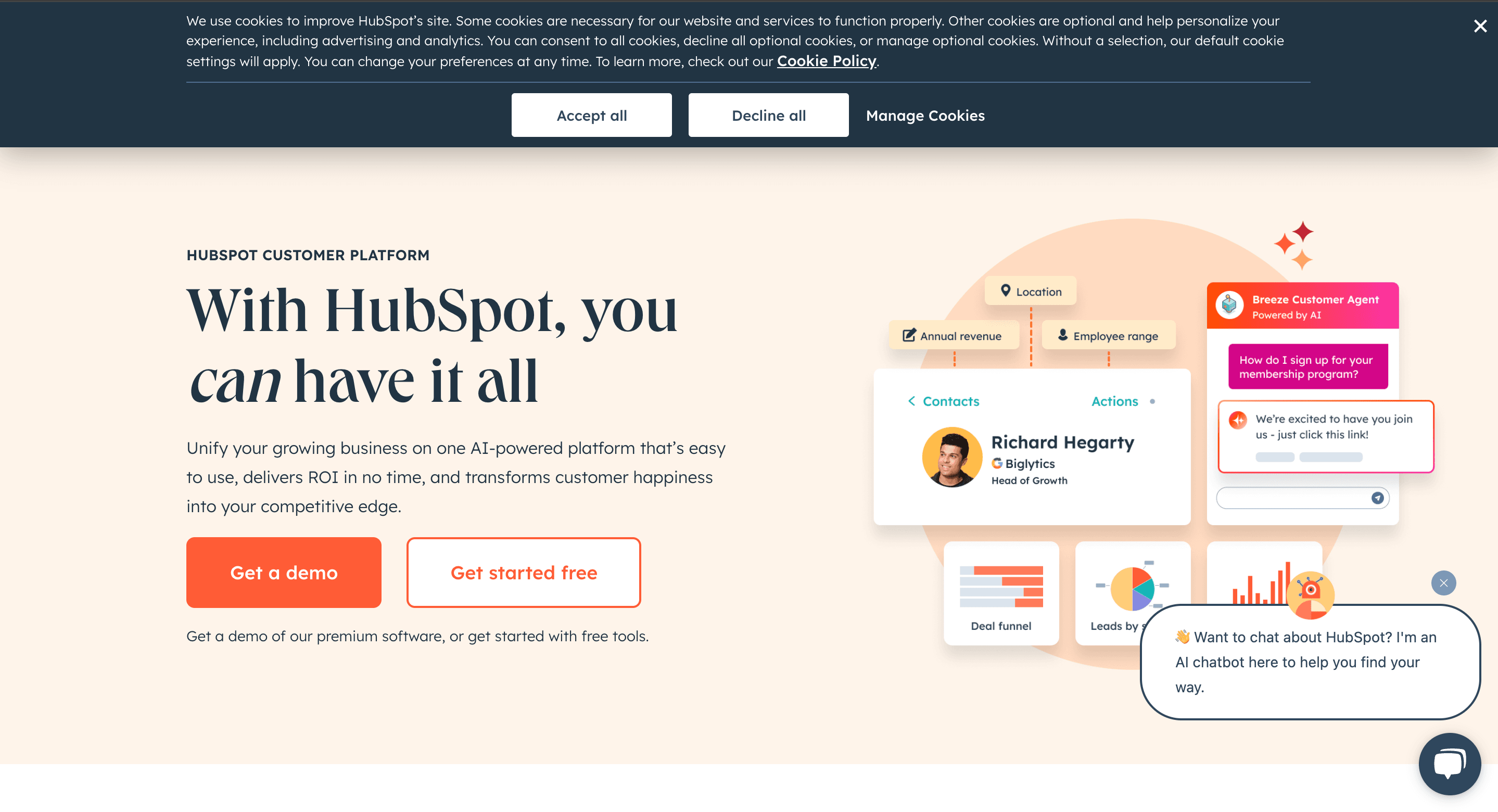
Cookie banner as seen on HubSpot's website.
Cookie banner on HubSpot aligns to the top of the window with equally prominent accept and reject buttons.
LegoLand
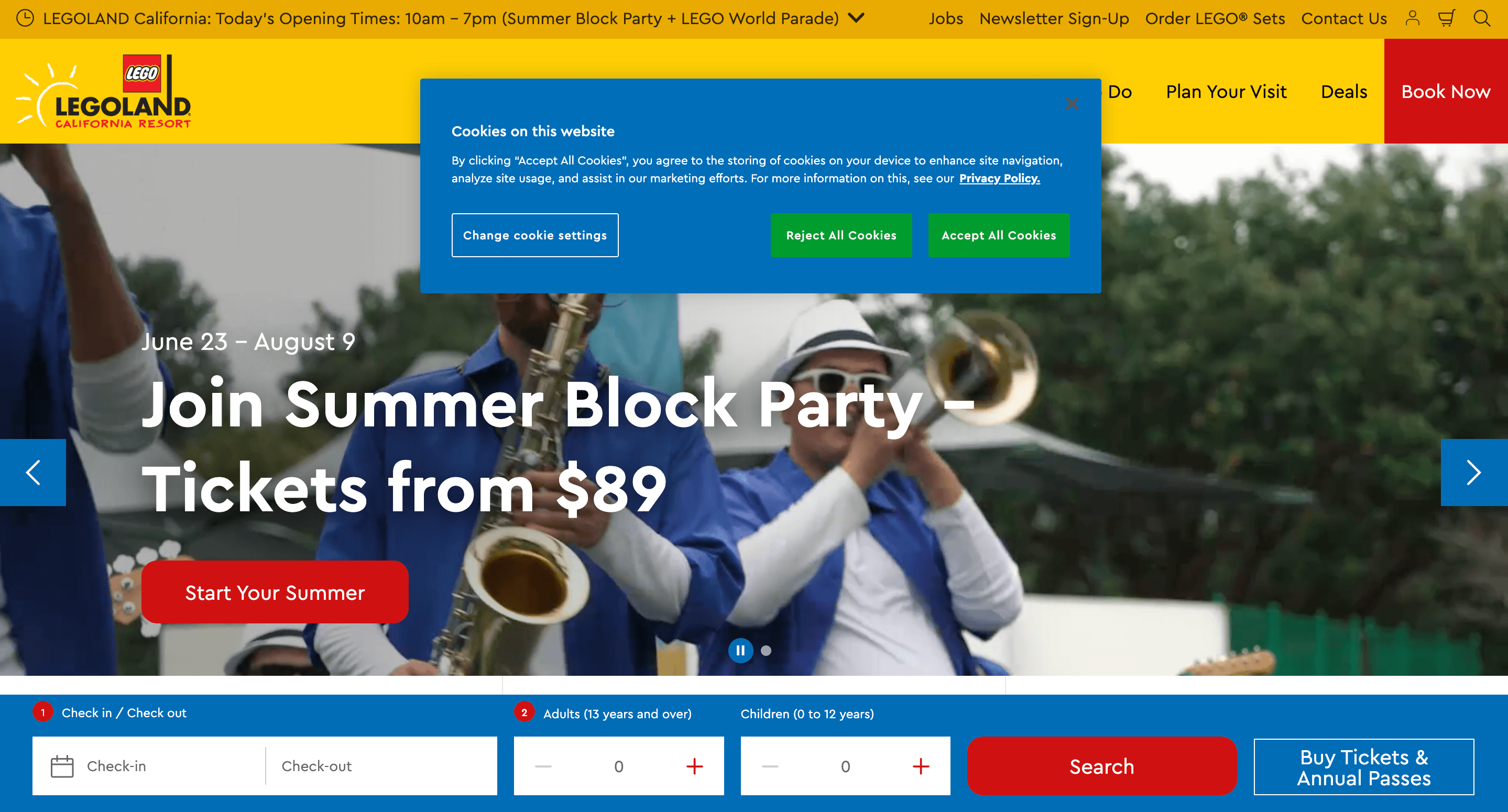
Cookie banner as seen on LegoLand's website.
LegoLand provides a fun-coloured opt-in banner with a short and easy-to-understand cookie message. The accept and reject buttons are equally highlighted in the banner.
Sports Facilities
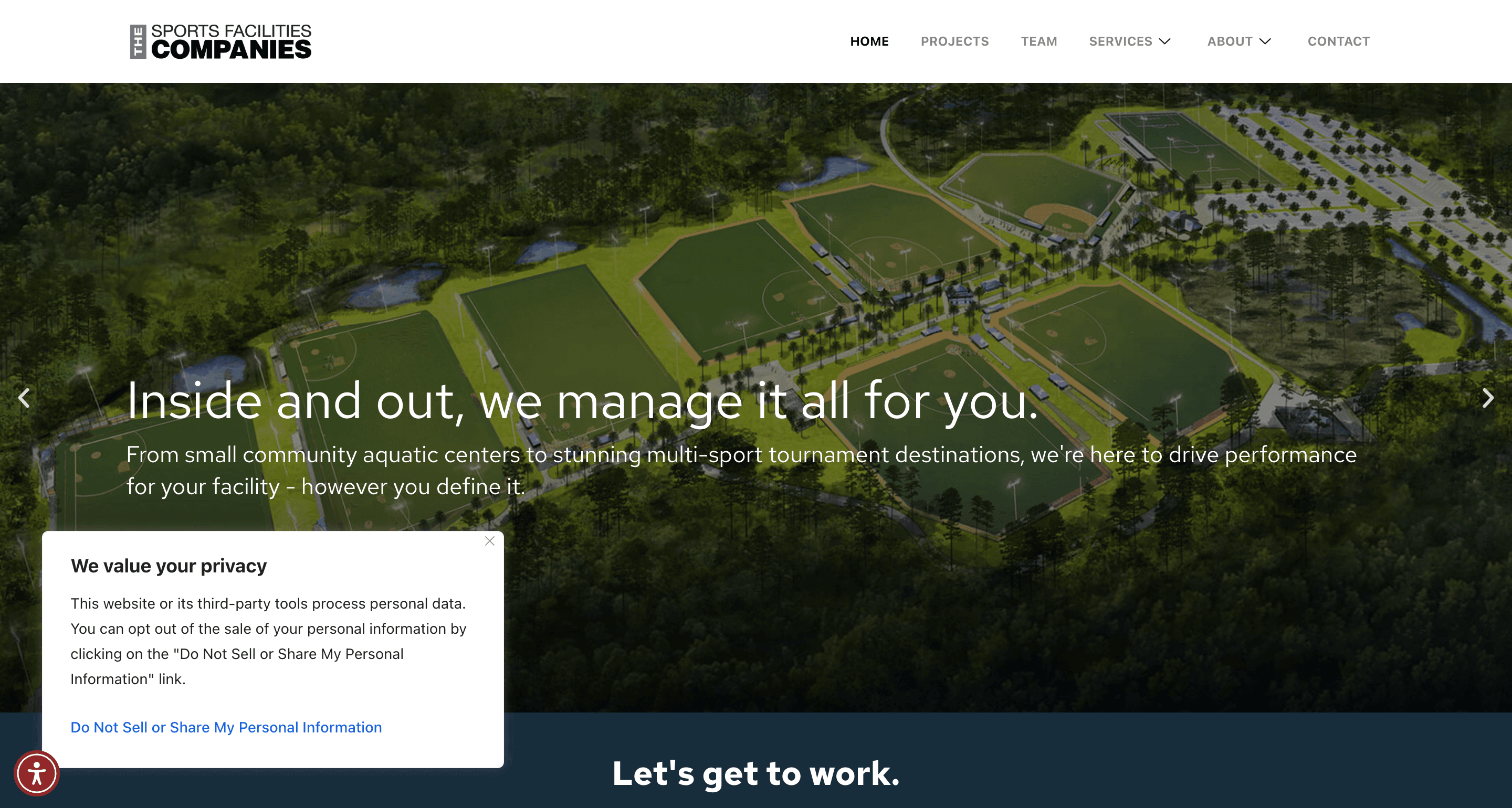
Cookie banner as seen on Sports Facilities's website
The Sports Facilities’ website features an opt-out cookie banner in compliance with US privacy laws like the CCPA. By clicking on the “Do not sell or share my personal information” link, users can opt out of third-party cookies.
Create your custom cookie banner today
Automate your consent management & stay compliant
Sign up for free- 14-day free trial
- Cancel anytime
FAQ on cookie consent psychology
Can psychological nudges legally improve cookie consent compliance?
Laws like GDPR require that consent must be freely given, informed, specific and unambiguous. Therefore, nudging users to accept cookies using methods like highlighting accept buttons is not generally legal.
What is an example of a cookie consent message?
A cookie consent message usually refers to the text on a cookie banner that explains how cookies are used. An example is “We use cookies to enhance your browsing experience, serve personalised ads or content, and analyse our traffic. By clicking "Accept All", you consent to our use of cookies.”
How does visual design influence cookie consent psychology?
Visual cues like colour, button placement, highlighted buttons, and clear wording might affect user perception and consent decisions.
What is a dark pattern?
A dark pattern is a deceptive or manipulative design technique used in websites and apps to trick users into taking actions they may not intentionally want, such as sharing personal data, subscribing to services, or making purchases.
Examples include hidden opt-outs, misleading buttons, or deliberately confusing language. Dark patterns undermine user autonomy, transparency, and informed consent, often violating privacy regulations and ethical design principles.
Why is cookie consent fatigue a psychological phenomenon?
Cookie consent fatigue occurs due to repeated exposure to consent banners, causing users to habitually ignore details and make impulsive decisions.