
Privacy is now part of the user experience. Countries around the world are introducing stronger data protection laws, and businesses are stepping up. From geo-target banners to dynamic consent tools, websites are finding new ways to respect user privacy without disrupting engagement.
But here’s the challenge: different places, different rules. Some require opt-in consent. Others allow opt-out. That means a single, static cookie banner just won’t cut it. Geo-targeted cookie banners offer a smart solution. They adapt based on where your visitor is located, showing the right banner to the right audience.
This guide explores how geo-targeting works, why it's becoming essential, and how to implement it effectively without compromising on user experience.
Go global with geo-targeting
Sign up for CookieYes and easily geo-target your cookie banner for any region
Get a free trial- 14-day free trial
- Cancel anytime
Already a CookieYes Free or Basic plan user? Upgrade now to make your banner globally compliant.
Why does geography matter in cookie consent?
Consent laws differ across countries
Not all data protection laws share the same rules. Therefore, if your website reaches users in multiple countries or states, your approach to cookie consent needs to be flexible.
130+ countries in the world already have their own privacy laws.
GDPR readiness
In the EU and UK, the GDPR and ePrivacy Directive require prior, explicit consent before placing non-essential cookies. Visitors must be able to accept or reject cookies easily. This means no pre-ticked boxes, hidden Reject buttons or other dark patterns.
CCPA readiness
In California, the CCPA/CPRA focuses on opt-out consent instead of opt-in. A compliant banner must clearly explain cookie use and offer a visible Do Not Sell or Share My Personal Information link so users can easily opt out.
Other laws
Beyond the EU and California, regions like Brazil (LGPD), Canada (PIPEDA), and several US states (like Virginia and Texas) have their own rules. Each requires different consent experiences.
Because these requirements differ so much, a single approach won’t work across the board. This is where geo-targeting becomes essential. It helps you display the right type of banner to the right user in the right place.
Around 80% of the global population enjoys by some form of privacy protection
What is geo‑targeting in cookie consent?
Geo-targeting refers to displaying cookie banners based on a user’s location to meet regional data privacy requirements. Instead of showing the same banner to every visitor, websites can customise the consent experience depending on where someone is browsing from.
(Available in pro and ultimate plans)
This means you can present a GDPR-compliant banner to users in the EU, show a CCPA-style opt-out for visitors from California, and offer a simpler notice in regions with more relaxed or no cookie regulations.

The result is a consent banner that’s both relevant and compliant, avoiding unnecessary pop-ups while still meeting legal expectations across multiple jurisdictions.

How do geo‑targeted cookie banners work?
#1 Detecting the visitor’s location
Geo-targeting uses several data points to determine a visitor’s country or state:
- IP address: The most common method. Each IP address can be matched with a specific region or country using geolocation databases.
- GPS or Wi-Fi data: On mobile or connected devices, location can be refined if users grant permission.
- Browser language and time zone: These are secondary indicators when IP detection isn’t precise.
This process usually happens within milliseconds as the page loads, so the correct banner appears instantly.
#2 Mapping the location to geo-targeted banner preference
Once the location is known, your consent management platform (CMP) checks which banner is configured to be displayed to the visitors from that region.
#3 Displaying the right banner
This way users can choose to
- show a GDPR-style banner in an opt-in model with Accept, Customise and Reject buttons to visitors in the EU or UK.
- show a CCPA-compliant banner with a “Do Not Sell or Share My Personal Information” link to California users.
#4 Managing multiple banner versions
Most CMPs let you:
- Create separate banner templates for different regions.
- Automatically trigger the correct banner based on the detected location.
- Log consent actions region-wise for audit and compliance reports.
CookieYes lets you automate geo-targeting, so once configured, you don’t need to worry about endless coding. This saves time for both legal and tech teams.
Why use CookieYes for geo-targeting?
CookieYes automatically detects a visitor’s location using reliable IP-based geolocation and displays the consent banner that aligns with that region’s privacy requirements.
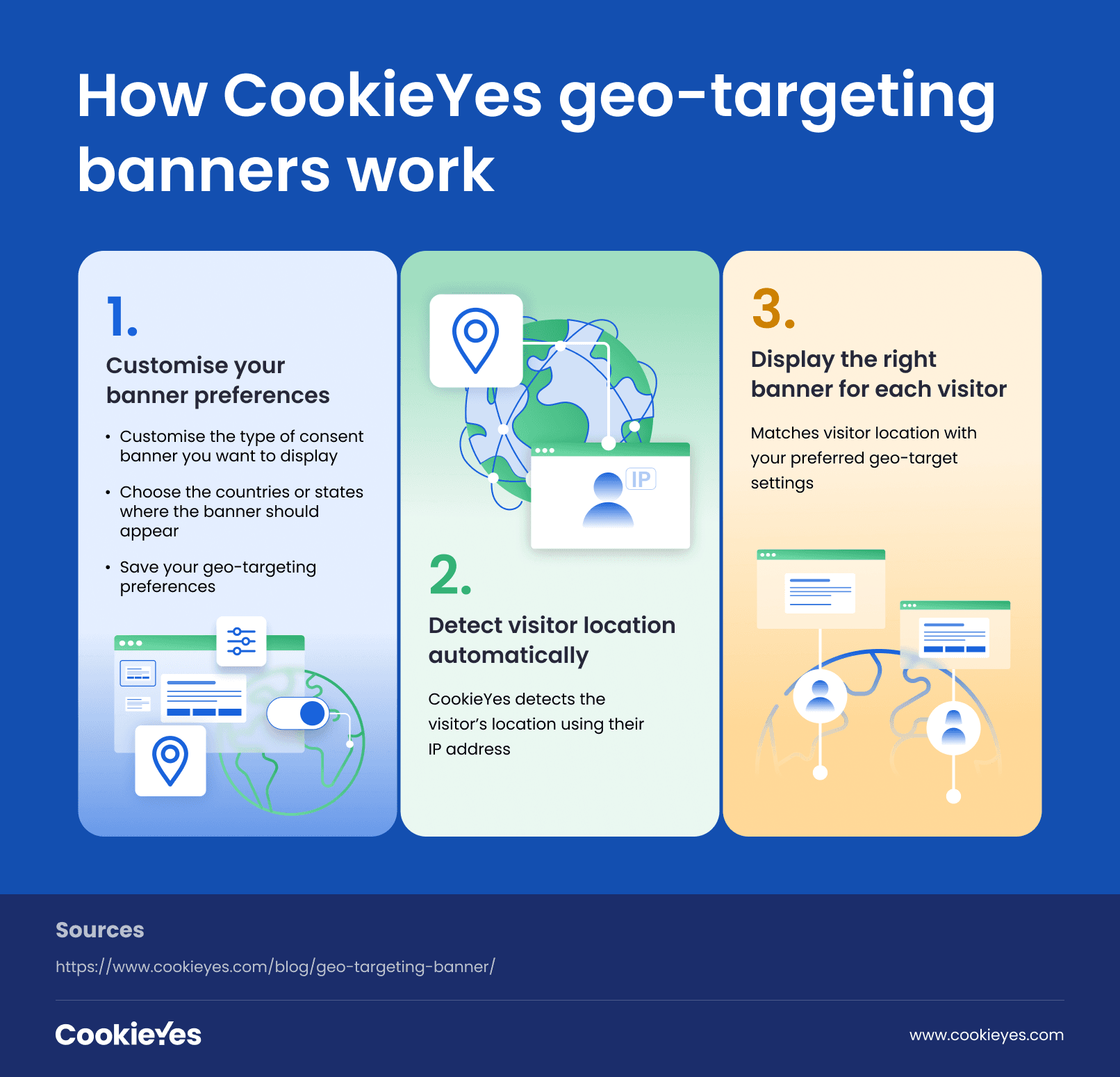
You can choose the banner template, customise it and select to display the banner to all EU visitors, the US, or specific locations. The process is as simple as it sounds.
Therefore, you can individually customise what banners should be shown to what audience, instead of showing the same banner. This automated approach removes the need for manual region-specific coding and ensures continuous compliance, even as new laws emerge.
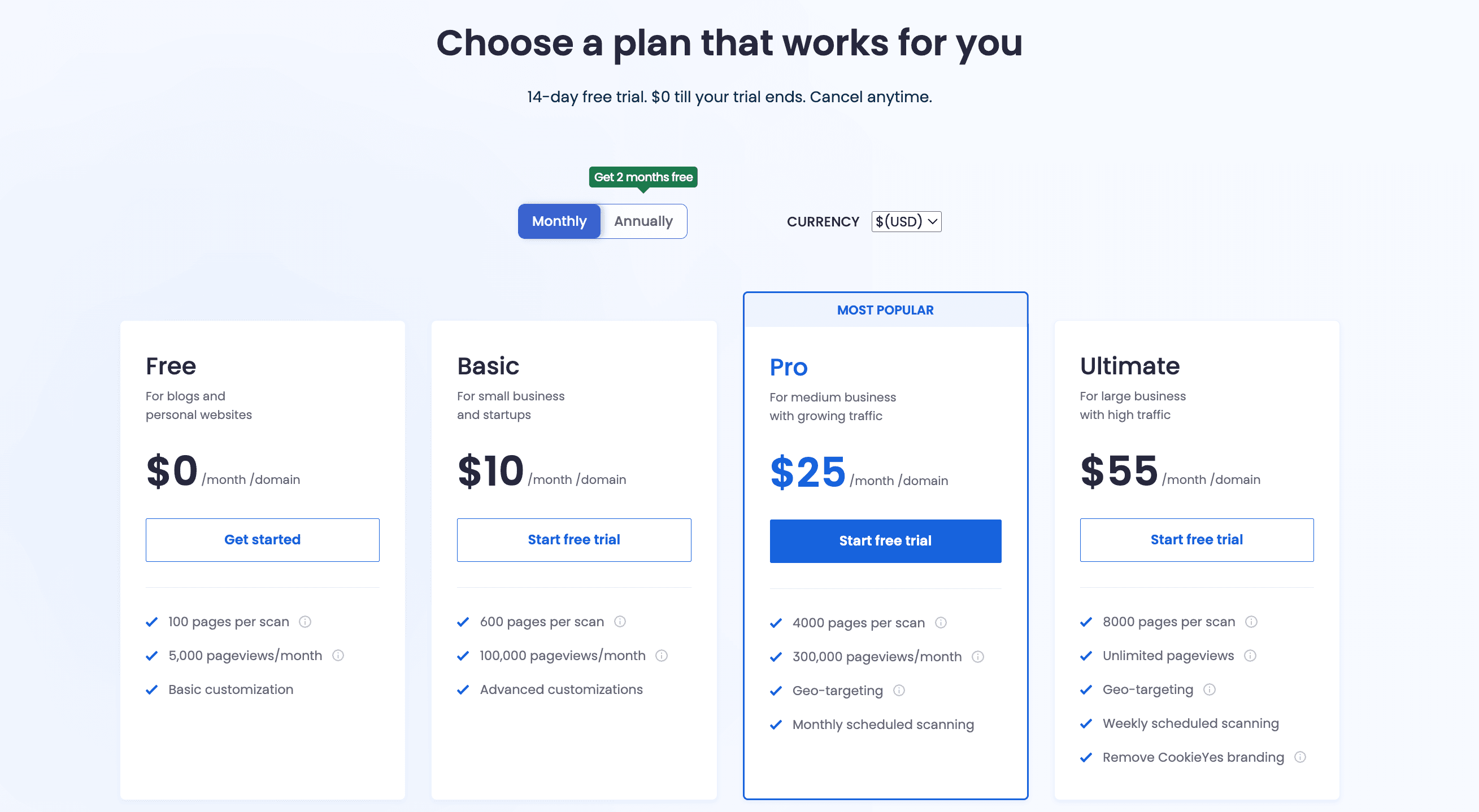
This feature is available in both our Pro and Ultimate plans.
Implementation: Simple steps to set up a geo-targeting banner
- Log in to your CookieYes dashboard
- If you’re on the Pro or Ultimate plan, go to Cookie banner → General. If you’re using the Free or Basic plan, upgrade to a higher plan to enable the geo-targeting feature.
- Choose your preferred banner template and then click on the location under the Geo-target banner setting.
- You can also customise your banner for a more personalised experience.
Here, check out this demo video for a complete walkthrough on geo-targeting your cookie banner.
Benefits of geo‑targeting your cookie banner
The following are the advantages of opting for a geo-targeted banner setting for your website:
#1 Ensures legal compliance across jurisdictions
Geo-targeting helps display region-specific banners, automatically meeting each law’s consent standard. This prevents non-compliance fines and makes your site legally agile as new privacy laws appear globally.
#2 Improves user experience
Visitors outside regions with strict consent laws, such as the EU, may not always need the same level of cookie disclosures. Geo-targeting ensures that each visitor sees a banner that matches their local privacy expectations, avoiding unnecessary complexity while maintaining full transparency where it matters most.
#3 Builds trust and transparency
Showing location-relevant consent notices demonstrates that your brand respects privacy laws and local expectations. This transparency builds credibility, especially with users in regions that prioritise privacy compliance, like Europe and California.
#4 Reduces legal and operational risks
Instead of managing one blanket banner for every visitor, geo-targeting automatically applies the right rules.
This reduces errors such as:
- Showing a CCPA-style opt-out in Europe (non-compliant under GDPR).
- Collecting unnecessary consent where it’s not legally required.
It also simplifies audits and documentation, keeping compliance risk low.
#5 Optimises analytics and ad performance
In regions without strict consent laws, geo-targeting allows analytics and marketing tags to load immediately, without waiting for opt-in approval. This ensures more complete traffic data and smoother advertising performance, without breaching privacy rules elsewhere.
#6 Adapts easily to new privacy laws
With new laws emerging in the U.S., the Middle East, and Asia, geo-targeting future-proofs your consent strategy. You can quickly add or adjust banner versions for new jurisdictions without redesigning your entire compliance setup.
Best practices for geo-targeting banners: Checklist
Here’s a compact and effective checklist for best practices in geo-targeted cookie banners:
- Detect location accurately using reliable IP geolocation.
- Show geo-targeted banner to the visitor
- Use clear, concise language explaining cookie purposes and options.
- Provide granular controls for users to customise cookie preferences.
- Link to full privacy and cookie policies.
- Design non-manipulative layouts, avoiding dark patterns.
- Allow users to change their consent anytime easily.
- Test banners across regions to ensure compliance and usability.
- Log consent activities for audit and compliance proof.
EU, US, and beyond: Geo-target your cookie banner
Sign up for CookieYes and easily geo-target your cookie banner for any region
Get a free trial- 14-day free trial
- Cancel anytime
FAQ on geo-target cookie banners
How to geo-target cookie banners?
To geo-target your cookie banner, sign up for the Pro or Ultimate plan on CookieYes. Then, go to Cookie banner > General and select one template (GDPR, US, or GDPR & US). Next, pick the locations for geo-targeting. You can also customise the banner if needed. Save your preferences.
Repeat the same steps for each other template you want to target different regions.
Implementation guide: How to implement Geo-targeting cookie banner
Is the geo-targeting feature available in the free plan?
Geo-targeting is available on Pro and Ultimate plans only. The Pro plan starts at $25 per month, and you can get 2 months free with an annual subscription.