Agent readiness TLDR;
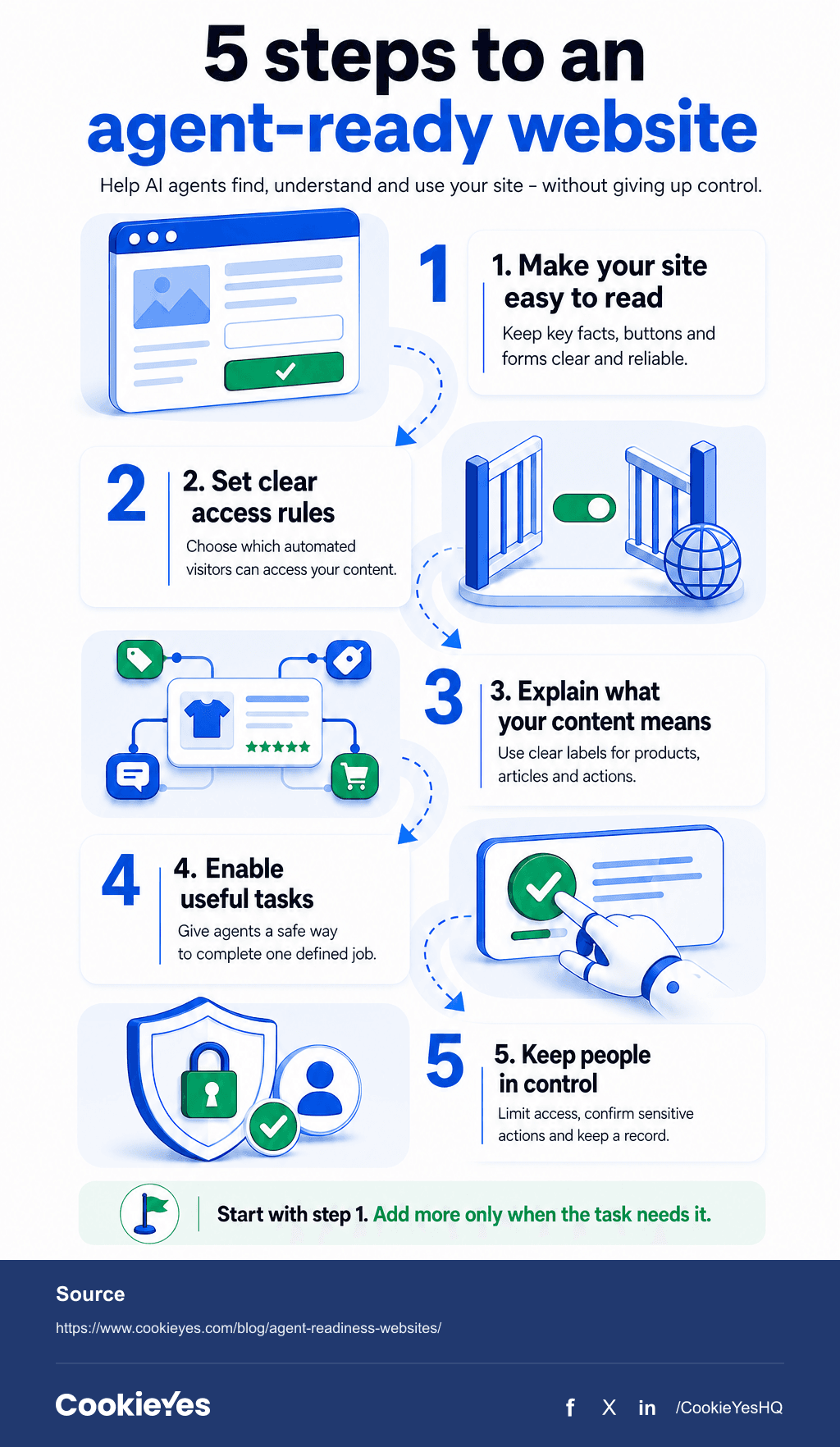
- Make key content reliably available.
- Use semantic HTML, descriptive controls, and accessible forms.
- Tell crawlers what they can access.
- Add structured data and documented capabilities where they serve a real task.
- Protect sensitive actions with identity, scoped access, and confirmation.
- Test what loads before and after a visitor records a consent choice.
How does agent readiness fit into the agentic web?
| Concept | The question it answers | Primary outcome |
|---|---|---|
| SEO | Can people and search engines find and rank the page? | Organic visibility and clicks |
| GEO | Can answer engines understand, quote, and cite the content? | Mentions and citations in generated answers |
| Agent readiness | Can an AI agent reliably use the website after finding it? | Successful tasks with appropriate controls |
| Agentic web | What changes when agents become active web users? | Infrastructure for machine-led discovery and action |
A page can rank well and earn citations, yet still fail when an agent tries to compare plans, submit a form, or complete a checkout.
How ready is the web right now?
Which AI agents might visit your site?
| Agent type | What it does | What your site sees | Main readiness need |
|---|---|---|---|
| Search or retrieval crawler | Fetches content for search indexes and generated answers | HTTP requests, sometimes without JavaScript rendering | Crawlability, clear content, sitemaps, and access rules |
| Training crawler | Collects content for model training or improvement | Crawler requests identified by user agent or infrastructure signals | Content-use preferences and enforceable access controls |
| Browser agent | Opens a browser, interprets pages, and may complete forms or transactions | A browser session that may resemble human traffic | Semantic controls, stable forms, security, and tested consent behaviour |
| API or protocol agent | Calls an API, MCP server, or other machine interface directly | Structured, often authenticated requests | Capability discovery, reliable schemas, scoped authorisation, and audit logs |
Why this matters commercially
Readiness does not guarantee recommendation. Your site also needs accurate product information, clear positioning, and corroborating mentions on trusted third-party sources. Agent readiness makes the site usable; SEO, GEO, reputation, and relevance help the agent choose it.
How do AI agents read websites?
Five-layer framework for agent readiness
| Layer | Implement | Important detail |
|---|---|---|
| 1. Render and structure | Put essential facts in reliable HTML or an equivalent machine-readable route. Use semantic headings, labelled controls, accessible forms, visible states, and recoverable errors. | This is usually the highest-return work and needs no agent-specific protocol. |
| 2. Discovery and signals | Maintain robots.txt, XML sitemaps, CDN rules, and separate policies for search, training, and agent crawlers. | Content Signals express AI-use preferences but do not enforce them against bots that ignore the signals. |
| 3. Meaning | Add accurate structured data for products, articles, organisations, events, and supported actions. | Markup must match visible content. It describes facts; it does not replace a documented interface. |
| 4. Action and capability | Use a documented API or OpenAPI for stable HTTP operations; MCP for compatible tools and resources; WebMCP for emerging in-page actions; Agent Skills for portable task instructions; and Markdown for content-heavy pages. | Start with a defined task, not a fashionable protocol. |
| 5. Identity, access, and transactions | Verify agents where appropriate, use scoped OAuth, require confirmation for sensitive actions, and log access and revocation. | Identity proves who is acting; authorisation limits what they may do; confirmation records that the person wants the action. |
What privacy and consent risks do AI agents create?
| Decision | Typical mechanism | What it establishes | What it does not establish |
|---|---|---|---|
| Cookie choice | Consent banner or preference centre | A person's choice about storing or accessing non-essential information on their device | Permission for every later use of personal data |
| GDPR lawful basis | Consent, contract, legitimate interests, or another applicable basis | The legal basis for a defined processing purpose | Authority for an agent to access an account |
| Delegated access | OAuth scopes and tokens | What an application or agent may access or do | Valid consent to cookies or all personal-data processing |
| Sensitive action approval | Review screen, step-up authentication, or confirmation | The person's approval of a specific high-impact action | Broad ongoing authority for unrelated actions |
Can an AI agent communicate valid cookie consent?
Run this privacy test
See what loads on your site. Run a free cookie scan with CookieYes to identify cookies and review what may load before a visitor records a choice.
How much agent readiness does your website need?
| Site type | Do now | Consider when the use case exists |
|---|---|---|
| Content, publisher, or brochure site | Reliable HTML, crawl controls, sitemaps, structured data, and consent testing | Markdown delivery, natural-language retrieval, or licensed agent access |
| Ecommerce or booking site | Clear product facts, accessible journeys, transaction safeguards, consent testing, and task audits | ACP, UCP, or another commerce protocol supported by your platform |
| SaaS or web application | Clear pricing and documentation, stable forms, scoped access, confirmations, and audit logs | MCP, WebMCP, API Catalogs, or agent-specific OAuth flows |
| Gated or sensitive service | Strong authentication, least-privilege access, revocation, logging, and human approval | Verified agent identity and tightly controlled automated actions |

Real-world e-commerce integration (ACP):
Platforms like Shopify, BigCommerce, and commercetools already natively support the Agentic Commerce Protocol (ACP) mentioned in the matrix above. Because ACP is integrated directly into payment and storefront platforms (via Stripe), e-commerce merchants can enable secure, agent-led discovery and direct checkouts without needing to build custom API integrations from scratch.
Watch your crawler settings. According to Cloudflare's new AI traffic controls, from 15 September 2026, Training and Agent crawlers will be blocked by default on ad-displaying pages for new domains. Search crawlers will remain allowed. Because multi-purpose crawlers follow the most restrictive selected rule, blocking Training can also block Googlebot, Bingbot, and Applebot.
Security is part of readiness. Browser agents can act inside logged-in sessions, and malicious page content can attempt prompt-injection attacks. Test security controls alongside the user journey, not after it.
Agent readiness checklist and audit
| Area | Implement | Test for |
|---|---|---|
| Discovery | Define which agents you support; maintain crawler rules, Content Signals, sitemaps, and CDN controls. | Intended content is reachable and unwanted access is restricted. |
| Understanding | Deliver reliable content with semantic HTML, labelled controls, accurate facts, and matching structured data. | The agent extracts current information without guessing. |
| Interaction | Make representative forms and journeys accessible, stable, and recoverable. | Controls are identifiable, errors are clear, and the task completes. |
| Capability | Add llms.txt, Markdown, APIs, MCP, WebMCP, or commerce interfaces only for defined use cases. | Interfaces are discoverable, documented, stable, and useful. |
| Privacy | Compare request-only and browser-agent paths before and after a cookie choice. | Non-essential processing follows the recorded preference. |
| Security | Apply verified identity where useful, scoped access, confirmations, logging, and revocation. | Sensitive actions require the right authority and human approval. |
Prioritisation rule: Fix a failure according to business impact and user risk. An inaccurate price, an inaccessible signup form, or a consent-control failure matters more than an unused experimental file.
What should you measure?
| Metric | What it tells you |
|---|---|
| Eligible crawler access | Whether intended agents reach priority pages |
| AI mentions, citations, and referrals | Whether answer engines reference the brand and send visitors |
| Task success, errors, and abandonment | Whether journeys finish accurately and where they fail |
| Consent and security exceptions | Whether sessions trigger unintended processing or actions |