Full site index for AI agents: llms.txt. Every page is also available as Markdown: replace the trailing slash with .md, so /pricing/ becomes /pricing.md. Or send the header Accept: text/markdown to the page URL itself.
We’re officially Built for Shopify. And it’s free. Cookie consent with no code and no slowdown.
For most Wix users, adding a cookie banner means struggling with third-party scripts or manual hacks that leave you guessing what’s running. Meanwhile, GDPR and CCPA fines are rising, transparency is a must, and Wix’s built-in cookie controls may not be enough.
However, there’s timely news on this front: CookieYes has just gone live in the Wix App Market, giving site owners an easy, native way to deploy its consent banner without code. Now, two apps are available for consent management on Wix—CookieYes and Usercentrics—both offering banners, automated scanning, and legal support. Under the hood, however, they differ in the level of control, visibility, and ease of use they bring to your site.
This article dives into CookieYes vs Usercentrics in depth, so you can pick the best privacy-first solution for your site.
CookieYes and Usercentrics are natively available in the Wix App Market and can be installed in just a few clicks. However, the post-install experience sets the tools apart.
Real user feedback suggests that while installation is easy, the post-setup experience with Usercentrics can be frustrating and unsupported:
“After installation, an error occurred and the app page couldn't be loaded. Frustrating. Support only responded after I followed up.” – Stevhooker (translated from German)
“At first, it seems to work well, but you quickly realize there are several hiccups. Promises of future improvements don’t help. Very frustrating.” – Info308404 (translated from German)
CookieYes provides a more helpful and complete setup experience for first-time users.
Banner customisation and flexibility
CookieYes (free plan)
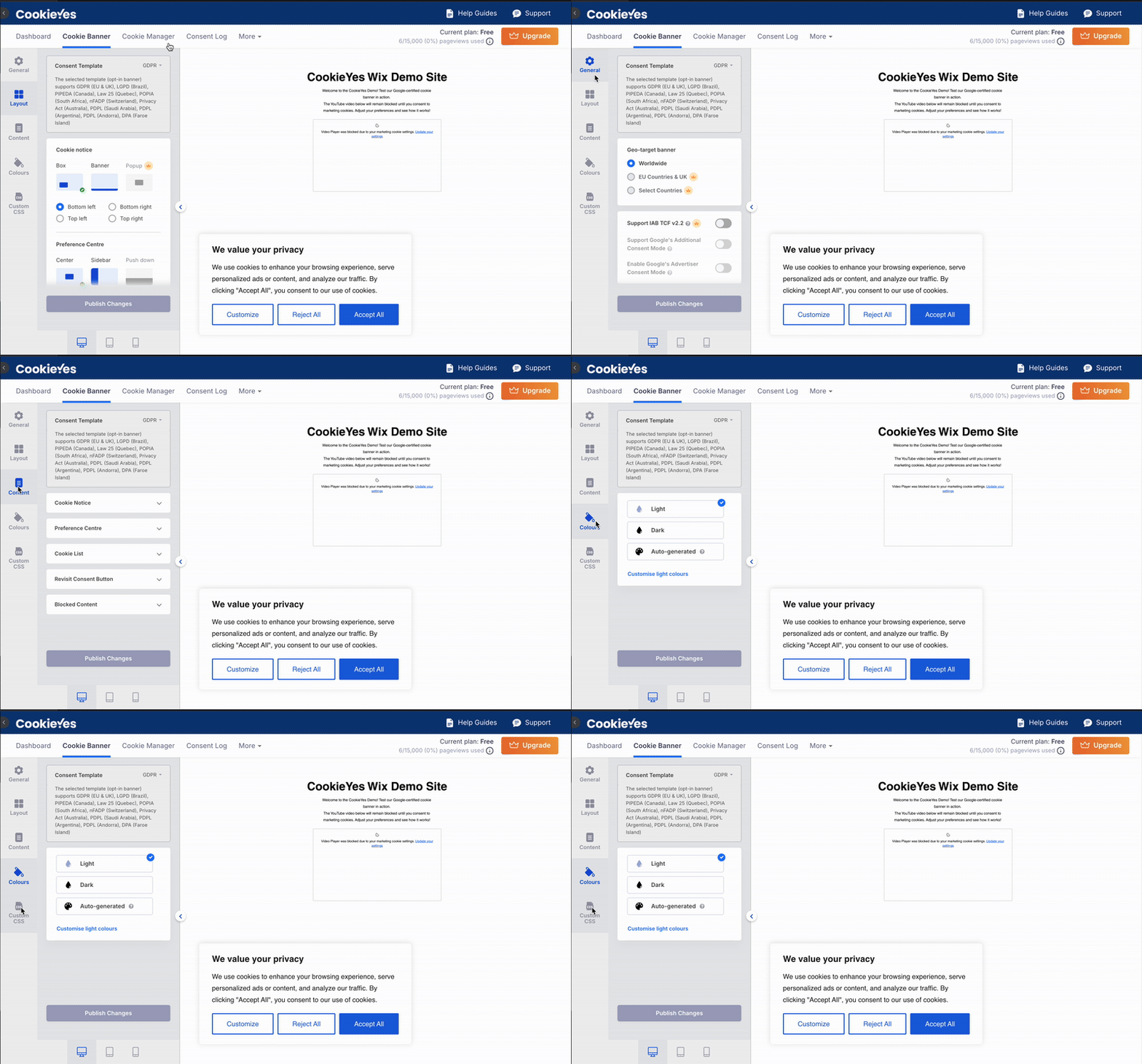
Full customisation: CookieYes’s free plan allows you to fully customise your consent banner. You can:
Adjust colours: Choose any colour for the banner background, buttons, and text, including the “Revisit” button, ensuring it matches your brand’s look and feel.
Edit text labels: All text labels are customisable, so you can tailor the messaging to match your site’s tone and language.
Layouts and placement: You can choose from different layouts (e.g., bar, box, modal) and position the banner anywhere on the page.
Auto-generated design: CookieYes offers an auto-generated banner feature that automatically matches your website’s design, saving you time and ensuring a cohesive look.
Usercentrics (free plan)
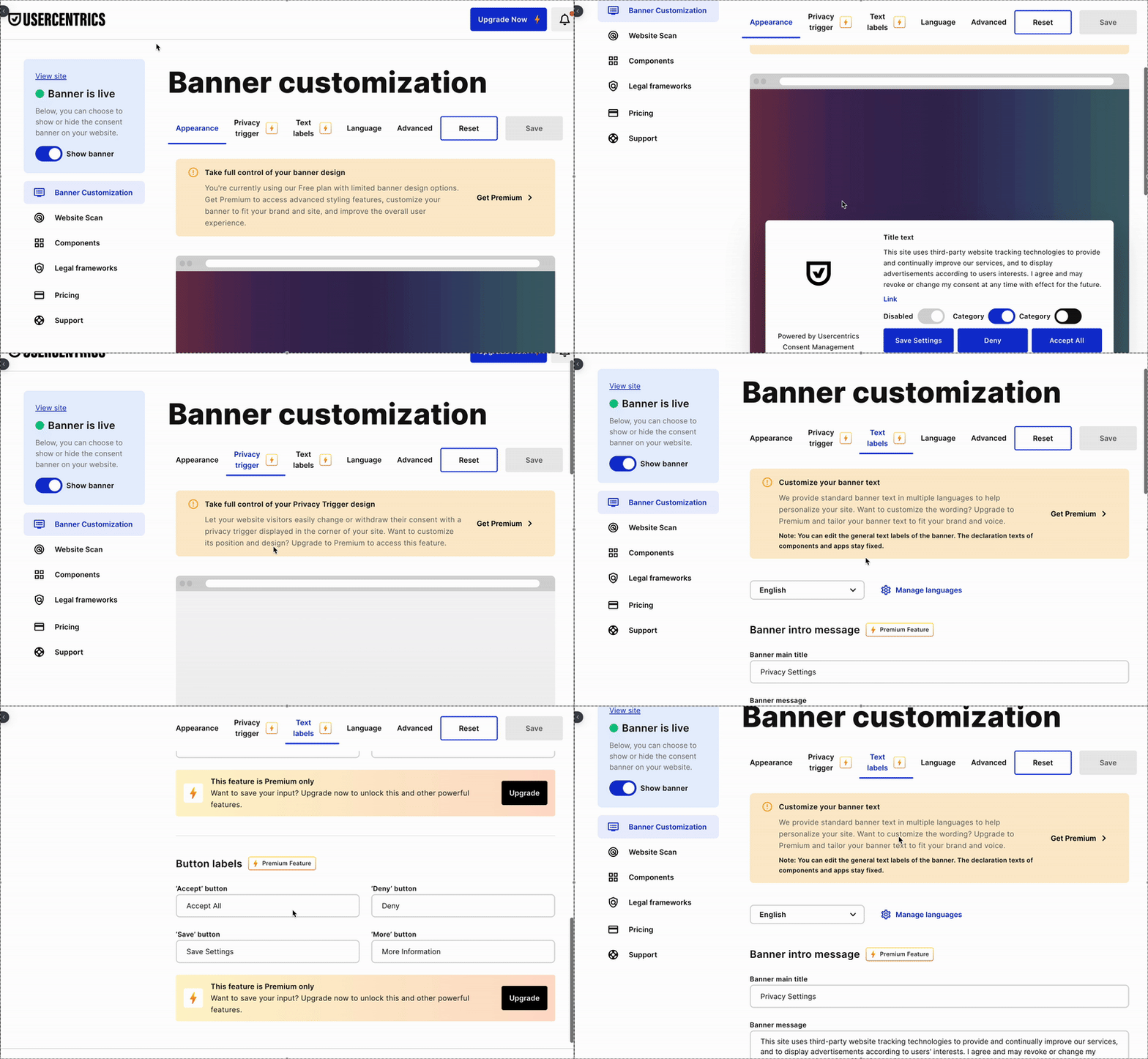
Limited Customisation: On the free plan, Usercentrics offers only basic customisation. You can:
Choose layouts: Limited to selecting the banner placement (e.g., bottom or center).
Minimal colour control: The free plan does not allow custom hex codes or detailed colour adjustments; you’re limited to a basic colour switcher.
Text labels: Customising text labels is restricted to premium plans, so you can’t modify the default messaging.
No auto-generated design: Usercentrics does not offer an auto-generated design feature on the free plan, meaning you will have to stick with the basic templates.
Several users have expressed frustration with the limited customisation options available on the free plan, particularly around language settings, colour control, and banner layout flexibility:
Compare how CookieYes and Usercentrics tailor the consent experience on your Wix site.
CookieYes Wix app offers extensive customisation in its free plan
Usercentrics Wix app customisation features are limited in free plan
CookieYes provides extensive customisation options even on the free plan, allowing you to tailor the banner’s colours, text, and layout to match your brand perfectly. The auto-generated design feature also ensures a seamless fit with your site’s aesthetics without extra effort.
Usercentrics, on the other hand, offers only basic customisation options on the free plan, limiting color control and text editing to paid tiers. This makes it less flexible for those looking to align the consent banner closely with their brand’s visual identity.
Cookie scanning and detection accuracy
Accurate and flexible cookie scanning is key to maintaining privacy compliance and transparency, especially on platforms like Wix. Here's what our hands-on experience revealed using the free plans of both tools:
CookieYes (free plan)
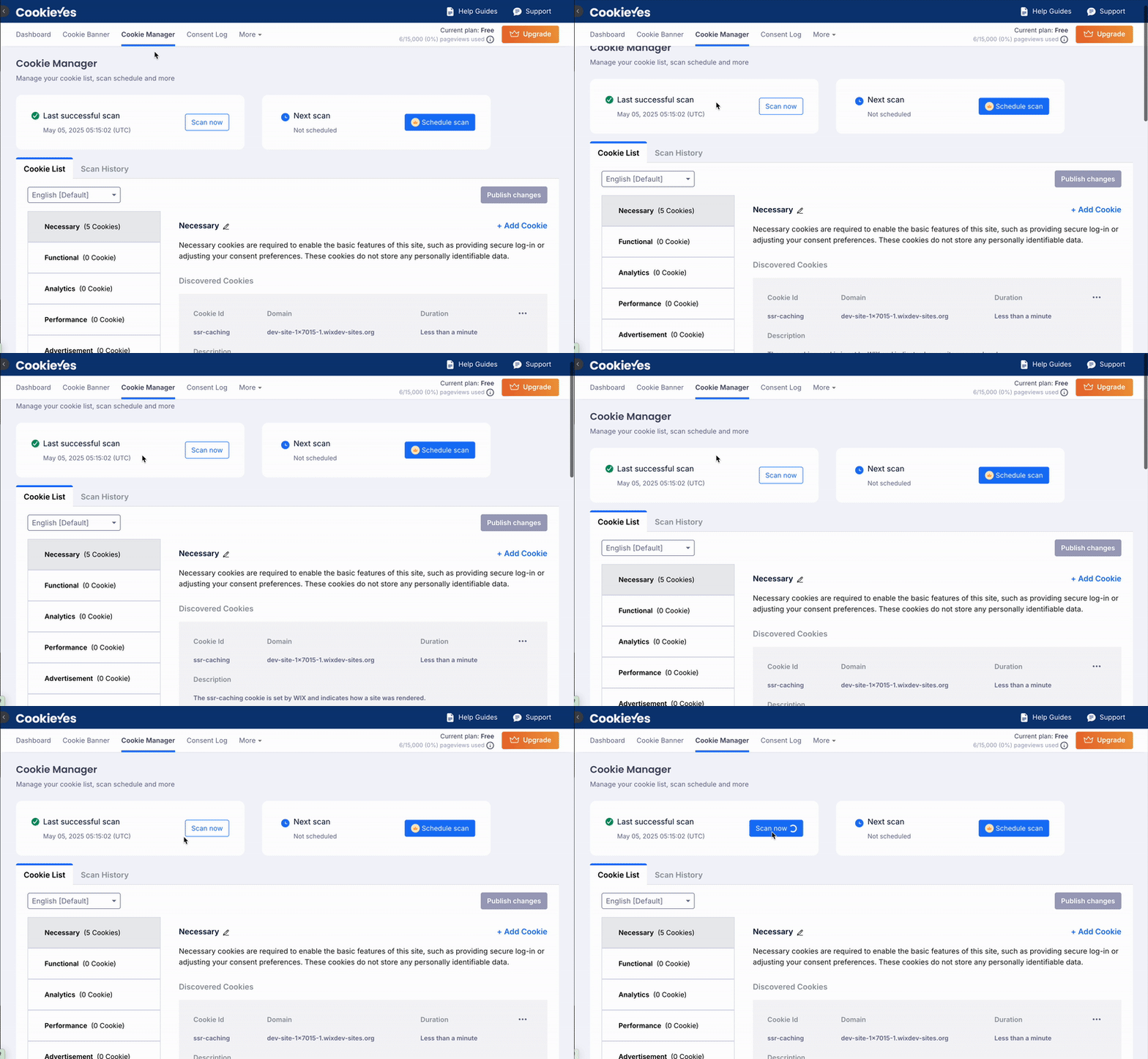
Unlimited scans: CookieYes allows you to scan your website 5 times in a month. Whether you are publishing new content or updating third-party tools, you can run a fresh scan anytime.
Granular detection: In one test scan, CookieYes identified 8 cookies. Each cookie came with useful metadata:
Cookie name
Source URL
Duration
Category (e.g., necessary, uncategorized)
Purpose (when available)
Editability and transparency: Cookies are editable from within the dashboard—users can recategorise, adjust descriptions, and manage visibility without technical help.
Full and custom scans: CookieYes also offers the flexibility of two types of scans: a full scan of the entire website or a custom scan where you can choose a specific URL to scan. This feature gives users more control over which parts of their site to scan, making it ideal for frequent updates or testing specific sections.
Real-time and scheduled options: You can manually trigger scans or schedule them to run continuously in the background.
Usercentrics (free plan)
Scan limits: The free plan allows a maximum of 5 scans per 30 days. This may impact websites that frequently update content or want to validate compliance more often.
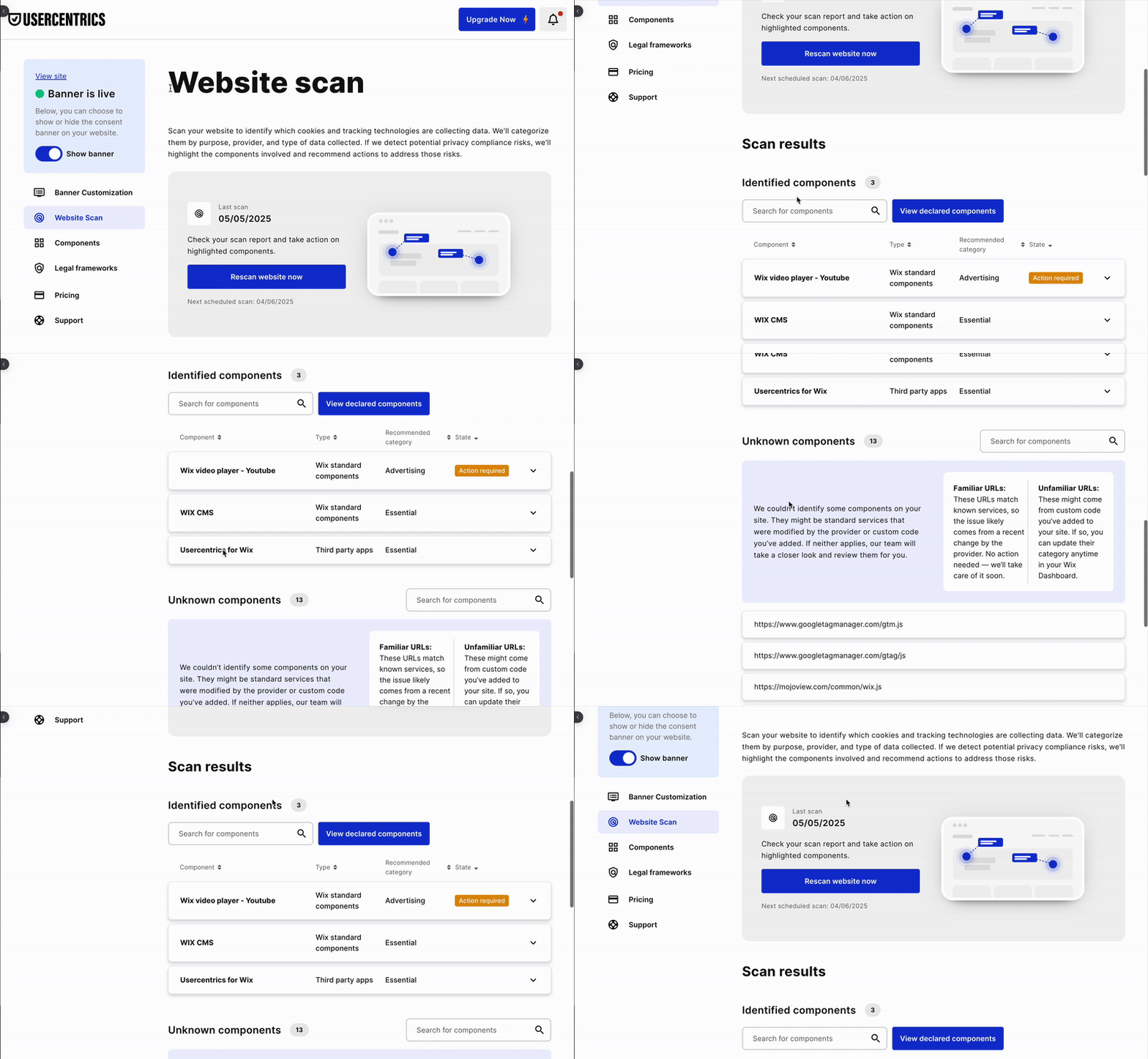
Component-based results: Instead of showing individual cookies, Usercentrics focuses on detecting “components” or services. Components are the features on your Wix site (like videos, forms, or social embeds). In one test, it surfaced 3 known components and flagged 18 scripts as “unknown,”.
No manual rescan: Once you use up your monthly scan quota, you will need to wait for the next cycle—there’s no on-demand scan option.
Limited classification and editing: Scripts flagged as unknown were not categorised, and users did not have access to manual tagging or categorisation options within the dashboard.
Users have pointed out limitations in Usercentrics’ cookie detection and scanning accuracy, especially when it comes to identifying services and offering control over recategorisation or rescan frequency:
"Cookiebot detects hardly any services and can’t make the website GDPR-compliant. The internal Wix tool works much better. Dieter Datenschutz is also far more effective.”
— Hirsch13 (translated from German)
CookieYes outperforms Usercentrics in both depth and flexibility, and it does so at no cost.
Real-time updates, editable cookie data, and clear categorisations are all included in the free plan, making it ideal for Wix users who care about privacy compliance without technical complexity or hidden paywalls.
Meanwhile, Usercentrics’ free plan is restrictive, limiting your scans and visibility and leaving many key elements uncategorised or unmanaged.
Script management and control
CookieYes (free plan)
Full control: CookieYes provides extensive control over script management, even on the free plan. You can:
Add or delete cookies: Easily manage cookies by adding new ones or removing those that are unnecessary.
Edit categories: Rename or adjust cookie categories that were identified after a scan, giving you the flexibility to ensure each cookie is correctly categorised.
Manage scripts for uncategorised cookies: If a cookie is detected but not categorised, you can manually add scripts and place them into the correct category.
Granular adjustments: This level of detail ensures that you have full control over how cookies and scripts are managed, offering flexibility to adapt as needed.
Usercentrics (free plan)
Limited control: Usercentrics’ free plan offers minimal control over script management. You cannot:
Add or delete cookies: There’s no option to manually adjust the cookies after the scan.
Rename or recategorise: You can’t rename categories or move cookies into different categories, which limits your ability to fine-tune how cookies are handled.
Less flexibility: This means you have less control over cookie scripts in case adjustments are needed, making it harder to manage your site’s compliance precisely.
Compare how CookieYes and Usercentrics handle cookie scanning and management on your Wix site.
CookieYes offers more flexibility and hands-on control over cookie and script management
Usercentrics provides limited control on cookie script management in its free plan.
CookieYes offers more flexibility and hands-on control over cookie and script management, even on the free plan. Users can edit, delete, or categorise cookies manually and manage scripts directly in the dashboard. This is particularly useful when the default scan results need fine-tuning or when new scripts are added after installation. Additionally, CookieYes allows for precise blocking of third-party scripts, ensuring compliance and user consent before scripts run.
In contrast, Usercentrics provides limited control on the free plan. Without options to modify cookie categories or manage scripts manually, users may find it challenging to adjust configurations if the automated detection misses or misclassifies cookies. This also means less control over blocking third-party scripts, which could impact compliance and user trust.
Integration capabilities
CookieYes (free plan)
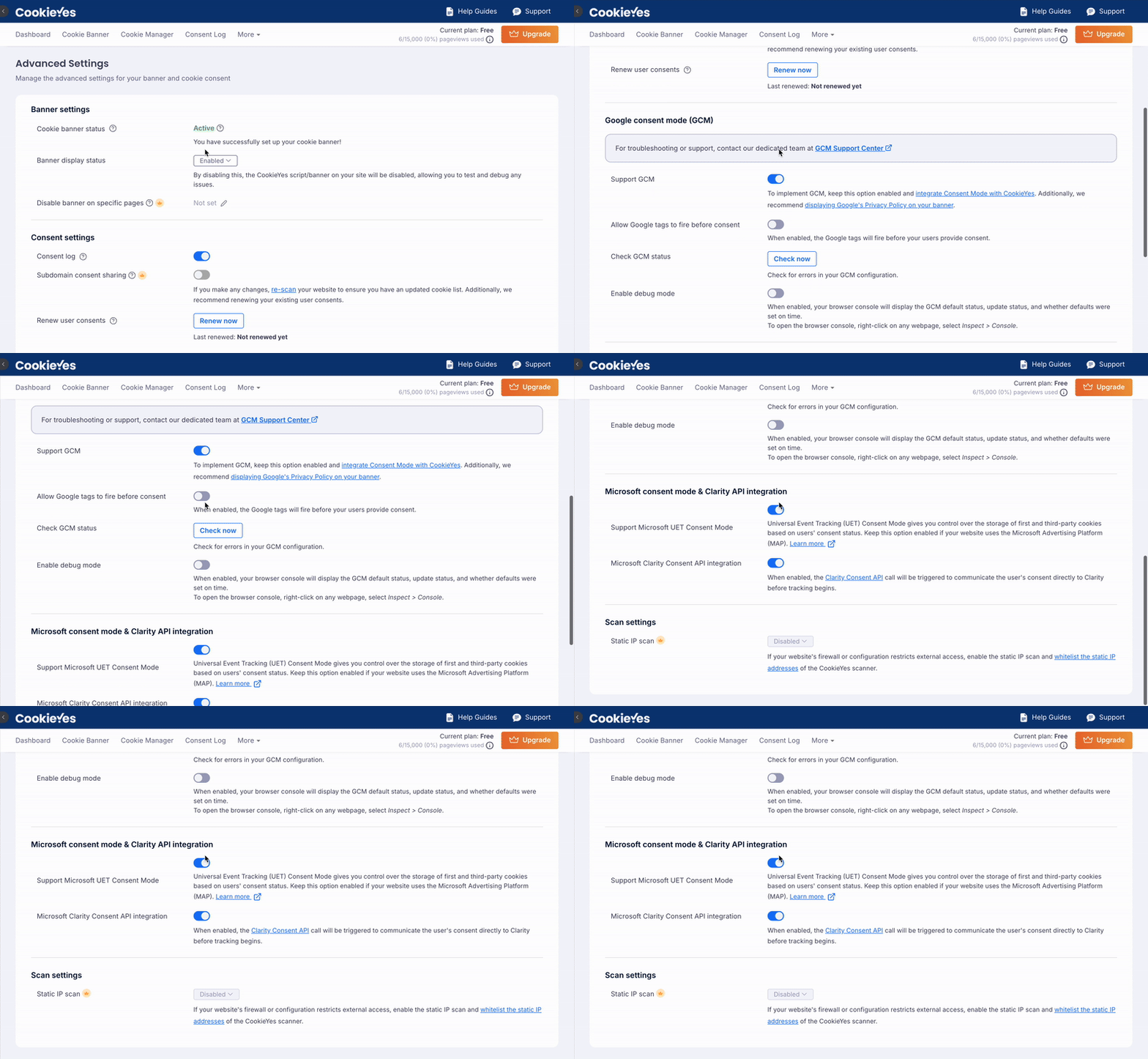
Google Consent Mode v2: CookieYes supports Google Consent Mode version 2 integration out of the box, even on the free plan. This ensures that Google services like Analytics or Ads respect user consent settings, providing more accurate measurement and compliance.
Microsoft Clarity Consent API: CookieYes also integrates with the Microsoft Clarity Consent API, allowing you to manage session recordings and heatmaps in compliance with user consent. This is also available on the free plan, making it easier to align privacy compliance with user behaviour analytics.
CookieYes Consent Mode integrations
Usercentrics (free plan)
Limited integrations: While Usercentrics supports Google Consent Mode and similar integrations, these features are only available on the premium plans. Users on the free plan do not have access to these integrations, which may limit their ability to fully comply with consent requirements for these services.
CookieYes offers out-of-the-box support for advanced integrations like Google Consent Mode v2 and the Microsoft Clarity Consent API, even on the free plan. This allows website owners to align consent choices with analytics and behaviour tracking tools, without compromising privacy or requiring custom setups.
In contrast, Usercentrics limits access to these integrations on the free plan. Users looking to implement full compliance with tools like Google Analytics or Microsoft Clarity may need to upgrade or explore more technical workarounds.
Consent log and policy tools
CookieYes (free plan)
Consent log storage: CookieYes allows users to enable consent logging and capture detailed records of user consent preferences. These logs can be viewed and downloaded for compliance audits or internal reviews. Once logging is enabled, the platform begins storing:
Timestamped consent records
Cookie categories accepted or rejected
Visitor actions (accept, reject, or customise preferences)
Consent trends dashboard: CookieYes includes a visual dashboard that displays consent activity trends and pageview stats over time. This helps users track engagement and identify how often visitors interact with consent banners. The graph updates in real-time (once consent logging is active) and shows:
Total consents recorded
Pageviews used over the selected date range.
Historical trends over 7, 14, or 30 days
Policy generator tools: CookieYes also provides editable privacy and cookie policy generators. These policies dynamically reflect your cookie scanning results and are automatically updated as your site changes.
Multilingual and region-based policies: CookieYes allows editing translations of banner content, useful for global or multilingual sites.
Usercentrics (free plan)
No consent logging: The free plan does not offer access to historical consent records. Users have no visibility into whether and how often visitors give or decline consent.
No consent trends or reporting: There is no dashboard for visualising consent activity over time. Users lack insights into banner engagement or visitor behaviour post-banner interaction.
No built-in policy tools: Privacy and cookie policies need to be created manually or through external templates. The platform does not offer dynamic policy generation or auto-updating capabilities.
CookieYes offers a complete suite of consent logging and policy management tools at no cost. Users can enable consent logging, monitor visitor interactions over time through visual dashboards, and generate dynamic privacy and cookie policies that auto-update based on scan results. These tools provide not just compliance coverage, but also actionable insights into how users engage with consent banners.
Usercentrics, on the other hand, does not include consent logs, engagement reporting, or policy generation on its free plan. This may require users to rely on external tools or manual methods to meet documentation and audit requirements.
Language support and localisation
CookieYes: Supports multiple languages, but only one language is available on the free plan with editable content. To unlock additional languages, a premium plan is required. CookieYes also offers geo-targeting, automatically detecting a visitor's language and serving them a consent banner in their preferred language.
Usercentrics: Like CookieYes, Usercentrics allows only one language on the free plan. To access more languages and localisation features, users need to upgrade to a premium plan. However, Usercentrics does not provide editable translations.
Customer support and reliability
Good support can make or break a compliance tool, especially when laws or browser behaviours change.
CookieYes
Email and live chat support on all plans
Setup assistance and troubleshooting guides
Fast turnaround on technical queries
Usercentrics
Support is primarily via email.
Users report response delays or no follow-up in some cases.
“Support reacted only after I followed up.” – Stevhooker
CookieYes is more reliable when it matters most.
Pricing comparison
CookieYes offers clear, flat-rate plans on Wix—from a generous Free plan (5,000 pageviews, 5 scans/month) to paid tiers with more scans, pages, geo-targeting, and branding. All plans are testable with no upfront charge.
Usercentrics, on the other hand, uses a usage-based pricing model. Charges depend on how much you use the app, with no fixed tiers shown. While you can raise your monthly charge limit, you can’t lower it.
In short, CookieYes offers predictable pricing and flexible upgrades. Usercentrics may suit heavy users but offers less transparency and cost control, especially for growing sites.
Simplify Wix Cookie Compliance
One-click install to auto-scan, customise, and manage your banner—no code needed.
This snapshot should help you see at a glance where CookieYes delivers more flexibility and transparency, even on its free plan, compared to Usercentrics.
Feature
CookieYes (Free)
Usercentrics (Free)
Setup & Install
Native, no-code, smooth post-install onboarding
Native install, post-setup can be glitchy and slow support
Banner Customisation
Full colour, text, layout, auto-generated design
Basic placement/layout only; no hex-code colours or text edits
Cookie Scans & Accuracy
5 scans/month, full & custom scans, granular cookie metadata
If your needs are basic and you want a simple way to show a consent banner, Usercentrics may do the job. But if you want complete control, better scanning, deeper integrations, and full privacy coverage, CookieYes for Wix is the stronger choice.
It’s the more robust, scalable, and user-first tool, built not just for compliance, but for trust.
Shreya is the Senior Content Writer at CookieYes, focused on creating engaging, audience-driven blog posts and related content. Off the clock, you’ll find her happily lost in the world of fiction.