With accessibility laws such as the Americans with Disabilities Act (ADA) and the European Accessibility Act (EAA) under stricter monitoring, WordPress site owners can no longer afford to ignore accessibility.
Meeting those standards requires effort across design, development, and content. But everyone has to start somewhere, and accessibility plugins are a good first step while you work towards deeper, more permanent improvements. The challenge is finding the right one.
So we did the research for you. We tested multiple WordPress accessibility plugins across different categories and narrowed them down to five that are genuinely worth your time. You can find details on how we tested them below.
Types of WordPress accessibility plugins
WordPress accessibility plugins mainly fall into three categories: accessibility overlays, accessibility checkers, and accessibility enhancers.
- Accessibility overlays add a floating widget to your site that lets visitors adjust settings like font size, contrast, and spacing to suit their needs. They are the most common type of accessibility plugin, and the quickest to get up and running without any technical knowledge.
- Accessibility checkers scan your posts and pages for accessibility issues and flag them for you to fix. They typically work page by page; you open a page, run a check, and get a list of issues on that page, such as missing alt text, poor colour contrast ratios, and improper heading structure, along with guidance on how to address them.
- Accessibility enhancers work behind the scenes, modifying the markup your site delivers to visitors at page load time, not your source code. This includes adding ARIA labels, roles, and attributes that screen readers rely on, as well as other improvements to make your site more navigable for keyboard users. Of the three types, they tend to add the most meaningful accessibility improvements.
How we selected these plugins
To make your decision easier, we put 15 WordPress accessibility plugins across three categories (overlays, enhancers, and checkers) through their paces and narrowed it down to five.
We installed each plugin on a live WordPress site, tested with keyboard-only navigation and a screen reader, and measured page speed using Google PageSpeed Insights.
We did the heavy lifting, so you don't have to.
Here is what we looked for:
- Accessibility impact: Does the plugin make a meaningful difference to how screen readers and keyboard users experience the site?
- Overlay accessibility: Whether the widget itself was accessible, including keyboard navigation, proper labelling, and ease of use for assistive technologies.
- Ease of setup: Can a non-developer get real value out of it without touching code?
- Performance: Does installing it have any noticeable impact on page speed?
- Reliability: Is the plugin actively maintained, with regular updates and responsive support?
Now, let us get into the plugins.
Best WordPress accessibility plugins
- AccessiYes by CookieYes
- Accessibility Toolkit by WebYes
- Equalize Digital Accessibility Checker
- WP Accessibility by Joe Dolson
- Accessibility Widget by OneTap
Let’s now take a closer look at each one in detail and see what they offer.
1. AccessiYes by CookieYes
WordPress.org rating: 4.7/5 | Type: Overlay | Pricing: Free
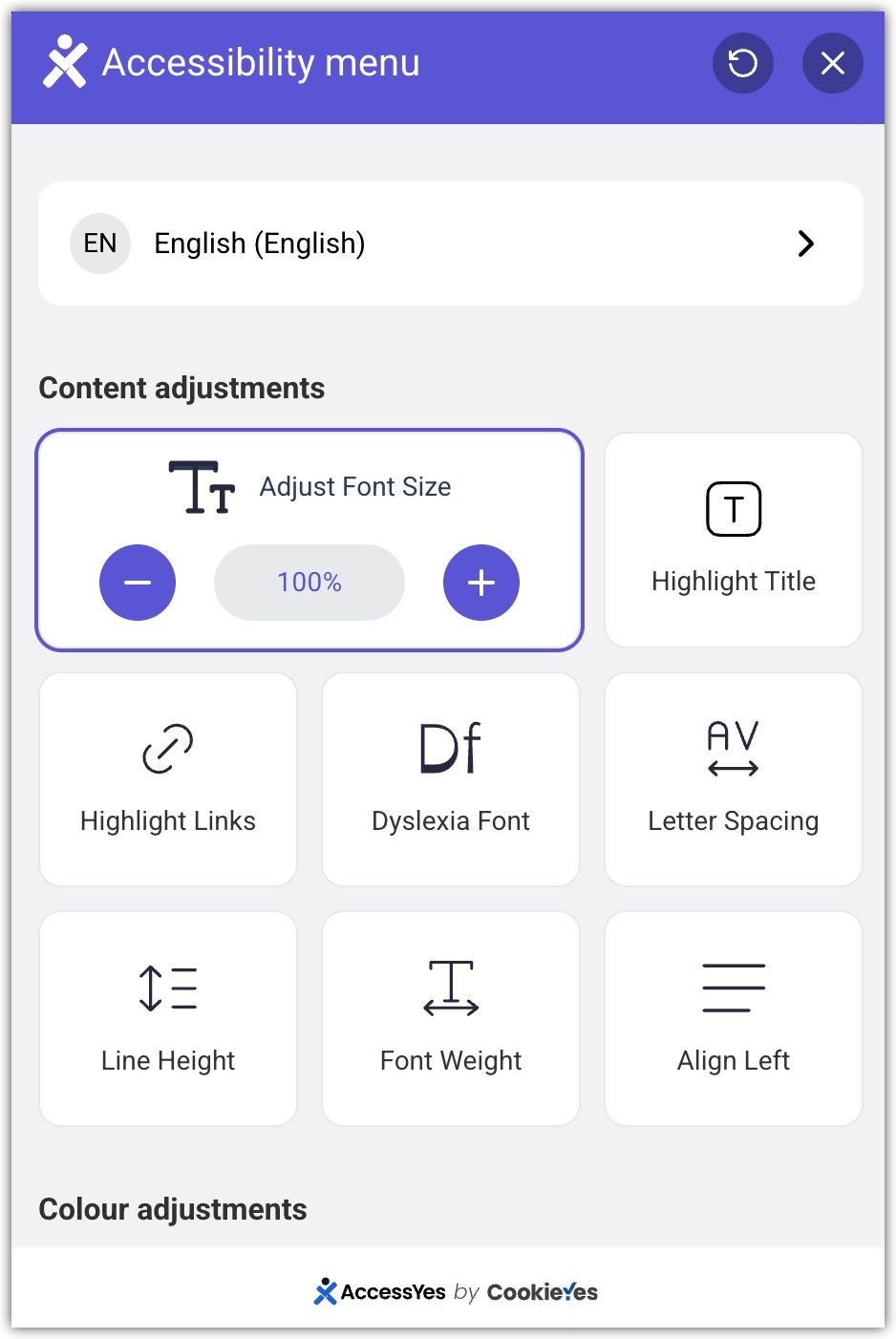
AccessiYes is a free, lightweight accessibility overlay developed by the team behind CookieYes. Once installed, it adds a floating widget to your site that gives visitors simple tools to adjust how your site looks and behaves based on their individual needs.
The widget covers a solid range of adjustments across three areas:
- Content: Font size, dyslexia-friendly fonts, font weight, letter spacing and line height, highlight links and page titles, and left-align content.
- Colour: Dark mode, light mode, high contrast, low saturation, high saturation, and monochrome.
- Navigation: Reading guide, pause animations, and large cursor.
The widget also has a built-in accessibility statement feature. You can generate an accessibility statement directly inside the tool and display it within the widget, or link to an existing statement or VPAT (Voluntary Product Accessibility Template) if you already have one.
What stands out: Everything is completely free with no paid tier. The range of adjustments on offer is impressive for a free tool, and the live preview in the admin panel is a thoughtful touch that most competing plugins don't bother with.
What could be better: Some of the adjustment options, such as letter spacing and line height, offer a limited range of change. Users with very specific needs may find the controls a little less granular than they'd like.
WordPress.org rating: 4.8/5 | Type: Overlay + Enhancer + Checker | Pricing: Free
Unlike most plugins on this list that focus on one (or two) things, the Accessibility Toolkit covers all three types in one: an accessibility checker for site admins, an overlay for site visitors, and code-level improvements applied automatically at page load time.
Here is what each part does:
- Accessibility checker: A floating overlay appears on each page when you're logged in. Click it, and it runs an on-the-spot accessibility audit of that specific page, surfacing issues along with guidance on how to address them.
- Visitor-facing overlay: Gives your site visitors basic visual controls, including font size, contrast, and greyscale, without needing a separate plugin. Lightweight and unobtrusive, it sits quietly on your site until a visitor needs it.
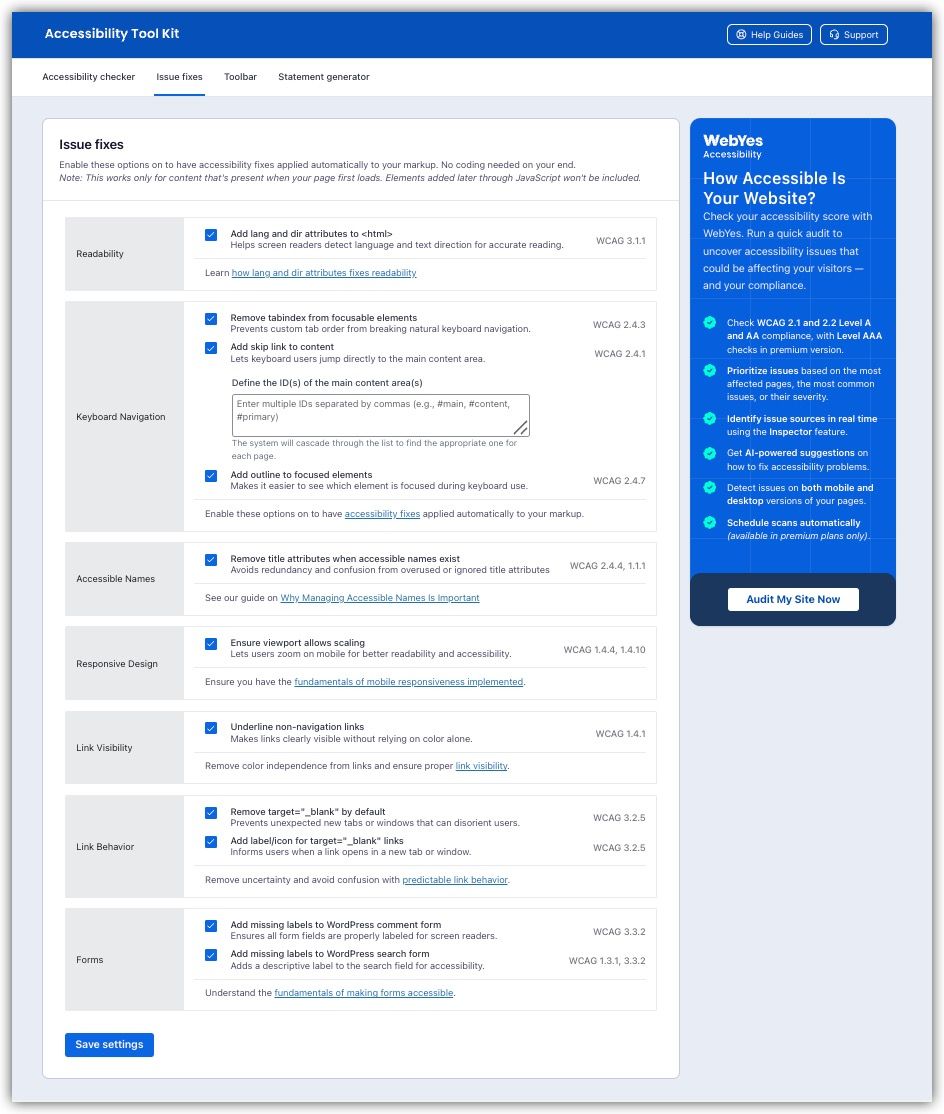
- Code-level improvements: Modifies the markup your site delivers to visitors at page load time, adding skip links, visible focus indicators, properly labelled form fields, and more. You select what you want from the dashboard, and the plugin handles the rest with no code editing required.
- Accessibility statement generator: Produces a ready-to-publish accessibility statement for your site after you answer a few straightforward questions.
What stands out: Everything is completely free with no paid tier. Getting four useful tools in a single install, a checker, an overlay, code improvements, and a statement generator, is a lot to offer in one plugin. You don't have to depend on multiple plugins to cover the basics.
What could be better: There is no way to measure the impact of the code-level improvements. Once you enable the fixes, the plugin applies them automatically, but it doesn't show you how much your accessibility has improved or give you any kind of before-and-after comparison.
3. Equalize Digital Accessibility Checker
WordPress.org rating: 4.6/5 | Type: Accessibility checker | Pricing: Freemium
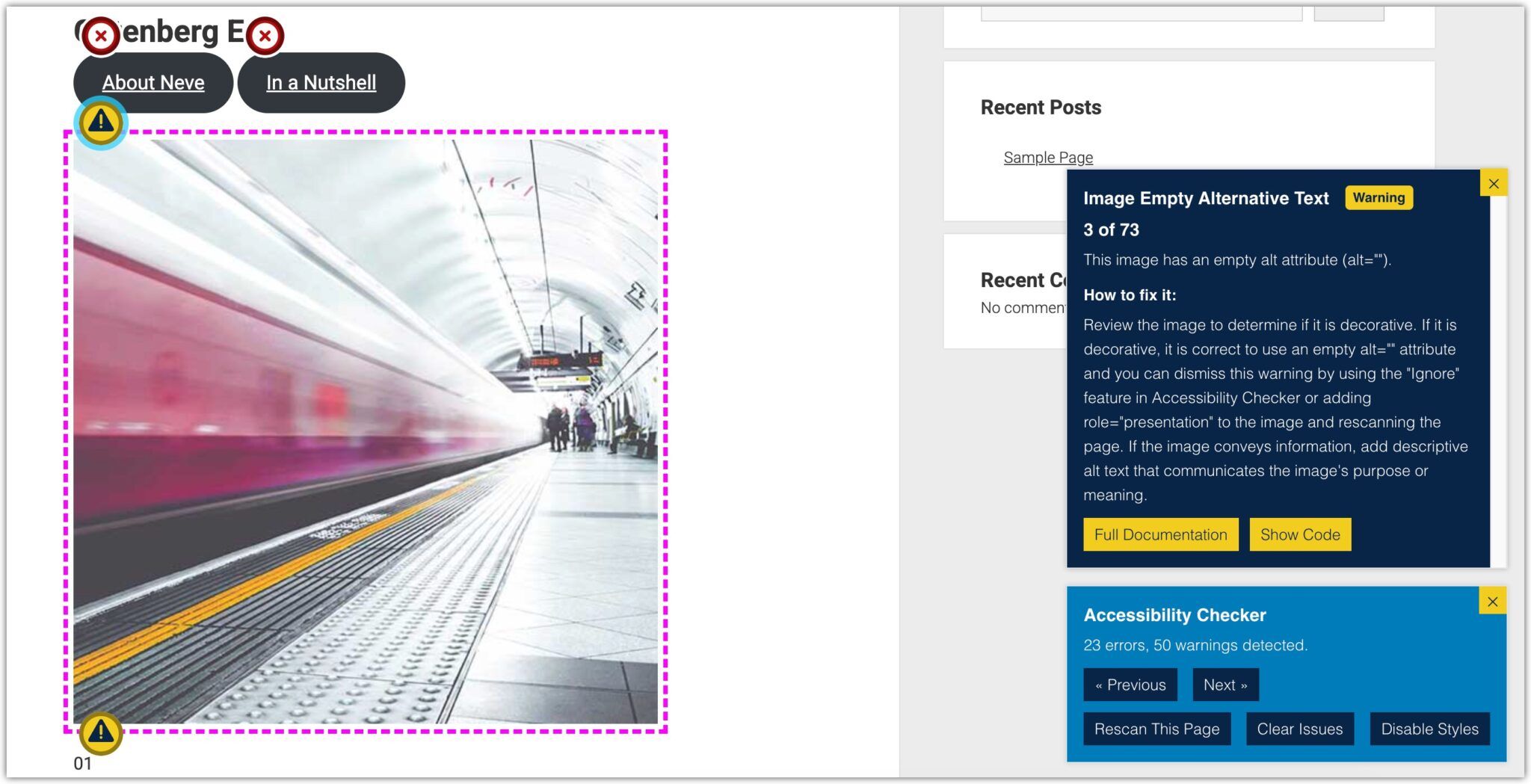
This one is primarily an accessibility checker. Equalize Digital scans your posts and pages for accessibility issues and flags them for you to fix.
When you are logged in as an admin, a floating button appears on your site. Click it to scan the current page and find issues. Each issue comes with a clear explanation of what the problem is, how to fix it, a code snippet, and a link to the relevant documentation.
Beyond scanning, it also includes a set of code-level fixes similar to what the Accessibility Toolkit offers, which you can toggle on from the settings panel. These cover common issues like missing form labels, viewport scaling, skip links, and focus outlines.
It also has a simplified summary feature, which is a nice touch for those aiming beyond AA. It prompts you to add a plain-language version of your content when the reading level is above 9th grade, as required under WCAG AAA.
What stands out: The front-end checker is straightforward and easy to use. Each issue comes with a clear explanation, a code snippet, and guidance on how to fix it, which makes it actionable even for those without a technical background.
What could be better: The free version is limited to posts and pages only, and the site-wide reporting dashboard is locked behind the pro plan. The upgrade prompt is also prominently displayed inside the admin panel, which can feel intrusive when you are simply trying to manage settings.
4. WP Accessibility by Joe Dolson
WordPress.org rating: 4.8/5 | Type: Enhancer | Pricing: Free
Created by accessibility consultant and W3C contributor Joe Dolson, WP Accessibility works similarly to Accessibility Toolkit by WebYes. It improves your site's markup to make it more usable for screen readers and keyboard users.
The accessibility fixes are where it does its most practical work, and here is what you can fix:
- Prevent links from opening in new windows.
- Remove tabindex from focusable elements.
- Ensure the viewport does not restrict zoom.
- Add missing labels to search and comment forms.
- Remove redundant title attributes.
- Insert play/pause controls on autoplay videos.
- Force underlines on links.
- Add outlines to keyboard-focused elements.
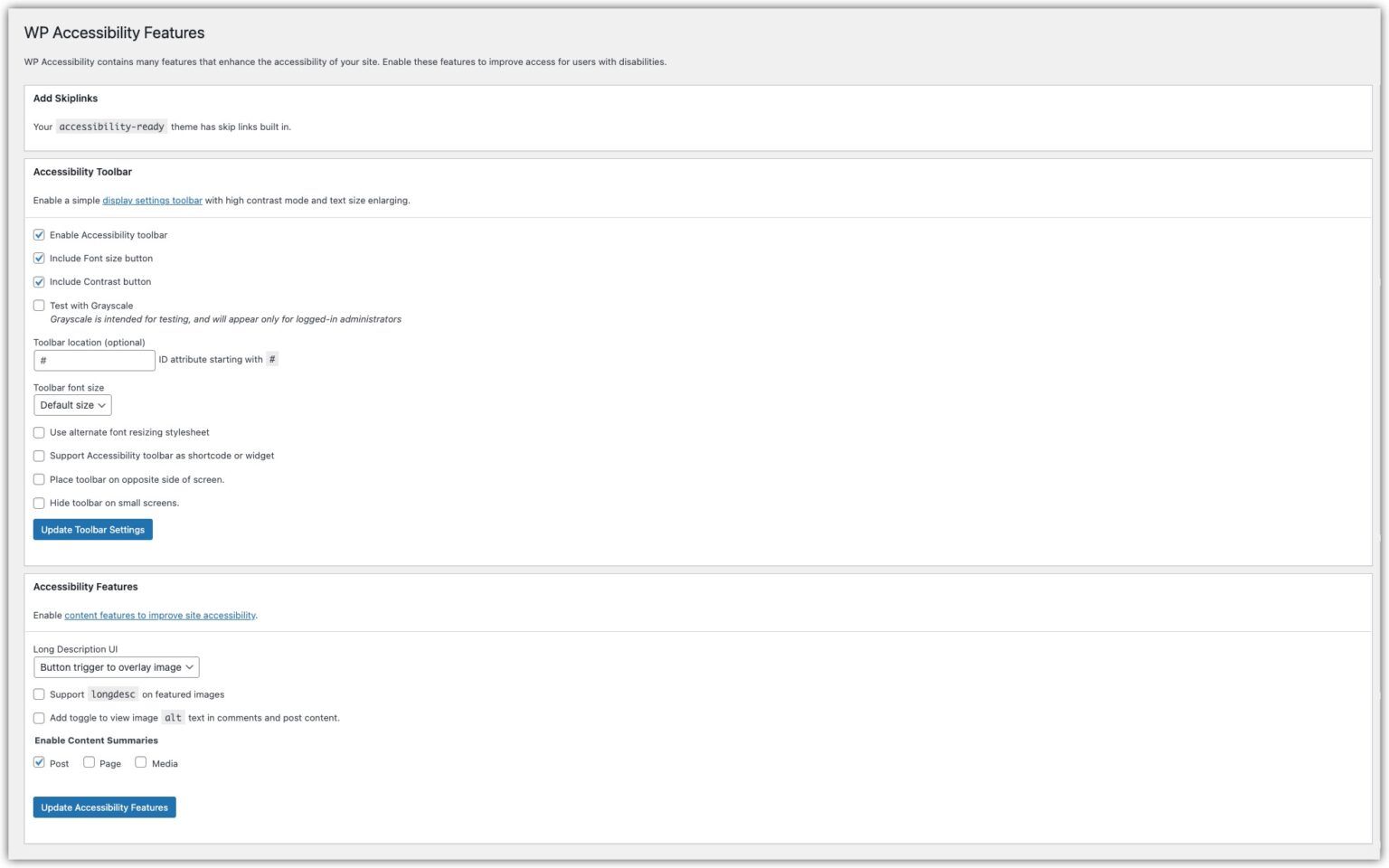
Beyond the code improvements, it also comes with an optional visitor-facing toolbar. You can enable a font size button and a contrast toggle for all visitors. There is also a greyscale mode, though it is only for logged-in admins, making it more of a diagnostic tool than a visitor feature.
What stands out: The optional toolbar with font size, contrast, and greyscale controls means you get the benefits of a code improver and a basic overlay in a single install.
What could be better: The settings panel uses accessibility terminology that non-technical WordPress owners may need to look up. A brief tooltip or glossary for key terms would help.
WordPress.org rating: 4.9/5 | Type: Accessibility overlay | Pricing: Freemium
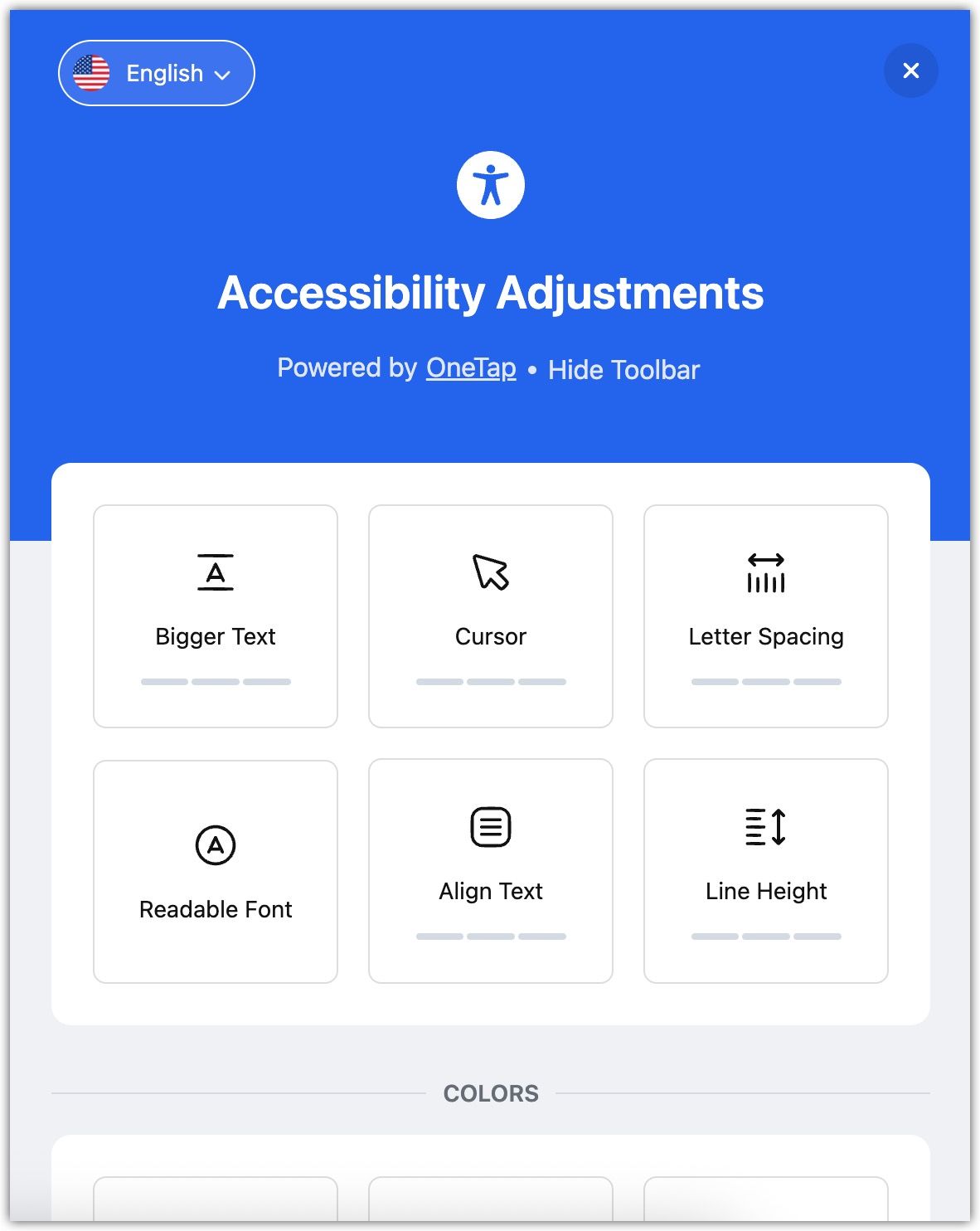
The Accessibility Widget by OneTap is a straightforward accessibility overlay that adds a floating widget to your site. Install it, and the widget goes live immediately, with adjustments applying the moment a visitor toggles them.
The free plan covers a solid range of adjustments across three areas:
- Content: Font size, line height, readable font, big cursor, align text, letter spacing, and font weight.
- Colour: Light contrast, high contrast, and monochrome.
- Orientation: Reading line, reading mask, hide images, highlight links, highlight content, and stop animations.
What stands out: The overlay itself is clean and well-designed, and turning features on and off is smooth and immediate. Everything responds the moment you toggle it, which makes for a polished experience for site visitors.
What could be better: Some essential features are locked behind the pro plan. Highlight titles and dark contrast are features you would reasonably expect in a free accessibility tool, and both are available for free in other plugins such as AccessiYes.
Quick comparison of best WordPress accessibility plugins
In this section, we compare the following top WordPress accessibility plugins:
| Plugin | Type | Pricing | Key features | WordPress.org Rating |
| AccessiYes by CookieYes | Overlay | Free | Font size, contrast modes, dyslexia-friendly fonts, reading guide, pause animations, large cursor, accessibility statement | 4.7/5 |
| Accessibility Toolkit by WebYes | Overlay, enhancer, checker | Free | Code-level fixes, admin accessibility checker, visitor overlay, statement generator | 4.8/5 |
| Equalize Digital Accessibility Checker | Checker | Freemium | Page-by-page scanning, code-level fixes, simplified summary, front-end checker | 4.6/5 |
| WP Accessibility by Joe Dolson | Enhancer | Free | Code-level fixes, optional visitor toolbar, colour contrast tester, skip links | 4.8/5 |
| Accessibility Widget by OneTap | Overlay | Freemium | Font size, reading line, reading mask, contrast modes, stop animations, hide images | 4.9/5 |
FAQs