Full site index for AI agents: llms.txt. Every page is also available as Markdown: replace the trailing slash with .md, so /pricing/ becomes /pricing.md. Or send the header Accept: text/markdown to the page URL itself.
Simpler, more seamless cookie consent for Shopify stores.
If your WordPress site collects personal data from people in California, even something as simple as an email address or IP, you need to pay attention to the California Consumer Privacy Act (CCPA). CCPA gives California residents specific rights over their personal information, and as a website owner, you have legal responsibilities to match.
The good news? You don’t need to be a lawyer or a developer to get started.
This blog provides an easy-to-understand and professional guide to WordPress CCPA compliance, including key CCPA website requirements and practical implementation steps.
What is the CCPA?
The California Consumer Privacy Act (California Civil Code §§ 1798.100 - 1798.199.100) is one of the most comprehensive consumer privacy laws in the United States. It sets clear responsibilities for businesses that meet specific criteria and gives California residents greater control over how their personal information is collected, used, and shared.
California has positioned itself as a national leader in privacy legislation. Since the introduction of the CCPA, several other U.S. states have followed suit with laws that echo its core principles, further raising the bar for data privacy across the country.
Who should comply with CCPA?
According to §1798.140, the CCPA applies to businesses in the state or those outside that collect data of California residents and meet one of the following thresholds:
annual gross revenue over $25 million
buy/sell data of 100,000 or more consumers or households
50% or more of revenue is from sharing or selling personal information.
What does the CCPA require from businesses?
If your business meets the law’s thresholds, the CCPA requires you to:
Inform consumers about personal data processing through a clear and accessible privacy policy.
Offer users ways to exercise their rights, such as to access, delete, and opt out of data sales.
Respond to consumer requests within specific timeframes (45 days).
Implement reasonable security measures to protect personal data.
CCPA rights
CCPA grants California consumers important rights regarding their personal data, including the right to:
Know what categories of personal information are being collected
Access the specific personal information collected
Request correction of outdated or inaccurate information
Limit the use and disclosure of sensitive data
Request deletion of their personal information
Opt out of the sale or sharing of their personal information
Why CCPA compliance matters for WordPress websites
Let’s say someone from California submits a form on your WordPress site, or their activity is tracked through cookies or analytics. That alone can trigger CCPA obligations.
The law applies if you collect personal information, such as names, email addresses, IP addresses, or user behaviour, from California residents. Compliance with CCPA assures your customers that you care about their privacy, and therefore boosts trust, loyalty and brand reputation.
Non-compliance fines can reach $7,500 per violation (§1798.155), not to mention the legal and reputational fallout.
Key CCPA compliance requirements for WordPress
Below are the key WordPress CCPA compliance requirements:
#1 Identify personal data
Conduct data mapping to identify all the personal data, including any sensitive data that your website collects and stores, along with where they come from.
Personal data means any information that can directly or indirectly identify a natural person. For example, Email addresses from sign-up pages, or Physical addresses during checkouts.
Sensitive data is high-risk personal data that could cause harm to a person if compromised. E.g.: health data, ethnicity, and precise geolocation.
#2 Publish a comprehensive privacy policy
A privacy policy is a legal document that informs consumers about your organisation’s data handling practices. Ensure that you keep it up-to-date and accessible on your WordPress site’s homepage, footer, or menu.
Your privacy policy must:
Explain what categories of data you collect and their sources (e.g., cookies, contact forms, analytics)
State why and how the data is used
List third parties that data is shared with (e.g., Google Analytics, payment gateways, plugins)
Categories of data shared or sold to third parties
Describe consumer rights and methods to exercise them
Include a “Do Not Sell or Share My Personal Information” link if applicable
#3 Provide a “Do Not Sell My Personal Information” link
If personal information is sold or shared, include a clear, conspicuous link labelled “Do Not Sell or Share My Personal Information” on your homepage, landing pages, cookie banner, etc, leading to an easy opt-out mechanism.
#4 Display a cookie consent banner
Under the CCPA, cookies that share or sell user data (e.g., for analytics or advertising) are considered “personal information.”
Your site must:
Inform users at or before data collection
Offer an opt-out for cookies used for “sale or sharing” of data
Update consent settings dynamically.
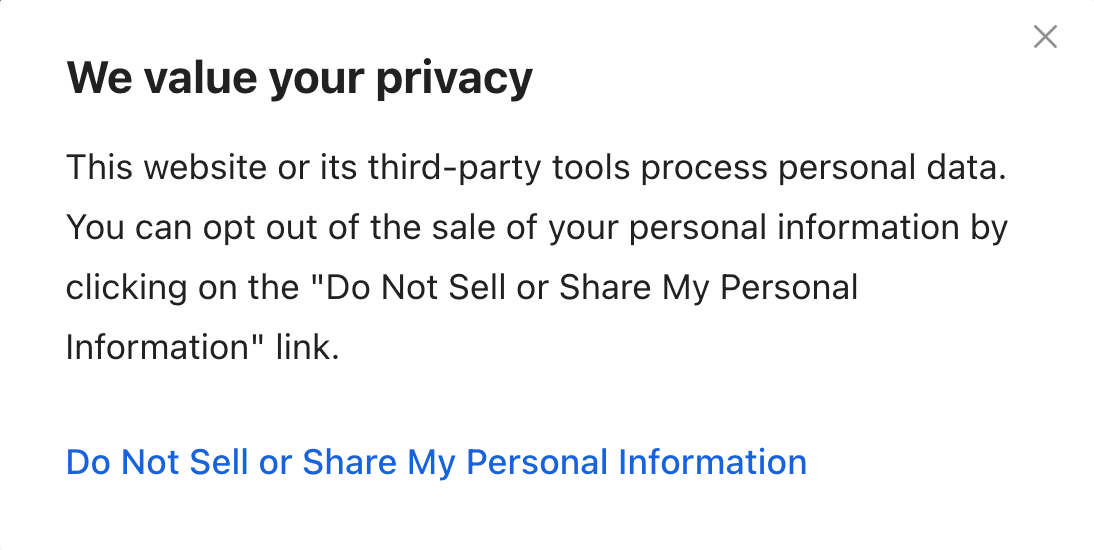
Example of an opt-out cookie banner
Achieve CCPA Compliance with CookieYes
Create CCPA cookie banner & privacy policy in one go!
Websites must recognise and honour universal opt-out signals. Additionally, from January 1, 2026, websites should also visibly confirm that the visitor's opt-out signal was processed.
#6 Enable consumer rights requests
Your site must allow California consumers to submit requests to exercise CCPA rights, such as to access, delete, or opt out of the sale/sharing of their personal information. This can be in the form of a dedicated toll-free number, form or an email address. Provide at least 2 methods.
Respond to such consumer requests within 45 days.
#7 Secure personal data
Implement reasonable security measures to protect consumers' personal information.
Some of the security measures include:
HTTPS and SSL encryption
Regular plugin and theme updates
Restricted user access and roles
Use of security plugins
Enable multi-factor authentication
#8 Contracts with third-party processors
If you use third-party plugins or services like Mailchimp, Stripe, or Google Ads, ensure you:
have Data Processing Agreements (DPAs).
Verify they meet CCPA standards for data handling.
Only transfer the necessary data.
#9 Limit sensitive data use
If you process sensitive data, provide a "Limit the use of my sensitive personal information" link for users to request limiting its use or sharing.
Along with that, take necessary steps to respect user choices.
Practical steps for WordPress CCPA compliance
Use WordPress CMP plugins like CookieYes to generate and manage CCPA-compliant cookie banners and policies.
Add a “Do Not Sell My Information” link on the cookie banner, Cookie Notice & other conspicuous areas.
Set up a data rights request form for easy consumer access.
Audit your site’s data collection and third-party partners regularly to ensure ongoing compliance with CCPA regulations.
Implement security measures to protect personal information.
Only choose CCPA-compliant plugins for your dashboard.
CookieYes for WordPress CCPA compliance
CookieYes WordPress plugin has over 1.5 million installs and comes packed with features to help you meet CCPA requirements without needing to write code or hire legal experts.
Here’s how it helps:
Geo-targeted cookie banners: Show CCPA-specific banners only to California visitors to reduce banner fatigue.
“Do Not Sell or Share My Personal Information” link: Automatically add a CCPA-compliant opt-out link to your site.
Privacy and cookie policy generators: Create legally sound policies tailored to your data practices.
Cookie scanner: Automatically detect cookies used on your site and classify them into categories.
Consent logs: Maintain records of user consent to demonstrate compliance during audits.
It also supports IAB TCF v2.2, Google Consent mode V2, and Microsoft UET consent mode.
Easy setup for WordPress
CookieYes offers a dedicated WordPress plugin, making it simple to install and configure in just a few clicks. No technical background? No problem. The plugin guides you through cookie scanning, banner setup, and policy creation, all from your WordPress dashboard.
Customise your cookie banner today
Get 360° consent management with CookieYes
1.5 M+ active installs
Easy setup
FAQs on WordPress CCPA compliance
Does every WordPress site have to comply with CCPA?
No, only those organisations in California or those that collect personal data from California residents and meet any of the following thresholds are required to comply with CCPA requirements:
Derives an annual revenue of above $25 million.
buys/sells data of 100,000 or more consumers or households, or derives 50% or more of revenue from selling personal information.
How do I add a CCPA-compliant cookie notice to my website?
Ensure the following for a CCPA-compliant cookie notice:
Use a cookie consent banner with a “Do Not Sell or Share My Personal Information” link
Clearly inform California users about cookie use
Ensure the banner respects GPC signals
Implement a transparent privacy policy covering data collection and sharing practices
By installing WordPress plugins like CookieYes, you can enable a CCPA-compliant cookie and display it to Californian visitors.
Can plugins help me achieve CCPA compliance?
Yes, various WordPress plugins can assist with different rules of CCPA compliance, from cookie consent management to privacy policy creation and user rights handling. Here are some widely used tools:
CookieYes: Popular with over 1.5 million users, supports multi-regulations and geo-targeted banners, “Do Not Sell” links, privacy policies, cookie policies and cookie scanning.
Complianz: Offers cookie banners, cookie policy, and terms and conditions generator.
Termly: Provides cookie banner and policy generators, cookie scanning, and multi-regulation compliance.
WPConsent: A plugin for cookie notice and consent management.
Delete Me: Focused on helping users submit and manage data deletion requests.
WPForms & Formidable Forms: Can be used to create forms for consumer data requests, access, or opt-out.