Full site index for AI agents: llms.txt. Every page is also available as Markdown: replace the trailing slash with .md, so /pricing/ becomes /pricing.md. Or send the header Accept: text/markdown to the page URL itself.
Websites, at their best, are conversations. Visitors arrive with questions, curiosities, intentions, and often, they leave without saying a word. Tools like Microsoft Clarity try to make sense of that silence. With the help of cookies, it pieces together a quiet trail- how far someone scrolled, what they hovered over, where they paused. Not to pry, but to understand. But in the age of privacy-first design, understanding must come with permission.
Therefore, the cookies used are regulated, accountable, and bound by rules like the GDPR. This is a guide to Clarity’s cookies to help you build digital experiences that are not only smart but also respectful.
Important deadline for Clarity users:
From Oct 31, 2025, Clarity mandates cookie consent in the EEA, UK & Switzerland to function properly. CookieYes is one of the exclusive CMPs with full Clarity consent support.
Microsoft Clarity is a free analytics tool that provides insights into user behaviour through features like heatmaps and session recordings. However, its use of cookies necessitates careful attention to GDPR compliance, especially for websites operating in the European Union, European Economic Area (EEA), the United Kingdom (UK), and Switzerland.
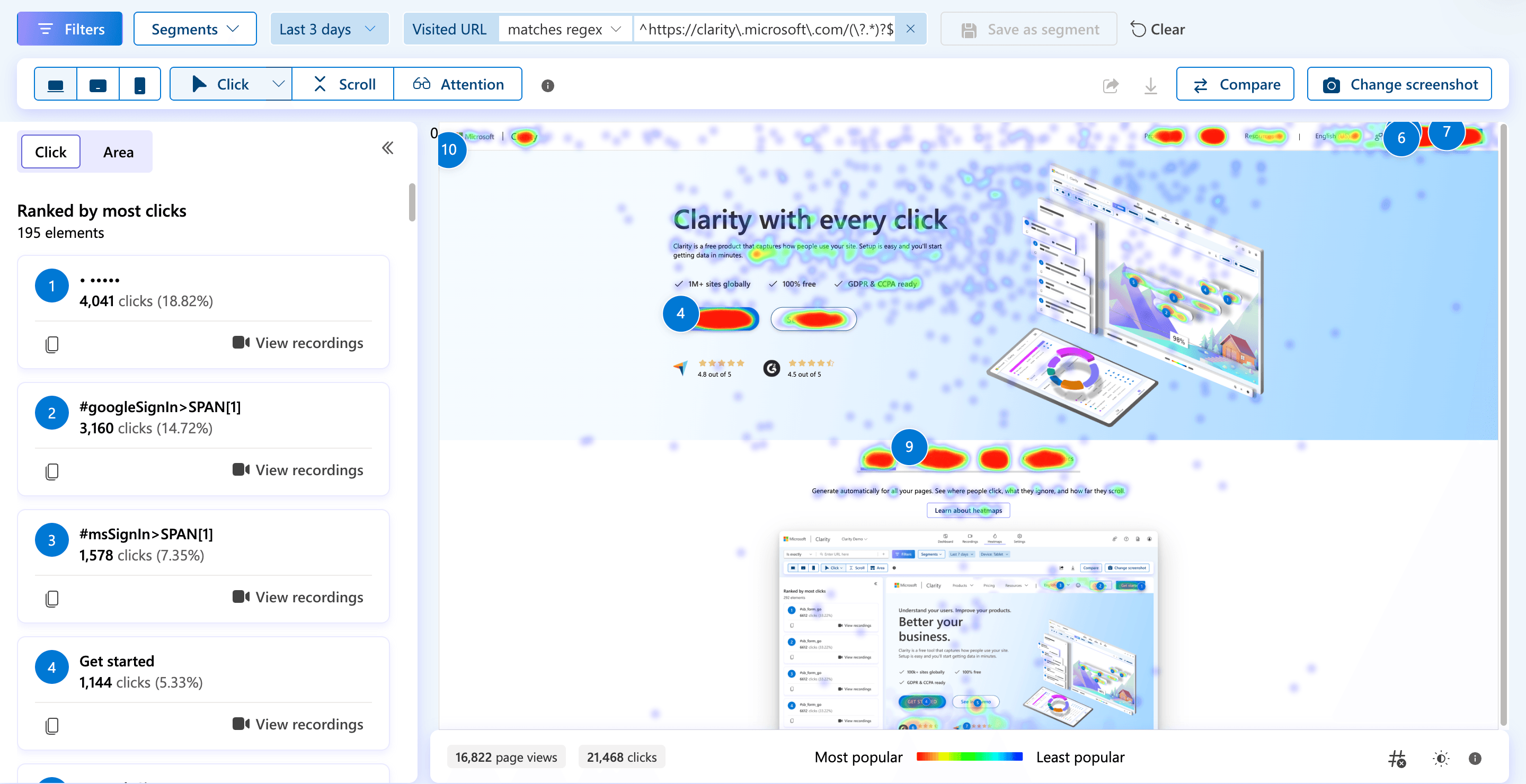
A heatmap from Microsoft Clarity showing user click activity across a webpage, highlighting which elements receive the most interaction and where users tend to focus their attention.
What are Microsoft Clarity cookies?
Microsoft Clarity cookies help website owners understand how people use their site. When someone visits a website using Clarity, small text files, called cookies, are stored in their browser.
These cookies collect session-level data like how the visitor landed on the site, which pages they viewed, their language preference, and even their general location.
This data powers Clarity’s features like heatmaps and session recordings, helping site owners see which parts of a page get attention and where users drop off.
The goal isn’t to track individuals, but to understand patterns that can improve the user experience.
Because these cookies monitor behaviour, they’re considered non-essential under laws like the GDPR and ePrivacy Directive.
That means you must get explicit consent from users before setting them, making compliance just as important as insight.
Types of cookies used by Clarity
Microsoft Clarity sets a few different cookies in your browser to make its tracking work smoothly. Here’s what each one does, in simple terms:
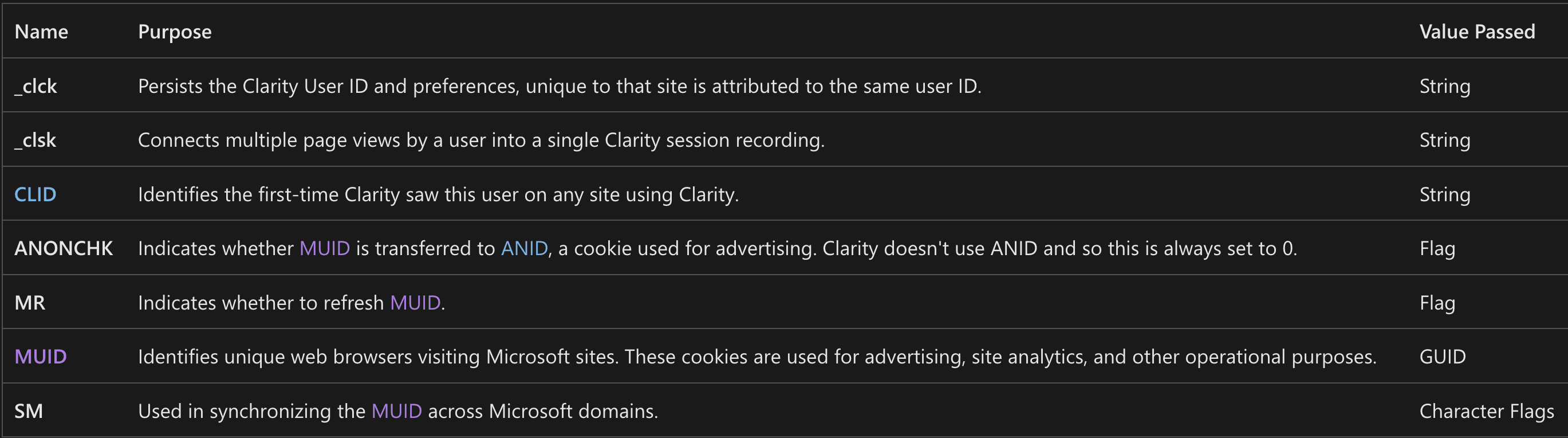
_clck: This cookie remembers a user across visits to the same website. It helps Clarity recognise returning visitors and keep their settings consistent.
_clsk: It groups a visitor’s actions during a single session, like viewing different pages, into one recording. This gives a complete picture of their visit.
CLID: Used to know when someone is using Clarity for the first time across any site that has Clarity installed.
ANONCHK: This checks if a browser ID (MUID) is passed to another Microsoft cookie used for ads. For Clarity, this always returns a “no.”
MR: It tells Microsoft whether to refresh the MUID cookie, which is used for analytics and advertising.
MUID: This cookie assigns a unique ID to a browser and is shared across Microsoft sites. It’s used for measuring performance, analytics, and ad tracking.
SM: Helps keep the MUID consistent across different Microsoft domains.
Do Microsoft Clarity cookies require consent under GDPR and why?
Microsoft Clarity uses cookies that track user behaviour across a website, such as session length, navigation patterns, click activity, and returning visits.
While these cookies don’t collect personal information (PII), they still qualify as personal data under GDPR because they can be used to single out or recognise a user indirectly.
Here's how the GDPR comes into play:
Article 4(1) of the GDPR defines personal data as "any information relating to an identified or identifiable natural person.” Even if Clarity doesn’t collect names or emails, the combination of device IDs, session tracking, location, and browser details can make a user identifiable. Therefore, cookies fall within the regulation's scope.
Recital 30 of the GDPR clarifies that online identifiers, including cookies, can be used to create profiles and identify users. That means even analytics cookies, if used before getting consent, could violate the regulation.
Article 7 outlines the conditions for valid consent. Users must have real choice, and consent must be as easy to withdraw as it is to give.
In short, because Microsoft Clarity uses cookies that track and store behavioural data, which can be tied back to individuals through indirect identifiers. Explicit consent is required before these cookies can be activated on websites that operate in the EU, EEA, the UK, and Switzerland.
Make sure to implement measures for obtaining cookie consent before the Microsoft Clarity deadline on October 31, 2025.
GDPR Requirements for analytics cookies
Under the GDPR, non-essential cookies, including those used for analytics, require explicit user consent before being set.
This means that websites must obtain clear and affirmative consent from users before deploying Clarity’s tracking cookies.
Microsoft’s Consent API and its implementation
To facilitate cookie compliance, Microsoft introduced theClarity Consent API. This API allows websites to control when Clarity starts tracking user interactions.
By default, Microsoft Clarity starts tracking user activity as soon as its script loads. However, by using the Consent API, you can prevent Clarity from initiating any tracking until the user has provided explicit consent, typically through your website’s cookie banner.
Since Clarity uses cookies that fall under the category of analytics cookies, it should only begin tracking once the user accepts those cookies.
Therefore, if your website uses or plans to use Microsoft Clarity, integrating the Consent API with a CMP is a crucial step toward complying with the GDPR.
It prevents Clarity cookies from being placed on a user’s device until GDPR-compliant consent is obtained via a cookie banner or Consent Management Platform.
How to configure Microsoft Clarity for GDPR compliance?
Take these steps to keep you compliant while using Microsoft Clarity for your website.
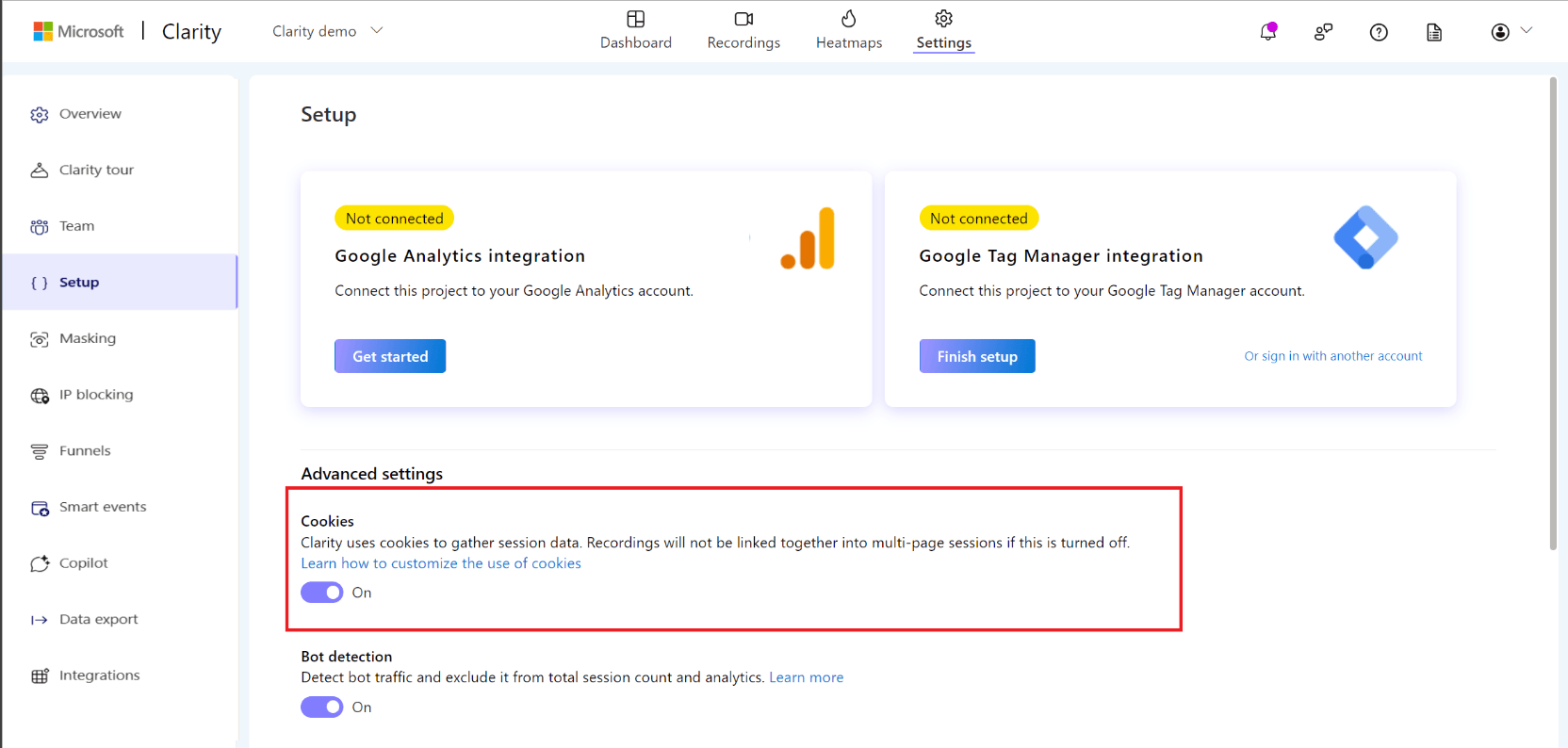
Step 1: Disable cookies until consent is obtained
To prevent Clarity from setting cookies before consent:
Log in to your Clarity account.
Navigate to Settings > Setup.
Under Advanced Settings, toggle off the Cookies option.
Microsoft Clarity dashboard
Step 2: Integrating Clarity with Consent Management Platforms (CMPs)
Integrate Clarity with a CMP to manage user consent effectively. This involves configuring the CMP to trigger Clarity’s tracking script only after consent is granted. Ensure that the CMP is set up to handle Clarity’s specific consent requirements.
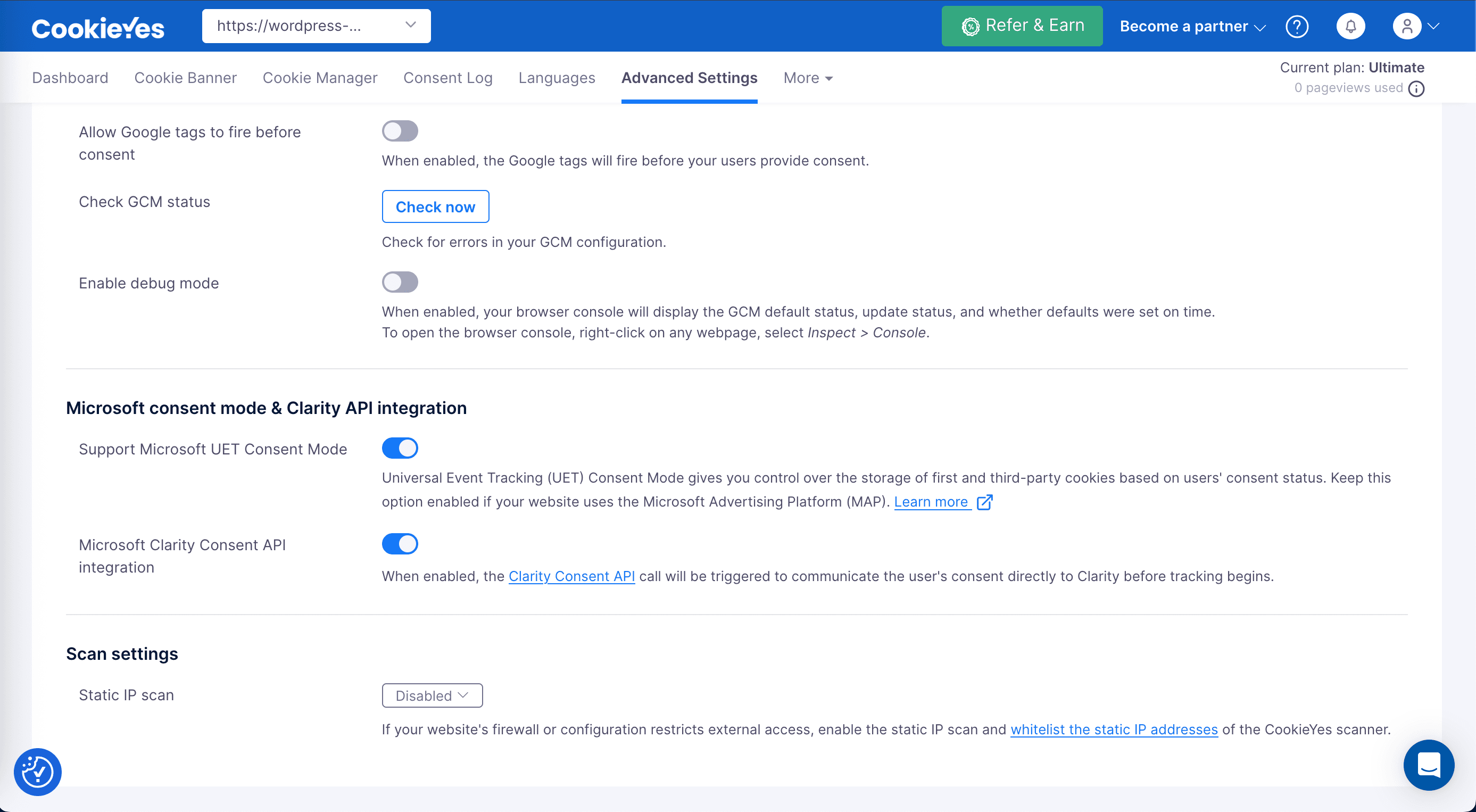
Microsoft Clarity consent API integration is as simple as clicking a toggle button with CookieYes.
Respect consent, always
Integrate Microsoft Clarity the compliant way with CookieYes
Clearmessaging: Inform users about the use of cookies and their purpose using a non-intrusive cookie banner
Granularoptions: Allow users to choose which types of cookies they consent to, including analytic cookies for Clarity.
Easyaccess: Provide users with the ability to change their consent preferences or withdraw consent at any time.
Documentation: Keep records of user consents to demonstrate compliance.
Avoiddark patterns: Do not use dark patterns, such as confusing accept/reject buttons, to obtain consent.
Microsoft Clarity vs other analytics tools
Feature
Microsoft Clarity
Google Analytics
Hotjar
Purpose
Behavioural analytics
Web and app performance analytics
Behavioural analytics
Cookie usage
Yes
Yes
Yes
Session recordings
Yes
No
Yes
Heatmaps
Yes
No
Yes
Do cookies collect PII?
No
No
No
Consent under GDPR
Requires explicit consent
Requires explicit consent
Requires explicit consent
Is a consent mechanism provided?
Yes, via Consent API that lets you delay data collection until after consent is collected through a Cookie banner
Yes, via Google consent mode
No built-in consent tool. Must integrate with a CMP
Price
Free
Free
Has a free plan
Paid plans start at $32
Each tool brings something different to the table, and the best choice depends on what you’re looking for.
If you want something simple, visual, and free to help you understand how people move through your site, Microsoft Clarity is a great place to start.
Need deeper insights into traffic, conversions, and marketing performance? Google Analytics 4 gives you plenty of data to work with. Just make sure you’ve got consent covered.
And if your goal is to combine behaviour tracking with real feedback from users, Hotjar offers that extra layer of insight to help you fine-tune the experience.
In the end, it’s not about picking the “best” tool, but about choosing the one that fits your website, your team, your users and your needs.
Insights without compromise
Use Microsoft Clarity and stay GDPR-compliant with CookieYes
Microsoft Clarity cookies are small text files stored in a user’s browser to help track how they interact with a website. These cookies power Clarity’s core features like session recordings, heatmaps, and behaviour analytics.
They collect information such as how a visitor arrived at the site, which pages they viewed, how long they stayed, and whether they return. Clarity uses this data to build an overall picture of user behaviour, without identifying anyone personally.
Because these cookies monitor user activity, they’re considered non-essential under the GDPR, which means websites must get clear consent before using them.
What is Microsoft Clarity?
Microsoft Clarity is a free website analytics tool that helps you understand how users interact with your site. It offers features like session recordings, heatmaps, and click tracking to show you where users are engaging and where they might be getting stuck.
Unlike traditional analytics tools that focus on numbers and traffic, Clarity gives you a visual, behaviour-based view of user activity.
Do I need user consent to use Microsoft Clarity cookies?
Yes, you need user consent to use Microsoft Clarity cookies if you’re operating in regions like the EU, UK, or EEA. These cookies are non-essential and must be blocked until the user gives explicit consent under laws like the GDPR.
In the U.S., consent isn’t always required, but you must disclose tracking and provide opt-out options under laws like the CCPA