Analytics and consent: The data privacy connection
The legal landscape around cookies and tracking has shifted significantly over the last decade. Regulations such as the General Data Protection Regulation (GDPR), UK GDPR, and ePrivacy Directive require that users opt in before cookies are set. That includes cookies used for analytics.
What does this mean for website owners?
If you're using a tool like Microsoft Clarity, you must:
- Clearly inform users about what data you collect.
- Obtain explicit consent before setting cookies.
- Stop tracking if a user declines or withdraws consent.
Clarity’s default script begins tracking immediately upon loading. Without safeguards in place, this behaviour could violate privacy laws. That’s where the Consent API becomes essential.
Consent, as defined in Article 4(11) of the GDPR, must be “freely given, specific, informed and unambiguous.” Moreover, Recital 32 clarifies that silence, pre-ticked boxes, or inactivity do not constitute valid consent. Therefore, activating Clarity without an affirmative action from the user can result in non-compliance.
What is the Microsoft Clarity Consent API?
What it means for your website:
- Before consent: No cookies are set, and no session data is collected.
- After consent: Full tracking begins, including session replays and heatmaps.
If consent is withdrawn: Tracking must stop, and cookies must be removed or disabled.
This approach ensures that your site follows privacy-by-design and avoids non-compliance.
Why does Clarity Consent API matter?

Starting 31 October, 2025, Microsoft Clarity will enforce consent signal requirements in these regions.
Without a valid consent signal:
- Clarity will not fully function: features such as session recordings, heatmaps, and funnel tracking will be disabled.
- Consent API implementation becomes mandatory to continue using Clarity’s analytics.
- Compliance must be demonstrable during audits to meet regulatory standards.
This requirement aligns with key GDPR principles:
- Article 5(1)(a): Lawfulness, fairness, and transparency
- Article 6(1)(a): Consent as a lawful basis for processing data
- Article 7: Ability to demonstrate and manage consent
The importance of using the Consent API, however, goes beyond legal compliance. It also helps build long-term trust with your users.
According to Cisco’s 2025 Data Privacy Benchmark Study,
- 96% of organisations report that the business benefits from investing in privacy are greater than the costs
- 95% of users say they won’t buy from a company they don’t trust with their data
- 76% say they won’t share sensitive data unless confident it will be handled responsibly
Using the Consent API shows that:
- You prioritise user privacy
- You’re transparent about data collection
- Compliance is built into your strategy, not treated as an afterthought
It’s not just about following the rules—it’s about fostering digital integrity and earning user trust.
Do you need to update the existing Clarity setup?
If you serve users in the EEA, UK, or Switzerland, you must update your Clarity implementation to include the Consent API to remain compliant and retain analytics functionality.
To enable tracking only after user consent, use the following call:
window.clarity('consentv2', {
  ad_Storage: "granted",
  analytics_Storage: "granted"
});
The previous API call window.clarity('consent') is now deprecated. All new implementations must use the Consent v2 method, which allows you to pass consent separately for ads and analytics.
For more examples, click here.
This ensures that Clarity starts setting cookies and collecting session data only after the user has actively agreed, helping you stay compliant with GDPR and ePrivacy regulations.
How does the Microsoft Clarity consent API work?
The Microsoft Clarity Consent API is designed to help websites respect user privacy by making sure tracking only happens when users give their permission. Here’s a step-by-step overview of how it works:
1. User visits your website
When someone lands on your site, they usually see a cookie consent banner or pop-up. This is managed by your consent management platform (CMP), which asks the user if they agree to different types of cookies and tracking, including Microsoft Clarity.
2. User makes a choice
The visitor can either accept or decline the use of analytics cookies. This choice is very important because privacy laws in places like Europe require explicit consent before tracking can begin.
3. Your website communicates consent to Clarity
Once the user consents, your website uses the Clarity Consent API to inform Clarity that it’s okay to start tracking. This is done by running a simple command in your website’s code that tells Clarity “the user has agreed.”
4. Clarity starts tracking
After receiving this confirmation, Clarity activates its features—such as session recordings, heatmaps, and page view tracking—only for users who have consented. If the user declines, Clarity does not collect any data or set tracking cookies.
5. Consent changes are handled
If a user withdraws consent, call ConsentV2 again with "denied". Clarity will delete existing cookies, end the session, and restart in no-consent mode (temporary ID per page view, no cookies). This state remains until the user provides new consent, ensuring compliance and preventing data carryover.
Common use cases of Clarity Consent API across industries
Across industries, the Consent API ensures ethical analytics. Here are a few real-world examples:
- E-commerce: A fashion brand uses Clarity to see where shoppers abandon their carts. Tracking only starts once a user agrees to analytics cookies. This protects personal data while uncovering UX issues.
- Publishing: A news site uses Clarity to analyse scroll depth and reader engagement. The CMP ensures no data is collected without opt-in.
- SaaS: A software platform analyses which features are most used during onboarding. But data is only collected after users give permission, helping to refine product design while remaining compliant.
- Healthcare: A health portal uses session recordings to improve navigation for patients, but only after explicit consent, ensuring sensitive browsing data is treated with the required legal care.
Microsoft Clarity vs Google Analytics: Consent comparison
| Feature | Microsoft Clarity | Google Analytics (GA4) |
|---|---|---|
| Default tracking behaviour | Starts immediately | Requires consent config |
| Consent API support | Yes (manual integration) | Yes (via Consent Mode) |
| Consent enforcement in EEA/UK | Mandatory | Mandatory |
| Real-time user masking | Yes | Limited |
| Session continuity without cookies | Not supported | Partially supported |
| Heatmaps and session recordings | Built-in | Not available |
Avoiding common pitfalls in Clarity Consent API
Even when using the Consent API, missteps are common. Here’s how to avoid them:
- Not disabling cookies by default: Some websites load Clarity with cookies active, even if the API is integrated. You must configure Clarity to remain idle until it receives consent.
- Unclear consent categories: If your cookie banner doesn’t separate ‘necessary’ and ‘analytics’ cookies, users can’t make informed decisions.
- Lack of consent logs: For full compliance, keep a record of when and how consent was obtained—this helps if you're ever audited.
- Ignoring consent withdrawal: Many implementations ignore what happens after a user revokes consent. This is risky. Once consent is withdrawn, tracking must stop, and associated cookies should be removed or disabled.
- Incomplete regional targeting: Don’t limit consent enforcement to the EU alone. Extending compliant behaviour globally fosters a consistent brand experience and prepares you for future regulations.
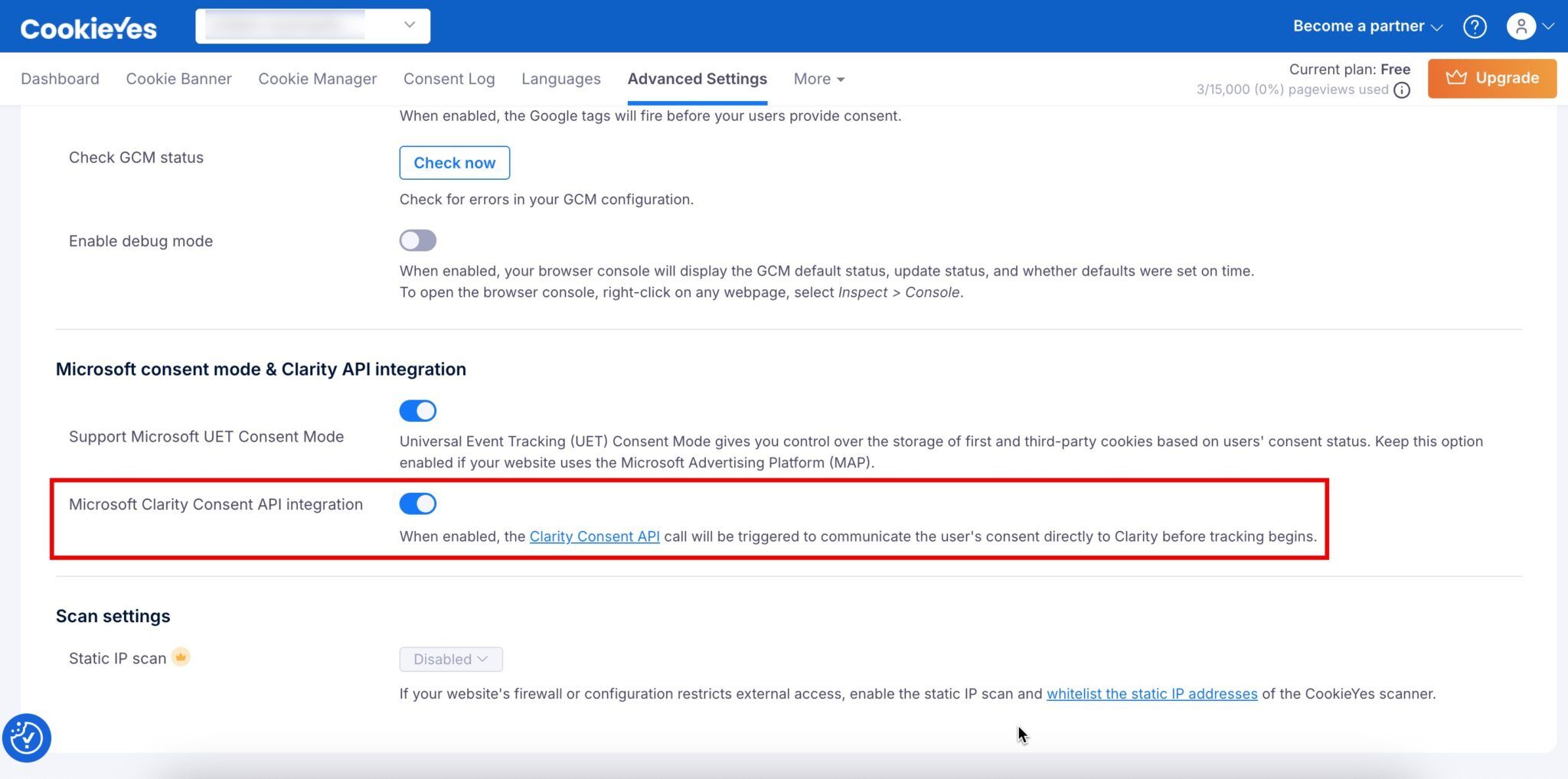
Avoid all these pitfalls by integrating Clarity using CookieYes. As the only CMP fully supported by Microsoft Clarity, setup takes just a few minutes. Once configured, CookieYes automatically handles consent categories, regional targeting, and consent logs, so you can focus on insights while staying compliant.
CookieYes dashboard – just toggle to enable Clarity Consent API:
Pro tips for advanced consent handling
- Let users revoke consent easily: Add a “Cookie settings” link in your footer or privacy policy.
- Use geo-targeting: Show cookie banners only in regions where consent is required.
- Optimise performance: Load Clarity after other scripts to keep your site fast.
The future of privacy-first analytics
Using analytics tools shouldn’t be a trade-off between insights and ethics. With the Consent API, Clarity lets you:
- Run behavioural analysis without breaching privacy laws.
- Honour local regulations in regions like the EU, UK, and Switzerland.
- Build transparency into your digital experience by default.
- Increase the quality of analytics data by ensuring it is lawfully collected.
Future-facing brands know that compliance is not a barrier—it’s a brand value. As frameworks like the Digital Markets Act, ePrivacy Regulation, and US state-level laws evolve, tools like Clarity’s Consent API will become critical to your tech stack.
FAQs on Microsoft Clarity Consent API

Here are some more FAQs related to Clarity