Cookies are a fundamental technology for personalising web experiences, but not all cookies are the same. While many understand browser cookies, fewer are aware of Flash cookies. These cookies have historically enabled greater data storage and persistent tracking, creating serious privacy and compliance concerns across jurisdictions.
This comprehensive guide explains what Flash cookies are, how they differed from traditional cookies, the risks they posed, and practical strategies to manage them effectively.
What are flash cookies?
Flash cookies, also known as Local Shared Objects (LSOs), are data files stored locally on a user’s device by Adobe Flash Player, introduced in 2002 to save user preferences, game states, and other Flash-related information. Unlike traditional HTTP cookies, Flash cookies:
- Are stored outside the browser’s cookie folder, accessible to multiple browsers on the same device.
- Have a default storage size of up to 100KB, substantially larger than standard cookies (usually limited to 4KB).
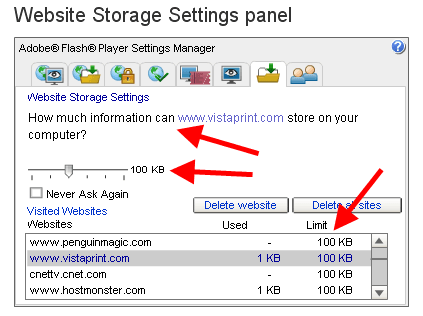
Image source: https://www.practicalecommerce.com/
- Are saved silently without asking for user permission.
- Use a binary format, making them harder for users to detect and delete manually.
- Persist indefinitely until manually removed, with no automatic expiry date.
Due to these characteristics, Flash cookies can track user behaviour extensively and persistently, crossing browser boundaries and resisting deletion efforts.
Are flash cookies still used?
Flash cookies, once widely deployed to store user preferences and enable persistent tracking, have largely fallen out of use. Adobe officially discontinued Flash Player support in December 2020, and major browsers quickly followed by blocking Flash content by default. Today, most modern websites have transitioned to more secure and privacy-conscious alternatives like HTML5.
However, Flash cookies may still exist in:
- Third-party embeds (e.g., old video players or games) that relied on Flash and haven’t been modernized.
- Legacy websites that haven’t updated embedded Flash content.
- Archived applications or internal systems built before Flash’s end-of-life.
Why were flash cookies a privacy concern?
Persistent tracking
Flash cookies were designed to persist on a user’s device even after standard browser cookies were deleted or when private browsing modes were used.
- Unlike regular cookies, Flash cookies were stored outside the browser’s regular directories, meaning standard methods of clearing cookies, such as using “Clear browsing data” or privacy tools, did not affect them.
- As a result, tracking could continue across sessions, undermining user efforts to manage or erase their online footprints.
Limited user control and transparency
Flash cookies bypass typical browser controls, reducing user agency and transparency:
- Most browsers did not include built-in tools to manage or delete Flash cookies until late in Flash’s lifecycle. Instead, users had to locate and use Adobe’s obscure settings panels or rely on third-party utilities.
- This lack of accessible controls meant that users were often unaware of the existence of Flash cookies, making privacy management more difficult.
- Many privacy policies also failed to mention Flash cookies, creating a significant transparency gap and increasing the risk of regulatory non-compliance.
Cookie respawning
Cookie respawning, or “zombie cookie” behaviour, was a well-documented Flash cookie privacy risk:
- When a website stored a unique identifier in both a browser cookie and a Flash cookie, deleting the browser cookie alone was ineffective.
- Upon deletion, the Flash cookie could restore (“respawn”) the browser cookie, allowing the site to continue tracking the user as if nothing had been deleted.
- This practice undermined user consent and violated the principles of privacy regulations like the GDPR and CCPA, which emphasize transparency and respect for user choice.g.
Cross-browser tracking and shared storage
Unlike standard cookies, which were isolated to individual browsers, Flash cookies were stored in a shared directory.
- A Flash cookie set in Chrome, for example, was accessible from Firefox, Safari, or any other browser on the same device.
- This cross-browser accessibility made it possible to build more complete user profiles and track behaviour more persistently than traditional browser cookies allowed.
- While true cross-device tracking remained complex, the shared and persistent nature of Flash cookies extended the reach of online identifiers.
Hidden storage and enhanced data capacity
Flash cookies were not only hidden from most users—they were also more powerful than traditional cookies.
- They were stored in system directories not typically visible or accessible through normal operations. Moreover, they were saved in binary format, making them difficult to inspect or manage without specialized tools.
- Each Flash cookie could store up to 100KB of data, far more than the 4KB limit of standard cookies, allowing for more detailed tracking and longer-term storage of user preferences, identifiers, and behavioural data.
- This enhanced capacity increased the risk of excessive data collection and made it harder to comply with data minimization principles and user rights under privacy laws.
Security risks and compliance challenges
Flash cookies introduced significant security and compliance risks.
- They could be exploited for cross-site tracking, persistent user identification, or, in rare cases, session hijacking—if attackers managed to inject or read LSOs on a vulnerable domain.
- Their persistence and invisibility complicated regulatory compliance, particularly where users were unable to access or delete stored data, hindering their ability to exercise rights such as access and erasure under laws like the GDPR.
Who uses flash cookies and why?
Flash cookies were widely used by:
- Advertising networks and marketers to build detailed user profiles and deliver personalised adverts across multiple platforms.
- Media and streaming platforms to store user playback preferences and settings.
- Online gaming sites to save game progress and preferences.
- Government and public sector websites for session management and customisation, although usage has declined significantly due to regulatory scrutiny
Best practices for businesses to manage flash cookies
Although Flash technology is largely deprecated, flash cookies may still persist in legacy systems or third-party embeds. To ensure compliance and maintain user trust, businesses should adopt the following practices:
Keep browsers and flash components updated
Ensure all browsers and legacy Flash Player components are up to date. Modern browsers restrict or block Flash by default, helping limit unauthorized use of Flash cookies. Regular updates also reduce security risks and improve overall privacy controls.
Disclose all storage types transparently
Inform users about every type of data storage used on your website—including Flash cookies if applicable. Clearly mention them in your cookie policy and explain their purpose in plain language. Transparency is essential for building trust and complying with privacy laws like the GDPR and CCPA.
Provide clear consent and control options
Offer users an easy way to manage and withdraw consent. Platforms like CookieYes help streamline consent management across various cookie types. Where automated control isn't possible, link to tools such as Adobe's Flash Player Settings Manager to help users manage Flash cookies manually.
Audit your website regularly
Conduct comprehensive cookie audits to detect all forms of local storage, including Flash cookies from embedded third-party content like video players or games. Update your cookie declarations and adjust your consent flow to reflect any findings.
Alternatives to flash cookies
With Flash Player deprecated, websites have adopted modern, privacy-friendly alternatives, such as:
- HTML5 local storage and session storage with enhanced control and explicit user permissions.
- Server-side tracking techniques that reduce reliance on client-side storage and improve privacy compliance.
- Advanced tracking technologies, including device fingerprinting, though these require careful legal assessment due to privacy implications.
How CookieYes helps you manage cookie compliance
CookieYes empowers businesses, especially in regulated markets such as the UK and EU, to manage cookie consent effectively by:
- Scanning websites comprehensively for all cookie types, including Flash cookies and modern local storage.
- Delivering GDPR, CCPA, LGPD, PIPEDA, UK GDPR, and other compliance-ready consent banners and preference centres.
- Providing detailed reporting and audit trails to demonstrate compliance.
- Integrating seamlessly with popular website platforms and custom setups.
- Helping businesses maintain transparency, user trust, and avoid costly fines related to cookie violations.
Ensure compliant cookie consent with CookieYes
Deploy a GDPR- and CCPA-ready cookie consent banner in minutes
Get started free- 14-day free trial
- Cancel anytime
Though Adobe Flash Player is no longer supported, businesses must remain vigilant in detecting and managing any residual Flash cookies to comply with stringent privacy laws globally. Employing comprehensive tools like CookieYes ensures robust cookie management, fosters user trust, and keeps organisations ahead in data protection compliance.
Frequently asked questions
Can flash cookies track me even if I clear my browser cookies?
Yes. Flash cookies were stored separately and were not deleted by clearing standard browser cookies, enabling continued tracking unless specifically removed.
How do I delete or clear flash cookies?
Users can delete Flash cookies via Adobe’s Flash Player Settings Manager or through modern browser privacy features supporting local shared object removal.
Are flash cookies still used today?
Use of Flash cookies has drastically declined since Flash Player’s end-of-life in 2020, but legacy websites and some niche applications may still use them.
How does CookieYes help with flash cookie compliance?
CookieYes scans and manages all cookie types, provides user-friendly consent solutions, and supports compliance with international privacy regulations including GDPR, PECR, and CCPA.