Facebook cookies are at the core of ad delivery, measurement and optimisation if you use Facebook (Meta) for ads. If you run Facebook ad campaigns, whether you’re a marketing manager in the United States, United Kingdom, Germany or beyond, grasping how these cookies work is crucial. Get it wrong and you risk wasting budget, misreporting or even facing fines under GDPR, CCPA and other data privacy laws. In this guide, we will explain exactly what Facebook cookies do for advertisers, how to integrate them correctly and how to stay compliant without sacrificing ad performance.
What are cookies in the context of Facebook advertising?
Cookies are tiny files stored on users' browsers that help track activity, store identifiers, and personalise experiences. In Facebook advertising, these cookies enable:
- Audience tracking: Identify people who click or view your ads and associate them with on-site actions.
- Conversion attribution: Track and credit user actions (e.g. purchases, form submissions, or sign-ups) to specific ad campaigns and creatives.
- Retargeting: Re-engage users who visited your site but didn’t convert using dynamic product ads or reminder messages.
- Optimisation: Feed real-time event data into Meta’s machine learning engine to improve bidding efficiency, select optimal placements, and prioritise top-performing creatives.
These cookies are primarily set via Facebook Pixel (client-side tracking) and the Conversions API (server-side tracking). Pixel drops cookies either via first-party (your domain) or third-party (Meta's domain) contexts, with the former being more resilient against browser restrictions.
Meta's 7 official cookie categories (and what they mean for your ads)
As per Meta cookie policy, they use cookies for mainly seven types of purposes. Each type of cookies plays a role in maintaining user experience, system integrity, or ad delivery:
1. Security, site and product integrity
- Cookies: sb, dbln, datr (stored up to 400 days)
- Purpose: Detect suspicious activity such as brute-force login attempts, bot traffic, or denial-of-service attacks.
- Ad relevance: These cookies are considered essential and help safeguard your advertising stack and user accounts.
2. Authentication
- Cookies: c_user, xs (stored up to 365 days)
- Purpose: Maintain login sessions across Facebook-owned domains and third-party embedded services.
- Ad relevance: Ensures logged-in users are recognised when navigating back and forth, preserving custom audience targeting continuity.
3. Advertising, recommendations, insights and measurement
- Cookies: _fbp, fr, oo
- Purpose: Enable ad targeting, delivery, and opt-out controls; support audience segmentation, frequency capping, and cross-device matching.
- Ad relevance: Powers advanced Facebook Ads features such as Lookalike Audiences, conversion funnels, and attribution reporting.
4. Site features and services
- Cookies: presence, social plugin cookies (session-based)
- Purpose: Power interactive features like Messenger chat and Like/Share buttons; support role-switching for Page admins.
- Ad relevance: Facilitates smooth transitions from your site to Facebook properties, increasing engagement.
5. Performance
- Cookies: dpr, wd (7 days)
- Purpose: Record screen size, pixel ratio, and contrast settings to ensure optimal rendering of assets.
- Ad relevance: Helps ensure high-quality ad display but doesn't directly influence conversions.
6. Analytics and research
- Cookies: Internal identifiers
- Purpose: Support Meta's internal performance analysis, including click path tracking, engagement metrics, and UI efficiency.
- Ad relevance: Informs product improvements and advertiser-facing analytics.
7. Third-party websites and apps
- Cookies: _fbc, _fbp (on partner domains)
- Purpose: Track users who interact with Facebook ads and land on external sites.
- Ad relevance: Expands retargeting reach beyond your domain—only valid if users give consent on the partner site.
How Facebook cookies enhance ad performance?
Conversion tracking
Once a user lands on your site, the Pixel sets a cookie and assigns a unique ID. Every action—from viewing a product to completing checkout—is tied back to that ID and logged as an event (AddToCart, Purchase, etc.).
This data:
- Connects purchases to ad campaigns
- Feeds reporting in Meta Ads Manager
- Supports A/B testing and ROAS analysis
- Optimises conversion windows (e.g. 1-day click, 7-day view)
Retargeting and audience building
Pixel cookies enable:
- Cart abandoner retargeting: Deliver reminder ads to users who left items in cart.
- Dynamic product ads: Show exact items users browsed using product catalog feeds.
- Lookalike audience modelling: Facebook uses cookie data to match behavioural traits with new user segments.
Machine learning optimisation
Meta’s real-time auction system uses cookie-derived signals to:
- Predict which users are most likely to convert
- Allocate budget to the highest performing combinations of copy, images, and CTA
- Test placements (e.g. Feed vs Reels vs Audience Network) and prioritise those with best cost-per-result
How to check or change your Meta Pixel cookie settings?
To customise your cookie use in Facebook Pixel:
- Go to Events Manager.
- Select Data sources > your Pixel.
- Click Settings > Cookie Usage.
- Toggle first-party cookie sharing on or off.
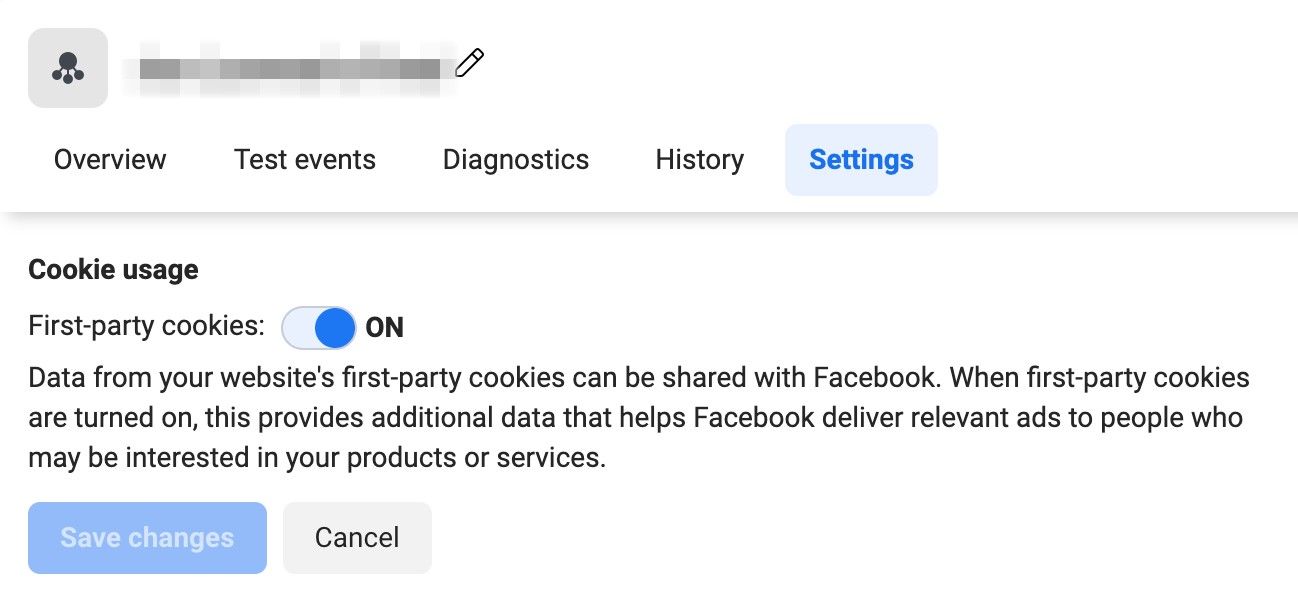
By default, both cookie types are used. Disabling first-party cookies reduces Pixel effectiveness significantly, especially in Safari and Firefox.
Facebook cookie compliance under GDPR and CCPA
If your website uses Facebook (Meta) Pixel, you must follow strict rules under privacy laws like the GDPR and CCPA. Here’s how to stay compliant without sacrificing performance.
Get clear consent before tracking
Tracking users for marketing requires consent—before any cookies are set.
- Block Meta Pixel by default.
- Load Pixel only after users opt in to marketing cookies.
- Use a consent management platform (CMP) such as CookieYes, OneTrust or TrustArc.
- Show banners based on location to meet regional rules.
Example setup:
if (userConsent.marketing) {
  fbq('init', 'YOUR_PIXEL_ID');
  fbq('track', 'PageView');
}
if (userConsent.marketing) {
fbq('init', 'YOUR_PIXEL_ID');
fbq('track', 'PageView');
}Respect consent withdrawal
When users change their mind, tracking must stop immediately.
- Delete cookies if consent is withdrawn.
- Stop sending events to Meta.
- Keep logs to prove consent was given and withdrawn (GDPR Article 7).
Honour CCPA opt-out rights
Under CCPA, users must have the right to opt out—not just opt in.
- Add a visible ‘Do Not Sell or Share My Personal Information’ link.
- Turn on Meta’s Limited Data Use (LDU) for California users.
Be transparent with users
Let users know exactly what’s being tracked and why.
- List all Facebook cookies (_fbp, fr, etc.) and explain their purpose.
- Disclose if and how you share data with Meta.
- Explain user rights clearly under GDPR and CCPA.
- Mention retention periods: _fbp and fr typically expire in 90 days

Consider server-side tracking
Client-side tracking is losing reliability due to browser restrictions and ad blockers.
Why go server-side:
- Run Facebook Pixel through your own domain using platforms like GTM Server-Side.
- Enforce consent on the server before firing tracking events.
- Mask or hash personal data (e.g. SHA-256 for emails) before sending to Meta.

Use data minimisation best practices
Send only what’s necessary.
- Avoid sending full names, emails or phone numbers in plain text.
- Stick to essentials like order value and currency.
- Follow Meta’s Business Tools Terms to stay compliant.
Keep documentation for audits
Maintaining internal records helps you prove compliance and stay consistent.
- Record which Pixel IDs and cookies are in use.
- Keep audit logs of user consent states.
- Document how long data is kept and why.
Key takeaways
- Facebook Pixel cookies are foundational to modern performance advertising.
- First-party cookies are now the default and survive browser blocks.
- Always load tracking scripts after consent, and honour user opt-outs.
- Server-side tracking with proper pseudonymisation is the way forward.
- Document and disclose your cookie use thoroughly to stay compliant.
FAQs on Facebook cookies
Do Facebook ads use cookies?
Yes, Facebook ads rely on cookies to work. When you add the Facebook Pixel to your site, it drops a small file in each visitor’s browser that tags them with a unique ID, tracks key actions like purchases or form submissions, and sends that information back to Facebook. Originally, Facebook used third-party cookies (set by facebook.com), but most browsers now block those. Today, the Pixel uses first-party cookies so it still captures all the same data for ad attribution, retargeting and optimisation, even when third-party cookies are blocked.
Do cookies affect ads?
Yes, cookies affect ads. By tracking what people do across websites, cookies let advertisers serve highly targeted, personalised ads and accurately measure which campaigns drive results. Without cookies, you lose visibility into user interests and actions, leading to more generic ads and weaker performance. As browsers phase out third-party cookies, marketers are shifting toward first-party data and server-side solutions (like Facebook’s Conversions API) to keep their targeting and measurement sharp.
How do I make Facebook Pixel compliant with GDPR?
Use a CMP, load Pixel only after consent, delete cookies upon revocation, and disclose cookie usage clearly.