CookieYes MCP Server
Last updated on September 9, 2026
On this page
Overview
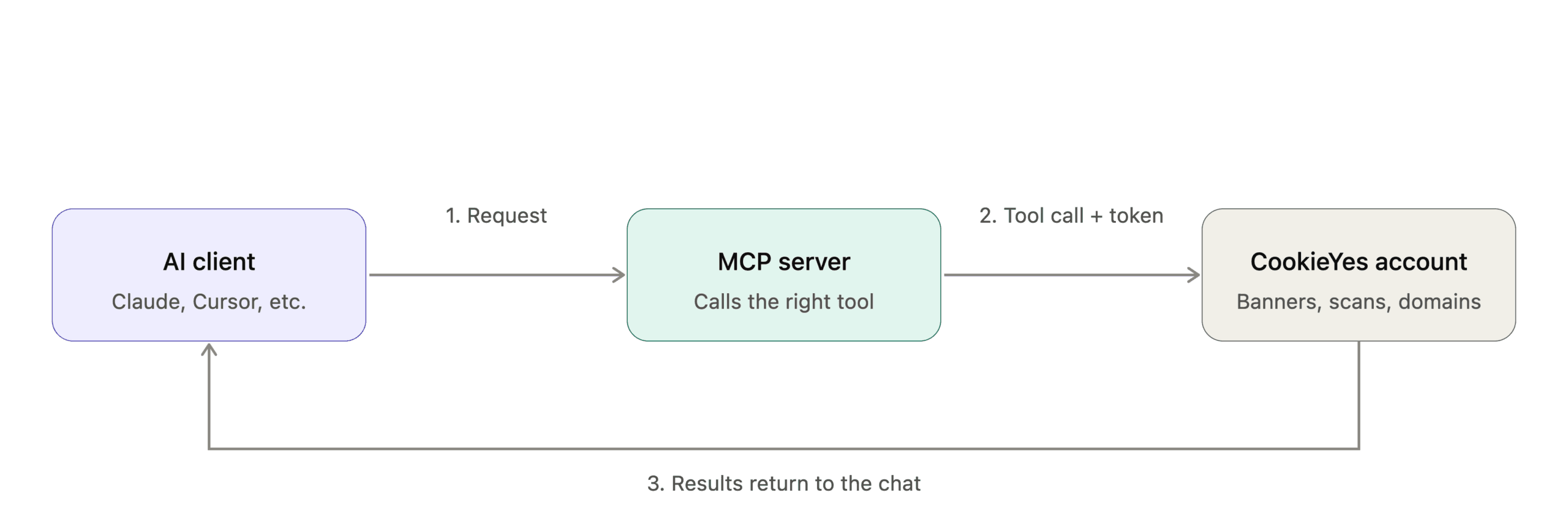
What can you do with CookieYes MCP?
Before You Begin
Connecting to the CookieYes MCP Server
After you start the connection, you're redirected to the CookieYes authentication flow (the same for all clients). Log in or sign up, review the permissions, and click Allow. Once you see Your CookieYes account is now connected, return to your client.
Permissions & Access
Tools
| Category | Tool | Type | Description | Example Prompts |
|---|---|---|---|---|
| Domains & Setup | list_domains | Read-only | List all websites in your CookieYes account | – Show all my sites. – Which of my sites have an inactive banner? |
| get_website_details | Read-only | Get detailed configuration for a specific domain. | – List my website details. – Show me the details for example.com. | |
| get_embed_code | Read-only | Get the JavaScript install code for your site | – Give me the installation code for my site. – How do I install CookieYes? | |
| Banner Management | list_banners | Read-only | List all consent banners configured on a domain | – Show me all my banners. – Which banners are active on my site? |
| get_banner_status | Read-only | Check if your cookie banner is live and active | – Is my banner live? – Is the installation code added to my site? | |
| update_banner_colours | Write/delete | Update banner theme and colours | – Change my banner on example.com to dark theme. – Set the accept button to navy blue. | |
| update_banner_layout | Write/delete | Change banner layout, position, and preference center style | – Move my banner to the bottom right – Change my banner position to top left. | |
| Compliance & Scanning | get_scan_results | Read-only | View latest cookie scan results by category | – What cookies are on my site? – Show me all third-party trackers on example.com. |
| get_compliance_status | Read-only | Check which privacy laws and geo-targeting are enabled | – Is my site GDPR compliant? – What regulations am I covered for? | |
| trigger_cookie_scan | Write/delete | Start a new cookie scan on your domain | – Run a new scan on my site – Scan my website for cookies. |
Security & Privacy Considerations
Note
Most MCP clients, such as Claude, ask you to approve each tool call before it runs. Keep this enabled and review every call, especially write tools, which can modify your account. We also recommend connecting only verified clients or custom clients you trust. Remember that an account owner must enable MCP access before any client can connect.