Full site index for AI agents: llms.txt. Every page is also available as Markdown: replace the trailing slash with .md, so /pricing/ becomes /pricing.md. Or send the header Accept: text/markdown to the page URL itself.
Building a website your visitors actually want to come back to starts with a simple thing: remembering them. Persistent cookies do just that. With them, you can keep people signed in, recall their language or theme choices, and even restore items in their shopping cart.
In this article, we will explain how persistent cookies work, why they matter for any site, and how you can use them safely to give your users a smoother, more personalised experience, without running afoul of privacy rules.
What are persistent cookies?
Persistent cookies are tiny text files your site tucks away on a visitor’s device so you can remember them next time. They store simple key–value pairs, like unique user IDs, language or theme settings, or session tokens, that stick around even after the browser closes.
Unlike session cookies (which vanish when you close the browser), persistent cookies are written to disk and stay until their set expiry date or until the user clears them.
By holding onto data between visits, these cookies power features like “remember me” logins, saved dashboards and seamless language preferences, making your site feel personal and effortless on every return.
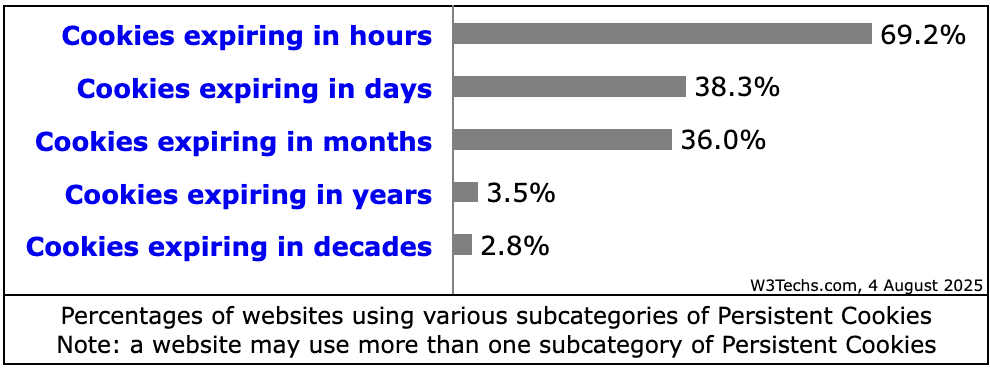
According to W3Tech' s August report, about 40.2% of websites use cookies, of which 23.3% use persistent cookies.
The table below summarises current statistics on adoption and expiry patterns:
What is the difference between session cookies and persistent cookies?
Here are the key differences between session cookies and persistent cookies
Feature
Session cookies
Persistent cookies
Lifespan
Exist only while the browser is open.
Remain on the device after closing the browser.
Expiration
No fixed expiry date; deleted when session ends.
Expiry date or Max‑Age attribute sets how long they persist.
Storage location
Stored in temporary memory and never written to disk.
Stored on the hard drive in a browser‑specific folder.
Information stored
Only a session identifier.
Can store preferences, authentication data, cart contents or tracking information.
Use cases
Maintaining login state during a single visit, shopping carts within one session.
Remembering logins or settings across visits, analytics, personalised ads.
Privacy risk
Lower – automatically deleted after session.
Higher – may track users across sites and store sensitive information.
Persistent cookies power a range of benefits, boosting usability, engagement and even SEO performance, while underpinning essential site functions:
Enhanced user experience
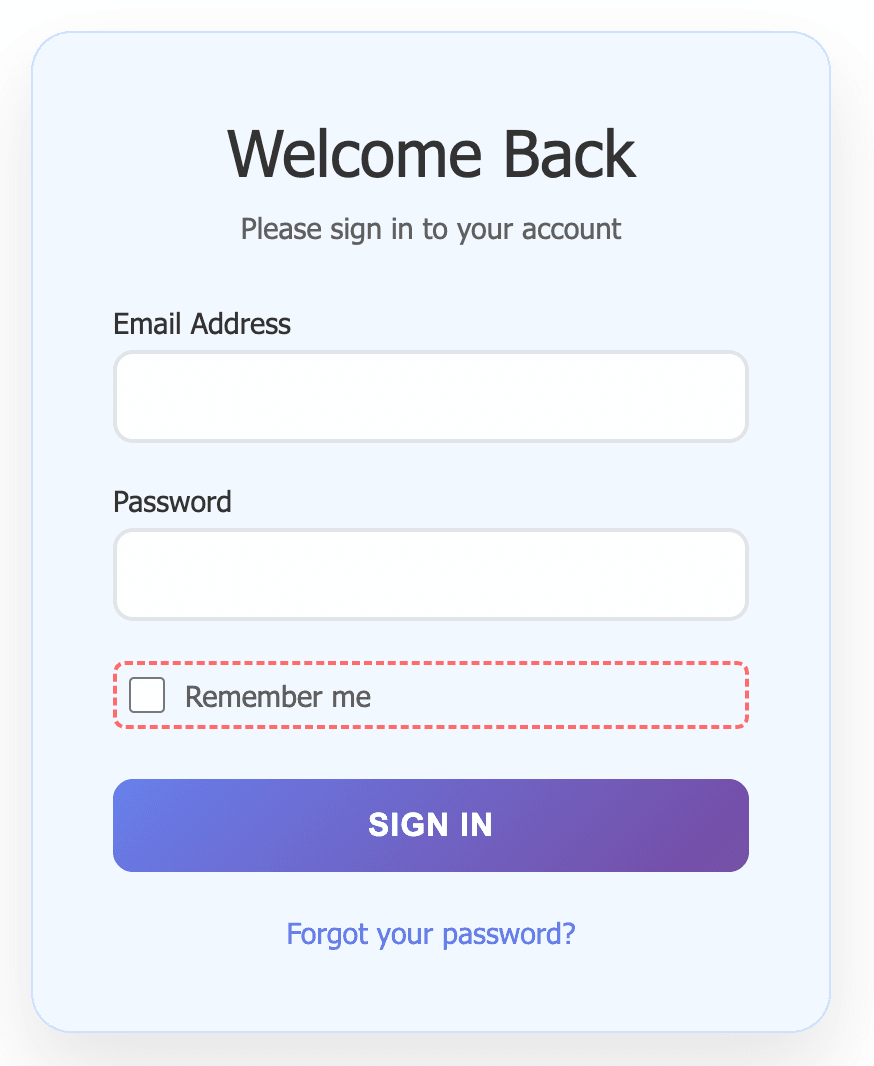
Remember logins: A persistent cookie stores your authentication token so you stay signed in across days or weeks, sparing you from re-entering credentials on each visit. E.g. "Remember Me" checkbox on a login page. When checked, a persistent cookie stores your login information for future visits.
Saved preferences: Language, theme (e.g. dark mode) and layout settings are applied automatically, avoiding repeated configuration and ensuring a consistent look and feel.
Shopping cart continuity: In e-commerce, users’ basket contents persist between sessions, i.e. when they close the browser and come back to find their items still there, lifting completion rates for many retailers.
Example of “Remember Me” checkbox on a login page
Improved engagement & SEO signals
Lower bounce rates: Returning users see pre-loaded preferences and faster page loads, encouraging deeper exploration.
Higher pages per session & dwell time: Personalised content keeps visitors clicking through more pages and spending longer on site, metrics that search engines interpret as signs of quality.
Continuous brand affinity: Every seamless return visit reinforces familiarity, increasing the likelihood of bookmarking, sharing and backlinking.
Personalisation & analytics
Behavioural targeting: Advertisers drop persistent cookies to track which products or pages the users view, serving highly relevant ads that improve click-through rates.
Cohort tracking: Analytics platforms link visits over days or weeks, revealing long-term conversion paths and user journeys. These insights fuel data-driven strategies, often boosting conversions.
Support functionality
Single sign-on (SSO): A persistent cookie lets the user move seamlessly across subdomains without repeated logins.
Workflow continuity: Complex web apps remember where the users left off, their last-saved draft, filter settings or customised dashboards, so they can pick up exactly where they left off on their next visit.
Common types of persistent cookies
From authentication tokens to marketing pixels, persistent cookies each serve distinct roles.
Different categories of persistent cookies underpin various features on modern websites. Understanding each helps in targeting user needs while maintaining transparency and compliance.
Authentication cookies: Secure, hashed "Remember Me" tokens that streamline user access.
Preference cookies: Retain language, theme, and layout settings for a personalised interface.
Analytics cookies: Unique identifiers powering insights into return visitor journeys.
Shopping cart cookies: Preserve cart contents and wishlists across sessions to reduce abandonment.
Advertising cookies: Retargeting tags (Facebook Pixel, Google Ads) that inform personalised marketing campaigns.
Social plugin cookies: Maintain login and sharing states for social widgets without repeated prompts.
By segmenting cookies into clear categories, you can present granular control to users, ensuring they understand the purpose of each cookie type and make informed choices.
How long do persistent cookies last?
The lifespan of a persistent cookie is defined by its Max-Age (in seconds) or an Expires timestamp attribute. It can be a few days or several months; there is no universal maximum, but browsers or servers may limit it in practice. In any case, users can manually delete persistent cookies via browser settings.
What are some real-world use cases of persistent cookies?
Persistent cookies power key features in e‑commerce, SaaS and media, driving conversions and retention. Persistent cookies underpin several high-impact scenarios across industries, elevating user satisfaction and driving measurable business outcomes. Let’s explore the underlying mechanics and benefits:
E‑commerce: When a visitor adds items to the cart but doesn’t complete checkout, persistent cookies remember the cart contents. On return visits, a gentle reminder, such as a pop-up or email, can reduce cart abandonment by up to 20%. These cookies can also store preferred payment methods and shipping addresses, expediting future purchases.
SaaS platforms: Authentication tokens saved in persistent cookies allow users to remain logged in for days or weeks. This avoids frequent login prompts, reducing friction and support tickets, and maintaining secure access using rotated session IDs.
News sites: Paywall status and article preferences are stored so readers can pick up where they left off. Persistent cookies also remember reading history, enabling personalised article recommendations and higher engagement.
Streaming services: Playback position, volume settings and subtitle preferences are retained. Users can pause on one device and resume on another, resulting in binge-watching sessions and improved retention rates.
What are the risks of persistent cookies?
Persistent cookies power many user-friendly features, but they’re not without downsides. Here are the main risks to keep in mind:
Privacy concerns: because persistent cookies remain on a device, they can track a user’s browsing habits over time. Advertisers may build detailed profiles of users’ interests without explicit consent. Public sentiment reflects this unease: a Deloitte survey found that 65 % of respondents are concerned about websites collecting too much personal data via cookies.
Security vulnerabilities: if a persistent cookie stores sensitive data such as login credentials, an attacker who gains access to it could hijack sessions. Persistent cookies kept on the hard drive also become attractive targets for attackers.
Storage overhead: persistent cookies take up space on the user’s device, which can slow down the browser if many are stored.
Regulatory compliance: long-lasting cookies may contravene privacy regulations. The EU’s ePrivacy Directive states that persistent cookies should not remain on a device for longer than twelve months, and the GDPR’s storage-limitation principle requires data not be kept longer than necessary. Many jurisdictions require user consent before setting persistent cookies that collect personal data.
What are the best practices to manage persistent cookies?
Implementing persistent cookies well means putting your users first and adding simple technical guards. Here’s what to do:
Regular audits: Regularly scan your own site and any third-party scripts to identify and make sure every persistent cookie aligns with user consent and your cookie policy.
Active opt-in consent: Give users unchecked checkboxes for each category (analytics, ads, preferences) so they must agree before setting any persistent cookie. Keep a log of when and what they consented to for audits.
Clear disclosures: In your banner and policy, plainly say what each persistent cookie does, where it applies and how long it lasts.
Easy withdrawal: Offer a one-click link or settings page so users can change or remove their consent choices at any time.
Logical lifespan & renewal: Limit cookies to 6–12 months. When a cookie expires or you change its purpose, ask for users’ opt-in again.
Data minimisation: Store only simple identifiers in cookies, i.e. keep personal or detailed data on your secure servers.
Secure transport & access controls:
- Use the Secure flag so cookies travel only over HTTPS.
Are persistent cookies the same as tracking cookies?
Not all persistent cookies are tracking cookies. A tracking cookie is typically a persistent cookie set by a third‑party advertiser to record browsing habits across websites. However, many persistent cookies are first‑party cookies used to remember logins or preferences. The term tracking cookie refers to the purpose rather than the lifespan.
Do persistent cookies store personal data?
Persistent cookies can store identifiers that link to personal data (e.g. user ID, preferences, or session tokens). Best practices discourage storing sensitive data directly in a cookie. Well‑designed persistent cookies contain only non‑sensitive identifiers, and the actual personal data is stored securely on the server. Users should review a website’s cookie policy to understand what information is collected.
Are persistent cookies legal under GDPR, CCPA and other privacy laws?
Yes, persistent cookies are lawful when used appropriately. However, under GDPR, the ePrivacy Directive, and CCPA/CPRA, website operators must obtain informed, opt‑in consent before setting non‑essential persistent cookies. They must also provide transparent information about their purpose, duration and any third parties involved. Failure to do so may lead to regulatory fines and loss of user trust.
Are persistent cookies safe to use?
Persistent cookies themselves are not malicious; they are simply text files. The security and privacy implications depend on what data they contain and how long they persist. When persistent cookies store sensitive information or have excessive lifespans, they become attractive targets for attackers. Website owners should use secure flags, minimise data stored and set reasonable expiration dates. Users should regularly clear cookies and choose privacy‑respecting websites.
Shreya is the Senior Content Writer at CookieYes, focused on creating engaging, audience-driven blog posts and related content. Off the clock, you’ll find her happily lost in the world of fiction.