AI is speeding up workflows across every business function, from content creation and customer support to design and development. Website building is no exception. Today, an AI website builder can turn a simple prompt into a live website in minutes, helping founders, marketers, and small businesses launch faster with less manual effort.
But while AI is changing how websites are built, it is not changing the laws that apply to them. If your site uses cookies, analytics, or tracking tools, you still need to think about privacy compliance and valid user consent. That is why cookie consent remains essential even for AI-built websites, and why a consent management platform like CookieYes still plays a critical role.
Style your cookie banner to your liking using CookieYes
Why AI website builders create a consent management gap
An AI website builder is designed to simplify the process, making it easy for anyone to create and launch a website without coding knowledge. Tools like Lovable and other standalone AI builders, as well as AI-powered features within platforms such as Wix, Squarespace, and similar website builders, can generate layouts, write content, optimise design, and even connect your domain. For early-stage businesses, this removes traditional barriers to launching online.
What these tools do not provide is a cookie consent management framework. They may not:
- Block cookies before user consent
- Offer granular consent options
- Store consent records
- Integrate with regulatory frameworks like Google Consent Mode v2 or IAB TCF
This creates a gap between building a website and running it compliantly.
How does an AI website builder work from a compliance perspective
If you are asking how does an AI website builder works, the answer depends on the layer you are looking at. From a functional perspective, it uses AI models and predefined templates to generate a complete website based on just prompts. It automates design, structure, or even integrations.
However, it may not control how or when cookies are set, capture user consent, or maintain logs required under privacy laws. This means any data collection happening on your site is your responsibility to manage.
Privacy laws like the General Data Protection Regulation and California Consumer Privacy Act require businesses to implement cookie consent for websites. Remember that compliance responsibility as a data controller rests with you, the site owner, not the platform that built the site.
Which laws apply to your AI-Built website?
It depends on where you are based and who your products or services are targeted at. Notable privacy laws include:
GDPR: What triggers the obligation for EU and UK sites
Article 3 of the GDPR establishes territorial scope based on where your visitors are located, not where your business is registered. The UK GDPR (retained EU law) Article 3 mirrors this scope for UK-based visitors post-Brexit, creating a parallel obligation.
Therefore, a US-based founder using Durable AI or 10Web AI still faces cookie consent obligations if EU users visit the site.
CCPA and US state privacy laws: When they apply
The CCPA applies to for-profit businesses meeting specific revenue or data-volume thresholds.

Read
If your site has ad scripts or uses analytics tools, this could trigger CCPA applicability, based on volume or threshold. Beyond California, states including Colorado, Connecticut, Virginia, and Texas have enacted their own privacy laws, each with consent or opt-out requirements. For third-party cookies, they typically require giving a "Do not sell/share personal information" option for users.
ePrivacy Directive: The cookie law
The ePrivacy Directive Article 5(3) is the regulation that specifically mandates prior cookie consent before storing or accessing information on a user's device. Analytics cookies, marketing pixels, and embedded third-party scripts all fall under this requirement. This directive operates alongside the GDPR and is the legal basis for every cookie banner you see across European websites.
Other laws
For internationally serving sites, additional frameworks apply: PIPEDA in Canada, PDPA in Thailand, and LGPD in Brazil, each carry their own consent and disclosure requirements. What we generally see in these regions are opt-in cookie consent requirements mirroring GDPR.
Cookie consent mistakes for AI-built sites
Tracking scripts and integrations
AI-powered website builders often provide built-in analytics features or prompt users to connect tracking tools during setup. In many cases, integrations like Google Analytics or Microsoft Clarity can be enabled with minimal configuration, meaning tracking may begin as soon as the site goes live if not properly configured.
These tools, whether built into the platform or added during setup, can process personal data such as IP addresses, device identifiers, and browsing behaviour. If they are active without appropriate consent mechanisms or without proper consent signal configuration (such as Google Consent Mode or Clarity consent settings), this can trigger compliance obligations under privacy laws.
Limited visibility for site owners
Most AI website builders allow you to enable analytics and integrations through their settings. However, they do not always provide a clear, cookie-level view of how these tools operate. As a result, site owners may need to independently verify which cookies are active to ensure compliance with consent requirements.
How to audit cookies on an AI-generated site
Before publishing your website, it is important to conduct a cookie audit.
You can use browser developer tools by navigating to the Application tab and reviewing cookies set by your site. Alternatively, a dedicated cookie scanning tool can provide a more comprehensive overview.
For each cookie, document:
- Name and provider
- Domain
- Purpose
- Duration
- Type, such as session or persistent
This inventory forms the basis of your cookie policy and helps configure your cookie banner accurately.
Google Consent Mode v2 and AI builder compatibility
Google Consent Mode v2 is required for websites in the European Economic Area that use Google Ads or Google Analytics and rely on consent for data processing. It allows websites to communicate user consent choices to Google services.
If Google Analytics or advertising tags are added to your site, they must be configured to respect user consent signals. Similarly, websites that use advertising technologies need to support frameworks such as IAB TCF V2.3 to manage vendor consent effectively. This is particularly relevant for sites participating in programmatic advertising ecosystems.
In practice, this means that if your AI-built website uses analytics or advertising tools, you need a consent management solution that can control when these scripts run and ensure they align with user consent.
Automate your consent management
Sign up to CookieYes, connect your site, and manage consent from today
Sign up for free- 14-day free trial
- Cancel anytime
How to implement consent management on any AI-built site
AI website builders' consent management gaps are fixable. Here is a practical five-step workflow that applies regardless of which platform you use.
Step 1: Run a cookie audit before going live
Scan your site using an automated cookie scanner to produce a full inventory of first-party and third-party cookies before launch. Document each cookie's name, provider, purpose, and expiry. This inventory drives your banner configuration and your cookie policy.
Step 2: Choose a CMP that supports custom script embedding
Most AI website builders support a custom HTML or JavaScript head-tag injection point. This is where you insert the CMP script tag. The specific location varies by builder: Wix users can install CookieYes directly from the Wix App Market for a fully integrated setup or use the Custom Code panel available as a manual fallback. On Framer, the injection point is Site Settings → Custom Code, using the Head code field specifically, so the script loads before any page content.
CookieYes integrates with 25 CMS platforms, making consent management an easy experience for all popular website builders.
Step 3: Configure your consent banner for GDPR and CCPA
Configure the banner to present granular categories: Necessary, Analytics, Marketing, preferences, etc. Require affirmative opt-in for EU visitors. For CCPA visitors, offer a clear opt-out mechanism. Set up geo-targeting to auto-detect visitor location for multi-jurisdiction sites.
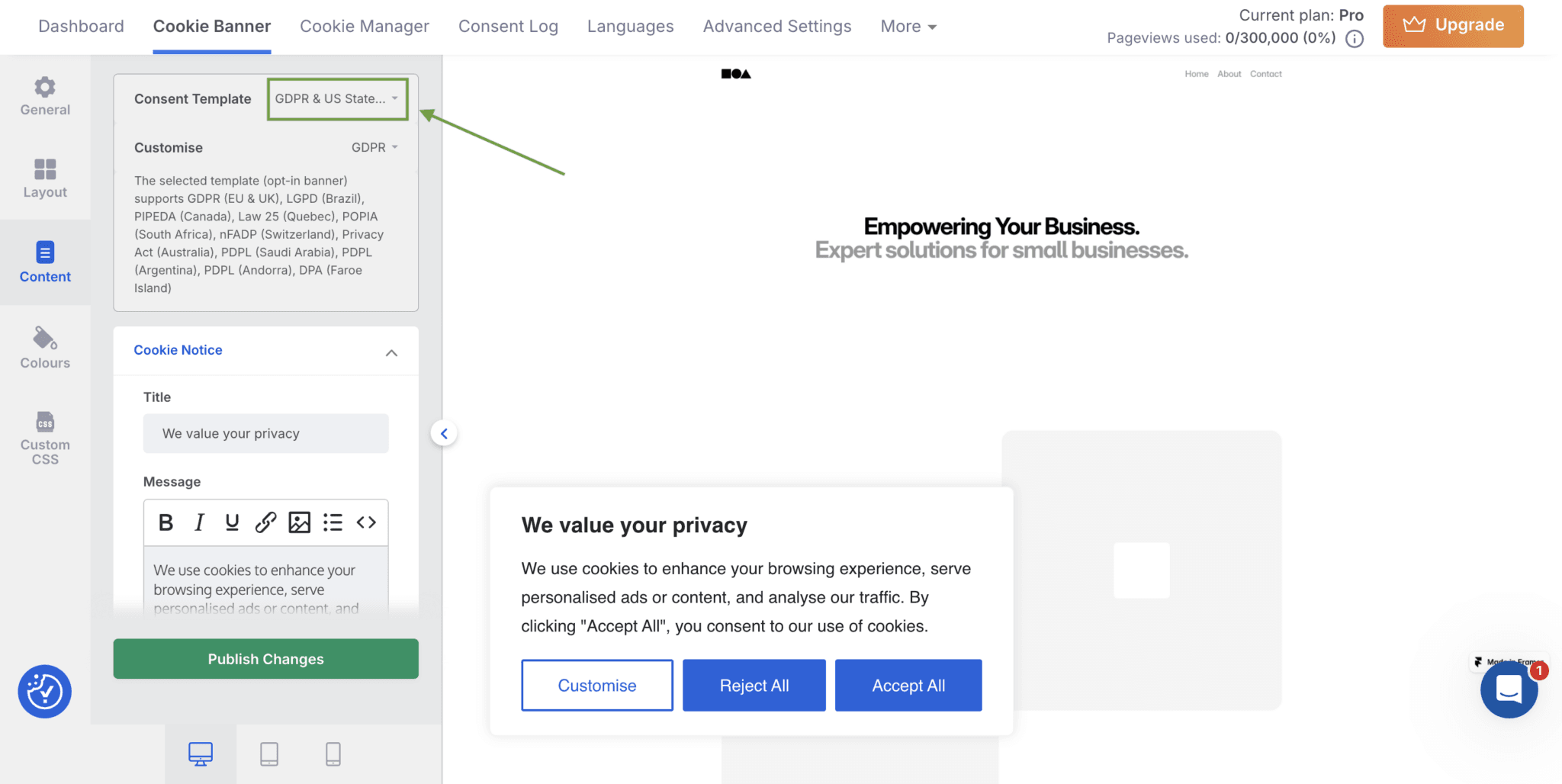
Enable geo-targeting for both opt-in and opt-out banners on international sites
Step 4: Enable Google Consent Mode v2 and IAB TCF signals
Connect the CMP to Google Tag Manager or use direct Consent Mode v2 integration so GA4 and Google Ads only fire after consent is granted. If your site runs programmatic advertising, confirm the CMP is IAB TCF V2.3 registered and passes vendor consent signals correctly.
Step 5: Set up consent logging and ongoing monitoring
Consent records, including timestamp, user ID hash, consent version, and choices made, must be stored and exportable. This is the audit trail regulators may request during an investigation. Schedule periodic rescans to catch any new cookies introduced by platform updates or plugin changes.
Why CookieYes works well for AI-built sites
- Automated scanner detects and categorises every cookie on your domain, including builder-injected scripts you didn't configure
- Google Gold CMP certified and IAB TCF v2.3 registered so that consent signals pass correctly to GA4 and Google Ads.
- Timestamped, exportable consent logs ready for regulatory audit requests
- Built-in geo-targeting serves GDPR opt-in to EU visitors and CCPA opt-out to California visitors automatically
- 25 platform integrations, documented setup path for every major website builder
- Built-in policy generators for transparency.
Multi-language and Multi-jurisdiction Banners on AI-built sites
With websites, you can reach users across the world from the moment your site goes live, making it much easier to scale your business.
However, this global reach also comes with legal considerations. Different regions have different legal requirements. A single generic cookie banner is not sufficient to meet these obligations. For example, users in the EU may require opt-in consent, while users in the US may be presented with opt-out options.
A proper consent management platform helps address this by enabling:
- Geo-targeted consent banners based on user location
- Configuration of region-specific consent requirements
- Multi-language support to present banners in the user’s preferred language
- Generation and maintenance of cookie policies that reflect actual data practices
These capabilities are particularly important for AI-built websites, where speed of deployment often means compliance considerations are addressed after launch.
CookieYes supports geo-targeting and multilingual consent experiences, allowing you to tailor your banner and policy based on where your users are located. This ensures that your website can adapt to different regulatory requirements without requiring manual intervention for each region.
Make cookie consent simple
Sign up to CookieYes, connect your site, and manage consent from today
Sign up for free- 14-day free trial
- Cancel anytime
FAQs on AI website builders and cookie consent
Do AI website builders come with built-In cookie consent or consent management?
AI website builders may let you create a basic cookie banner as part of the setup, but they typically do not provide a fully compliant consent management platform (CMP) by default. However, they often offer integration options or app marketplaces, allowing you to add tools like CookieYes for proper consent management. This enables features such as a cookie scanner, customizable banners, geotargeting, detailed consent logs, and integrations with consent modes like Google Consent Mode.
Are AI website builders compliant with GDPR and CCPA privacy laws?
While the website builder platform itself may be compliant in its role as a data processor, the compliance of your website ultimately depends on how you use it. As the site owner, you are responsible for ensuring that your data practices meet legal requirements. So, you can review the platform’s privacy policy or contact them directly to better understand their compliance standards.
However, AI-built websites are not compliant by default. Auto-enabled tracking scripts, basic consent banners, and generic privacy policies often fail to meet regulatory expectations. To address this, you need to implement a dedicated CMP, audit your cookies, and update your privacy policy to accurately reflect how your website collects and uses data.
How do I add a cookie consent banner to an AI-built website?
To add a cookie consent banner, go to your website builder’s settings and find the option to add custom code, usually called the header or head section (or use an app/integration if available). Copy the script provided by your consent management tool, such as CookieYes, and paste it there. Once you save and publish your site, the banner will appear, and you can manage its settings, cookie categories, and appearance from the tool’s dashboard.
What is a consent management platform and do I need one for my website?
A Consent Management Platform (CMP) is a tool that helps you collect, manage, and store users’ consent before placing cookies or tracking technologies on their devices. It displays a cookie banner, lets users choose what they accept or reject, and keeps a record of those choices for compliance.
If your website uses cookies for analytics, advertising, or personalization, you likely need a CMP, especially to comply with laws like GDPR and CCPA. A basic cookie banner is usually not enough, as these laws require clear user choices, proper consent logging, and the ability to withdraw consent at any time.